
Your needs, this model
Does it fit your priorities?
Does the standard StudSensor find a center or an edge?
It signals a stud edge. The manual describes locating both edges by scanning from opposite directions and using their midpoint as an estimate; the device does not display a separate center cue.
Explore this need in the finder →Can I use the standard StudSensor's 3/4-inch figure for the StudSensor Pro's DeepScan?
No. The shared manual assigns DeepScan to the distinct StudSensor Pro; the exact standard StudSensor page states a 3/4-inch Stud Scan ceiling. Do not transfer the Pro mode to this SKU.
Explore this need in the finder →Is the standard StudSensor suitable for lath and plaster or live-wire detection?
The manual says the StudSensor family is not designed for lath and plaster, and the exact product page does not document a live-wire meter. Follow the wall restrictions and use separate utility checks.
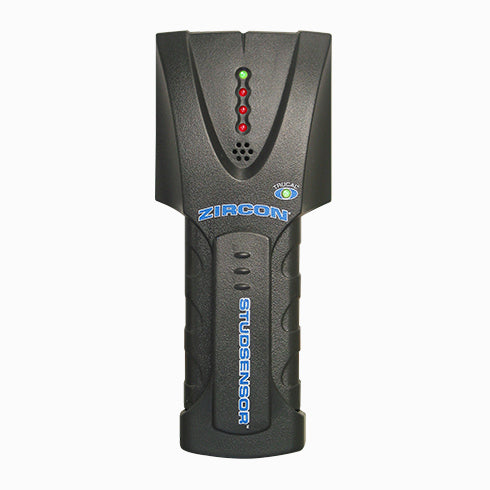
Explore this need in the finder →The unnumbered Zircon StudSensor is an electronic edge finder, not the StudSensor Basic, StudSensor Center or StudSensor Pro. Its current U.S. product page gives SKU 64710 and states that it locates wood and metal stud edges behind drywall up to 3/4 inch (19 mm). The exact page describes a sequence of red proximity lights, a green edge cue and an audible alert, while the shared StudSensor/StudSensor Pro manual supplies the operating procedure. The name is short enough to invite confusion, so the model identity is part of the buying decision.
Mark both edges to estimate a centerline
The ordinary StudSensor indicates an edge. The manual says to place the switched-off tool flat against the wall, hold the power button until the TruCal light signals readiness, and then move slowly while continuing to hold the button. The red LEDs build as the tool approaches; the green top LED and beep signal the edge. Mark that point, continue until the lights go out, then reverse direction to find the other edge. The midpoint between the two marks is a user estimate of the center—not a center indication generated by the device.
The manufacturer also describes an over-the-stud calibration error: if scanning starts over a dense area or directly over a stud, flashing lights and repeated beeps indicate the user should move and restart. The unit should remain flat and parallel to the stud as it crosses. Checking the marks at another height is a sensible way to distinguish a consistent vertical member from a pipe or unrelated density change. The instructions note that hidden wiring or pipes can produce a similar response, so a stud signal is not object identification.
Keep the stated depth and mode exact
The official page states up to 3/4 inch for this standard model. Because the finder’s minimum-depth options advance by tenths, 0.7 inches is at or below that maker-stated ceiling, while the next 0.8-inch step is above it. This is a screening boundary only. Zircon cautions that moisture, texture, material composition and consistency affect sensing depth and position. The page gives typical position figures for wood and metal studs using its dual-scan-and-mark routine; those are manufacturer claims, not independent measurements here.
The shared manual also discusses DeepScan, but labels that as a StudSensor Pro feature. It does not make DeepScan a mode of SKU 64710. The current product page likewise does not document a second mode, a live-wire meter, a bubble level or a ruler for this standard model. If any of those capabilities is essential, check the exact version rather than transferring features from another product with a similar name.
Use it only within the described wall conditions
The manual limits this family to dry interior walls and specifically says it is not designed for lath and plaster or ceramic floor tile. It also cautions about metallic wallpaper, damp paint and carpeting or padding. Those qualifications should govern this model; they are not erased by the page's generic depth figure. The sources reviewed describe the standard StudSensor behind drywall, not a universal wall scanner.
No live-wire warning is documented for this exact SKU. The instructions instead warn that conductors and pipes near the wall may be detected like studs and tell users to turn off power near electrical work. A green TruCal readiness cue is not the same as a wire alert. Even a model with a separate warning meter cannot certify that a location is safe, so identify utilities by other means before drilling, cutting or fastening.
How it differs from nearby StudSensor names
The StudSensor Basic also has an edge-only 3/4-inch plan, but it is a separate SKU with its own manual and SpotLite pointer. The StudSensor Center is a different model with a direct center cue, two modes and a 1-1/2-inch DeepScan plan. The Pro45 is another distinct variant whose instructions document separate shallow StudScan and deeper DeepScan plans. Similar product family names are not evidence of shared modes.
For the standard StudSensor, verify the listing says StudSensor and SKU 64710, rather than Basic, Center or Pro. The page specifies one 9V alkaline battery and says it is not included. Read the current retailer offer carefully for package details, then follow the exact calibration and reverse-scan steps. This assessment is based on official product and instruction material; it makes no claim of physical testing, ownership, measured performance or customer experience. It is a plausible low-complexity candidate for dry interior drywall when a shallow edge signal and a manual two-mark midpoint are enough, but it is not a center finder or a safety instrument.
Key specifications
Key details at a glance
| Maximum stated stud depth | 0.75 in |
|---|---|
| Depth qualification | The exact page and shared family manual give up to 3/4 inch (19 mm) for Stud Scan; DeepScan applies to the separately named StudSensor Pro, not this standard model. |
| Documented scan modes | ['Stud Scan'] |
| Center and edge indication | No |
| Live-wire meter | No |
| Battery requirement | One 9V alkaline battery |
Use the exact model’s instructions for operating limits, supplied equipment and version differences.
Sources for this review
Sources for this assessment
Check this model against your wall
Use the finder to compare documented surface limits, center/edge indications and other requirements. A match is not a safety certification.