
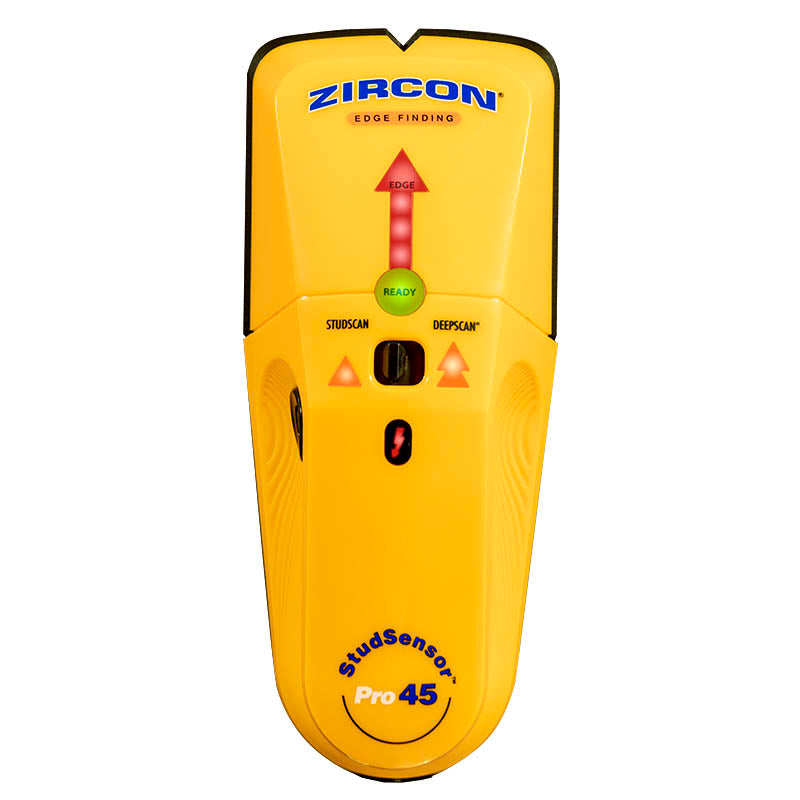
Your needs, this model
Does it fit your priorities?
Does Pro45 identify a stud center?
Its exact features and instructions describe the EDGE arrow and SpotLite boundary cue. They do not document a center indicator; two marked edges can help estimate a midpoint but do not make the tool a center-reading model.
Explore this need in the finder →When does the Pro45 reach its 1 1/2-inch stud limit?
Only in the separate DeepScan mode; StudScan is stated up to 3/4 inch. The manual directs users to start in StudScan because DeepScan can respond to an object that is not a stud.
Explore this need in the finder →Does the WireWarning make a 1.5-inch scan safe to drill?
No. It is an added live-unshielded-AC cue in both stud modes, not a safety clearance; the manual lists ways it can miss wiring. Shut down and independently verify services before penetrating a wall.
Explore this need in the finder →The Zircon StudSensor Pro45 combines edge finding, two distinct stud-depth modes and WireWarning. Its exact U.S. product page lists StudScan up to 3/4 inch (19 mm), DeepScan up to 1 1/2 inches (38 mm), and a live unshielded-AC alert in both modes. The indicators remain edge-based: Pro45 does not document a displayed center cue. The higher number belongs to one selected mode, not to every wall or every scan. This review analyzes manufacturer pages and the matching instructions; it does not describe hands-on testing.
Two settings do not make one universal depth
StudScan is the starting point for an ordinary wall. The manual warns that DeepScan can respond to something that is not a stud and tells users to begin in StudScan. That guidance is important: a stronger or deeper response is not automatically the better answer. Use the separate DeepScan selector only when the supported material or an initial signal calls for it, then compare its result with the shallower pattern and look for consistency at more than one height.
Both settings report edges. Hold the tool flat, keep it still while it calibrates, then move slowly while holding the power button. Mark the first edge response; keep moving until it clears; reverse and find the opposite edge. The midpoint between those marks estimates the center of a possible stud, but it is not a center readout from the device. Pipes, wires, firestops and other density changes may be sensed similarly, so confirm a repeatable vertical pattern and use other evidence before fastening.
WireWarning is independent of the stud mode
WireWarning operates during both StudScan and DeepScan and indicates live, unshielded AC under the manual’s conditions. The maker describes a typical detection depth around two inches, but the instructions list important blind spots: greater depth, concrete, conduit, plywood shear walls, metal coverings and moisture can interfere. A negative indication cannot certify a wall as free of electricity, and the alert does not locate every conductor with certainty.
Do not treat the Pro45 as an electrical tester or a permission to drill. The manual explicitly says not to assume there are no live wires and advises extra caution whenever wiring is suspected. Check building information and likely entry paths, turn off power and independently verify services before penetrating the wall. A live-wire warning and a stud boundary are separate observations; one does not validate the other.
Surface compatibility is narrower than the mode list
The page and instructions say indoor use and do not recommend lath and plaster because plaster thickness varies. The manual also excludes tile, slate, granite, marble and other rock, carpet and padding, metallic-fiber wallpaper, damp new paint, foil-covered insulation, glass or other dense materials, and bathroom inserts. It gives qualified use cases for dry wallpaper/fabric, bare wood flooring or drywall over plywood in DeepScan, and uniform texture when scanning over thin cardboard. Those details do not amount to a blanket rating for exterior walls, metal mesh or every layered surface.
Moisture, mineral content, texture and material consistency can affect sensing depth and accuracy. The 1 1/2-inch specification should be read alongside those caveats. A manufacturer-stated maximum helps compare documented operating modes; it does not predict what the Pro45 will see through a particular wall assembly.
Differences from Pro25 and Pro35
Pro25 is a single-mode edge finder without a documented live-wire alert. Pro35 has the same stated 3/4-inch StudScan ceiling and adds WireWarning, but it does not add DeepScan. Pro45 keeps the separate wire cue and adds a higher 1 1/2-inch DeepScan option. All three remain edge-output models; a buyer who specifically needs a center indication should compare a model whose exact documentation describes that output rather than assuming DeepScan reports a center.
Pro45’s extra mode is useful when the task and wall are within its manual’s supported cases and the user can interpret the mode-specific result carefully. It is not an across-the-board upgrade for a thin, ordinary wall, and DeepScan should not be used to resolve conflicting evidence by simply preferring the larger signal. The correct choice depends on surface, desired indication, depth threshold and whether a warning feature is a requirement.
Battery and offer checks
The current page lists a required 9V alkaline battery, but it does not establish that every seller package includes one. Confirm the actual offer’s contents and return terms. Match the exact model name “StudSensor Pro45” and SKU 75156; family names and neighboring model numbers are not interchangeable. The product page’s directly linked instructions identify Pro45, although the current PDF filename and its printed footer use different part-number strings. Read the instructions supplied with the exact tool.
In short, Pro45 offers documented edge finding in a shallow StudScan mode and a separate deeper mode, with WireWarning active in both. Its limits are equally material: no center display, a conditional warning signal, a deeper mode that may respond to non-stud objects and no plaster recommendation. Repeated mapping and independent utility checks remain part of the task.
Key specifications
Key details at a glance
| Maximum stated stud depth | 1.5 in |
|---|---|
| Depth qualification | StudScan is stated up to 3/4 inch; the separate DeepScan stud mode is stated up to 1 1/2 inches. Neither figure guarantees a response through a particular wall. |
| Documented scan modes | ['StudScan', 'DeepScan'] |
| Center and edge indication | No |
| Live-wire meter | Yes |
| Battery requirement | One new 9V alkaline battery is required. |
Use the exact model’s instructions for operating limits, supplied equipment and version differences.
Sources for this review
Sources for this assessment
Check this model against your wall
Use the finder to compare documented surface limits, center/edge indications and other requirements. A match is not a safety certification.