
Your needs, this model
Does it fit your priorities?
Does WM5 mark an edge or the center?
It indicates the edge with its EDGE arrow, SpotLite pointer and sound. Mark both sides by scanning across and reversing; the midpoint between your marks is a layout estimate rather than a center value read from the tool.
Explore this need in the finder →Is WM5 suitable for lath and plaster?
The WM5 instructions do not recommend it because plaster thickness varies. A single magnetic or density response can be ambiguous; the exact manual's limit does not support the site's conditional lath-and-plaster choice.
Explore this need in the finder →What depth and warning features are documented for WM5?
Its exact page and manual state edge finding through up to 3/4 inch, with one StudScan mode. The reviewed WM5 sources do not document WireWarning or an active AC mode, so a requested live-wire meter excludes it; no warning function is not proof of safety.
Explore this need in the finder →A simple edge-finding routine
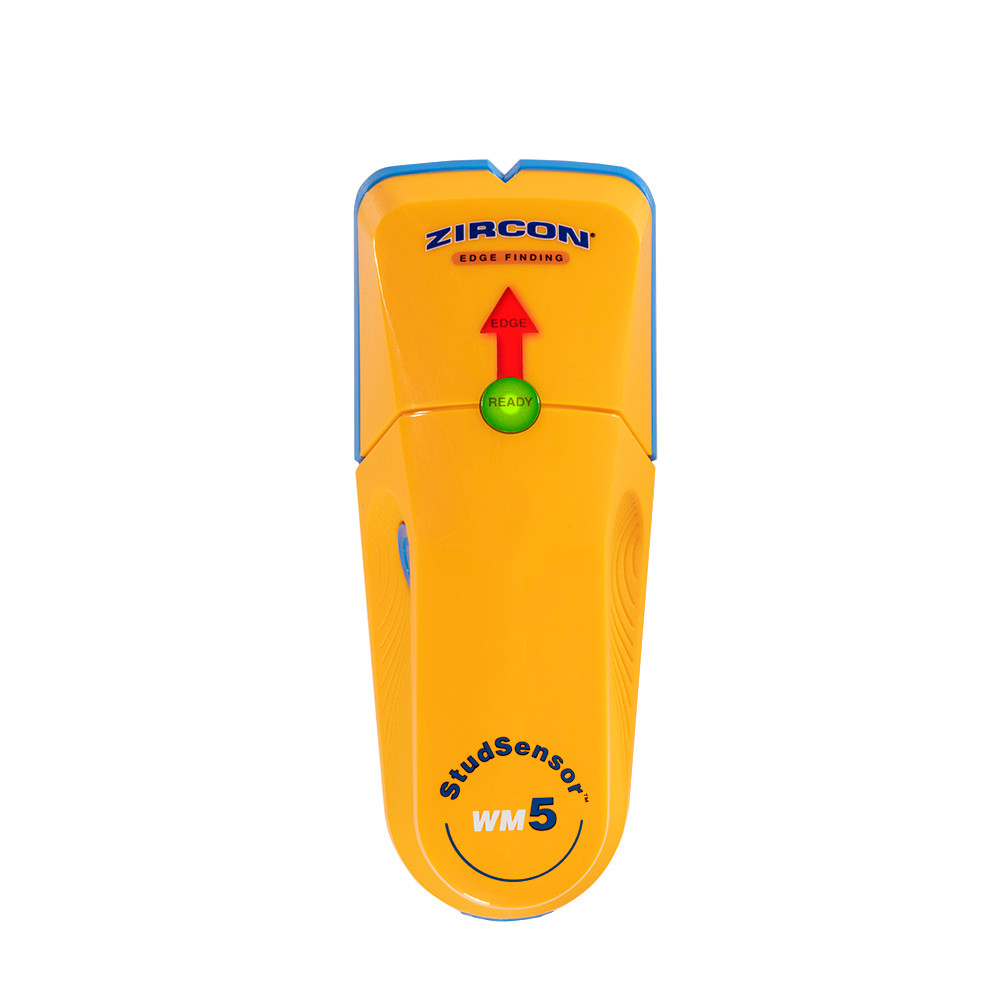
The StudSensor WM5 is a single-mode electronic edge finder with a contoured grip and a small set of cues: a READY light, an EDGE arrow, Zircon's SpotLite pointer and an audible signal. The exact U.S. shop page identifies SKU 69571 and links WM5 instructions P/N 69574. The maker describes the tool for locating wood and metal stud edges up to three-quarters of an inch behind the surface. This assessment is based on those exact model sources; it does not claim personal use, ownership or measured results.
The WM5's interface is intentionally different from a screen-led MultiScanner. It does not show a direct center value. The instructions tell the user to mark the first edge, keep scanning until the cue disappears, reverse direction and mark the opposite edge. A midpoint between the two marks is a user calculation. The V-shaped groove provides a place to transfer the edge mark, but it is not a sensor and does not turn an edge finder into a center-indication model.
What its shallow depth figure means
Zircon states a maximum stud-finding depth of three-quarters of an inch. There is no separate DeepScan mode on this exact WM5 configuration, so a buyer should not transfer the 1-1/2-inch DeepScan ceiling from a different MultiScanner or Pro model. The data sheet gives typical position-accuracy figures for wood and metal when the manual's two-edge method is used. These are conditional maker specifications, not a promise for each wall; the same sheet cautions that sensing depth and accuracy change with mineral content, moisture, texture and consistency.
That narrower operating range can still be useful for a straightforward drywall task where the goal is to find likely edges and mark a span. If the project calls for greater documented depth, a center readout, metal-target scanning or active live-wire detection, compare an exact model with a supported mode rather than assuming the WM5 adds those functions through its brand name.
Setup and surface restrictions
The instructions describe holding the tool flat to the wall and keeping it still while it calibrates, which takes about one to two seconds. The user then moves slowly while holding the power button. Starting directly over a stud or dense patch can cause an over-the-stud warning; the manual directs the user to move to a new starting point and recalibrate. For an uneven surface, the instructions discuss using thin cardboard to help the tool slide while retaining contact. Repeat the scan at additional heights to check whether the marks align with a likely framing line.
The manual does not recommend the WM5 for lath and plaster because irregular plaster thickness interferes with sensing. It also lists ceramic tile, slate, granite, marble, metallic-fiber or foil surfaces, glass, carpet and padding among conditions for which the tool is not designed. A fresh paint layer may need to dry. These are important limits: the stated drywall-oriented maximum should not be carried into a difficult material just because the tool still powers on.
No documented live-wire feature
The WM5 product page, instructions and data sheet reviewed here do not document WireWarning, an electrical meter or an AC Scan mode. Its general safety instructions warn users not to assume walls are free of wires; that caution is not evidence of a detection function. A requested live-wire warning therefore rules this model out in the finder. For any wall, do not treat silence from a stud finder as clearance. Consult other wall information and turn off electrical, gas and water supplies before penetrating a surface.
Compare exact models and packages
The data sheet lists a 9V alkaline battery and gives dimensions and weight without the battery. Confirm the exact WM5/SKU 69571 label, whether the package includes a cell, its condition and the seller's return terms. The data sheet identifies the required cell type, but the sources reviewed here do not establish whether a particular package includes one or whether a seller has stock.
The MultiScanner 340 adds a distinct DeepScan mode, Metal Scan and an added WireWarning alert, while remaining edge-only. The 440 adds a separate AC Scan mode, also with edge cues. The 540 adds direct center indication as well as edges. The WM5 is the simpler choice only when its one-mode, shallow edge routine fits the work. Read the instructions for the exact model and verify a likely stud with repeatable marks and independent construction clues before installing a heavy fixture.
Key specifications
Key details at a glance
| Maximum stated stud depth | 0.75 in |
|---|---|
| Depth qualification | The exact WM5 page and manual state wood/metal stud edges up to 3/4 inch behind the scanned surface. This is a manufacturer comparison ceiling; sensing depth and accuracy depend on the wall. |
| Documented scan modes | ['StudScan'] |
| Center and edge indication | No |
| Battery requirement | One 9V alkaline battery |
Use the exact model’s instructions for operating limits, supplied equipment and version differences.
Sources for this review
Sources for this assessment

Check this model against your wall
Use the finder to compare documented surface limits, center/edge indications and other requirements. A match is not a safety certification.