
Your needs, this model
Does it fit your priorities?
Does the MultiScanner 540 show both the stud edge and center?
Yes. The exact 540 instructions describe an edge-center-opposite-edge scan sequence in both StudScan and DeepScan. The center output is a documented tool cue, not the same thing as estimating a midpoint from two marks as on an edge-only finder.
Explore this need in the finder →What changes when I switch the 540 to DeepScan?
StudScan is the maker's starting mode through 3/4 inch; DeepScan is the distinct built-up-wall mode for the 3/4-to-1-1/2-inch range. Its added sensitivity can respond to other objects, so compare repeated cues and independent wall evidence rather than treating the maximum as a promised detection.
Explore this need in the finder →Does 540 WireWarning make a wall safe to drill?
No. It is an added alert during stud, deep and metal scanning for some live unshielded wiring, while AC Scan is a separate mode. Shielding, conduit, depth, concrete and moisture can hide wires; shut off supplies and corroborate before penetrating a surface.
Explore this need in the finder →What distinguishes the 540
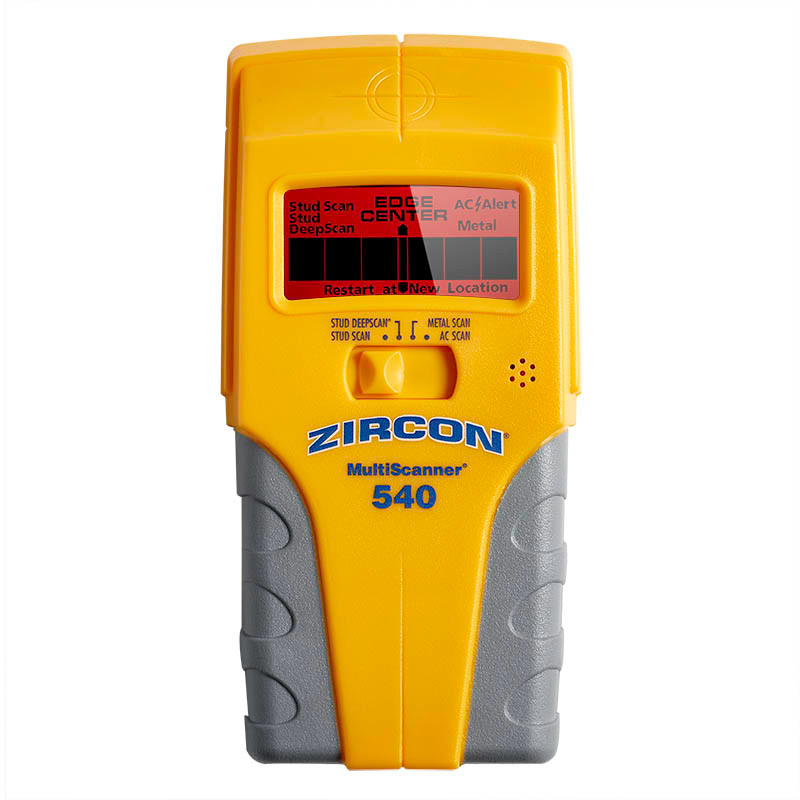
The Zircon MultiScanner 540 is a four-mode wall scanner whose most notable documented distinction is that it reports both stud edges and the center. The exact U.S. shop page identifies this retail configuration as SKU 67323 and links instructions for MultiScanner 540, P/N 67394. That matters because the “MultiScanner” name also appears on edge-only instruments with different displays and operating controls. This assessment uses the 540 page, its own instructions and its product sheet; it does not report a physical sample, hands-on scanning, ownership or measured accuracy.
The manual describes an edge-center-edge sequence while scanning across a stud, and the data sheet identifies CenterVision as a center-finding function. That is different from an edge-only finder, where the user marks both sides and calculates the midpoint. The 540's screen, audio tone and SpotLite pointer reinforce the scanner's position cues, but they do not identify the hidden material. A center signal is still a candidate that needs mapping and confirmation.
Four separate modes, not one broad depth claim
StudScan is the maker's starting point for ordinary wall construction and is stated for surfaces up to three-quarters of an inch. When a wall is built up, the manual describes DeepScan for the interval between three-quarters and one-and-a-half inches. Its more sensitive setting can also respond to pipes, wiring, fasteners or other dense targets, so a deeper signal is not automatically a stud. The instructions recommend beginning with the normal mode, keeping the tool flat and still through calibration, and only selecting DeepScan when the surface warrants it.
Metal Scan and AC Scan are separate selector positions for different targets. WireWarning adds an alert during StudScan, DeepScan and Metal Scan, while AC Scan actively searches for live, unshielded wiring. Do not turn either electrical feature into a safety promise: Zircon warns that shielding, conduit, depth, concrete, moisture and other conditions can prevent a warning, and the manual says to turn off services and use other wall information before penetration. The 540 cannot certify that a location is safe.
There is also a source discrepancy worth keeping in view when comparing peripheral metal detection. The current shop page gives one copper-target Metal Scan figure, while the linked 2017 product sheet gives a lower one. Those are metal-target claims, not stud depth, and this review does not use either to qualify the 540 for a stud-finding depth request. For the buyer's main question, the useful distinction is StudScan at three-quarters of an inch versus a separate DeepScan maximum of one-and-a-half inches.
Surface limits and a repeatable routine
The instructions support indoor use and explain that moisture, texture, paint and material consistency can change sensing depth or accuracy. Plaster is difficult because its thickness varies; Metal Scan may help locate nails that fasten lath, but that is not the same as a stud-edge indication. Metal-mesh reinforcement prevents detection, and the manual excludes scanning for studs through concrete, ceramic floor tile, or carpet and padding. A wallpaper or textured surface needs its own manual-directed treatment rather than an assumption that the drywall ceiling carries over.
A careful scan starts with the exact mode, a flat tool and a stable calibration. Move slowly, note both boundaries and the center cue, and repeat the map at a second height. If results do not line up, recalibrate in a different location and compare with likely stud spacing, visible service entry points and construction clues. This process can reduce uncertainty; it cannot reveal a full wall cavity or rule out every wire or pipe.
Power, package and comparisons
The linked product sheet specifies one 9V alkaline battery and says it is not included; it calls for a new cell for proper operation. The 540 is therefore not a ready-to-use purchase unless the exact package supplies a usable battery. Check that any listing is the 540/SKU 67323, that the exact manual is available, and that package, battery and return details match the intended version. This assessment does not validate current seller stock or a current offer.
For an edge-only instrument with a separate AC Scan, the MultiScanner 440 review explains the 4-mode edge-finding alternative. The MultiScanner 340 has three selector modes and WireWarning but not a separate AC Scan; the StudSensor WM5 is a simpler one-mode edge finder without a documented live-wire meter. Those are functionally different choices, not different labels for the same arrangement. The 540 is most relevant when direct center and edge cues plus mode separation are useful; it is less compelling if a simple edge mark is all the job needs. In every case, read the exact model instructions and confirm a likely location independently before drilling.
Key specifications
Key details at a glance
| Maximum stated stud depth | 1.5 in |
|---|---|
| Depth qualification | StudScan is stated for surfaces up to 3/4 inch; DeepScan is the separate arrangement for built-up surfaces between 3/4 and 1-1/2 inches. The instructions show both edge and center cues in the StudScan/DeepScan scan procedure. These are maker limits, not predicted readings through a particular wall. |
| Documented scan modes | ['StudScan', 'DeepScan', 'Metal Scan', 'AC Scan'] |
| Center and edge indication | Yes |
| Live-wire meter | Yes |
| Battery requirement | One 9V alkaline battery |
Use the exact model’s instructions for operating limits, supplied equipment and version differences.
Sources for this review
Sources for this assessment

Check this model against your wall
Use the finder to compare documented surface limits, center/edge indications and other requirements. A match is not a safety certification.