
Your needs, this model
Does it fit your priorities?
What is in the 2290-23 package besides the scanner?
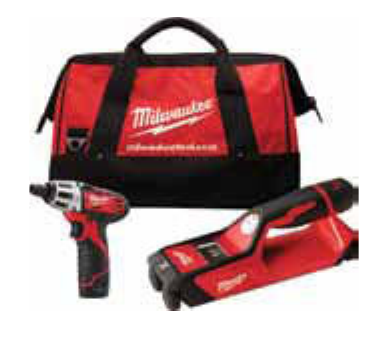
The 2010 Milwaukee catalog identifies the 2290-23 as a two-tool combo containing the 2290-20 SUB-SCANNER and 2401-20 screwdriver, with two M12 batteries, a 30-minute charger and contractor bag. Battery capacity is not listed; the catalog does not itemize the manual.
Explore this need in the finder →Does the screwdriver combo increase the scanner's stud depth?
No. The combo contains the same 2290-20 scanner whose manual tops Stud mode at 1.5 inches. Six inches is a separate metal-in-concrete figure, not stud depth.
Explore this need in the finder →Can I use the 2290-23's live-voltage icon as a safety check?
No. The included 2290-20 has a manual-documented AC-voltage V symbol in Stud mode, but the manual warns of false-negative conditions and metal-conduit blocking. It is not safe-to-drill clearance.
Explore this need in the finder →The finder is one part of a two-tool package
Milwaukee’s 2010 catalog lists the 2290-23 as an M12 two-tool combo: one SUB-SCANNER detection tool, identified as model 2290-20, and one 2401-20 screwdriver. The same catalog lists two M12 lithium-ion battery packs, a 30-minute charger and a contractor bag. This is a real stud-finder purchase configuration, but it is not a scanner-only kit and should not be compared as if the additional screwdriver improves detection.
The package image is a catalog illustration from the exact 2290-23 block. It represents the bag and two tools rather than documenting every accessory detail. The catalog does not identify the battery capacity or enumerate the included manual, so this review does not invent either. A used or old-stock offer should be checked against the exact model number and the pieces actually present.
Use the included scanner's own instructions
The combination does not change the 2290-20 scanner’s operation. Its manual’s Stud mode lists 0.5-, 1- and 1.5-inch settings for wallboard scanning and states ±0.5-inch center accuracy through that range. The display shows an edge cue as it crosses a stud and paired arrows at the center. The sequence is manual: select Stud mode instead of the default Metal mode, set the anticipated scan depth, calibrate against a clear wall location away from a stud, keep the scanner flat and in contact, then continue over the signal to locate its edge and center cues.
Those steps are not a substitute for interpreting a complicated wall. The manual says variable-density surfaces, moisture, carpet, wire mesh, stucco, heavy plaster and thick grout may affect readings. It also warns that metal or a wire touching the back of wallboard can look like a stud. A second pass and other information about the wall are sensible before a fastener goes in. This assessment relies on Milwaukee’s instructions; it does not claim a personal scan or a measured result.
Two different depth figures, plus a limited voltage cue
Do not mistake the 6-inch Metal-mode figure for the combo’s stud depth. Milwaukee assigns that reach to metal targets in concrete, including rebar; the wood/metal-stud setting tops out at 1.5 inches. The manual notes that the more sensitive deep metal scan may show additional noise. It is a different task, target and mode.
The included 2290-20 also has a non-contact AC-voltage V symbol described in Stud mode. It is an added warning cue, not a numeric voltage meter or a safe-to-drill indicator. The manual explains that detection depends on the sensed field and tool position, that wire direction matters, and that metal conduit can block the signal; it cautions that a symbol may fail to appear even if a live circuit is present. Follow electrical safety procedures and do not infer a clear wall from the display.
Surface claims are not a blanket guarantee
Milwaukee’s official page for the same 2290-20 scanner sold as the 2290-21 kit says that it can locate materials beneath ceramic tile and marble. The 2290-23 catalog confirms the combo includes that same 2290-20 scanner. Still, the manufacturer statement does not identify a target, mode, thickness or process for tile. It is not evidence that the drywall depth, center/edge display or voltage warning all remain valid beneath tile. Neither source establishes exterior-wall or metal-mesh use; the manual specifically warns about mesh and variable surface density.
When the 2290-23 is worth comparing
This combo is most relevant when both the scanner and a 2401-20 screwdriver are wanted, the two included M12 packs and charger are useful, and the package can be checked in person or through dependable listing evidence. If the goal is only wall scanning, the extra powered tool and larger package may add little. The 2290-21 is the distinct scanner kit with one M12 battery, charger, carrying case and manual; the 2290-20 is identified as bare tool. None of those package changes extends the scanner’s 1.5-inch Stud-mode limit.
The older 2290 series also should not be confused with Milwaukee’s later 2291 series. The later manual is not authority for the 2290’s AC-voltage warning, and the 2290 manual should not be used to add that feature to a 2291. Review the 2290-20 bare-tool facts, the 2290-21 kit contents and the separate 2291-21 assessment before comparing any exact offer. The 2290-23 is a combo configuration that contains a useful scanner, but the second tool, battery capacity, condition and historical availability are separate purchase checks—not scan specifications.
Key specifications
Key details at a glance
| Maximum stated stud depth | 1.5 in |
|---|---|
| Depth qualification | The included 2290-20 scanner's exact manual gives Stud-mode settings of 0.5, 1 and 1.5 inches with ±0.5-inch center accuracy from 0.5 through 1.5 inches. The 6-inch Metal-mode rating concerns metal targets in concrete, not studs. |
| Documented scan modes | ['Stud mode', 'Metal mode'] |
| Center and edge indication | Yes |
| Live-wire meter | Yes |
| Battery requirement | The scanner uses a Milwaukee M12 12V lithium-ion battery pack. The catalog lists two M12 packs in the 2290-23 combo but does not state their capacity or battery suffix. |
Use the exact model’s instructions for operating limits, supplied equipment and version differences.
Sources for this review
Sources for this assessment
Check this model against your wall
Use the finder to compare documented surface limits, center/edge indications and other requirements. A match is not a safety certification.