
Your needs, this model
Does it fit your priorities?
What depth can the 2291 support for studs?
The 2291 operator manual offers 0.5-, 1- and 1.5-inch Stud-mode settings and gives ±0.5-inch center accuracy over that range. Its 6-inch figure belongs to Metal mode for metal targets in concrete; it is not a stud-depth figure.
Explore this need in the finder →Does this Milwaukee scanner show both stud edges and center?
Yes. The 2291 manual describes an edge cue as the scan crosses a stud and a two-arrow cue at the center. These are signal-location aids; a wire or metal touching the back of wallboard may also be identified as a stud.
Explore this need in the finder →Does the 2291 have a live-wire meter?
The exact 2291 manual and official feature list reviewed do not document a voltage detector. Do not transfer the AC-voltage indicator described in the older 2290 manual. For a wire warning, choose a model whose exact documentation establishes one, and never treat a missing alert as safe clearance.
Explore this need in the finder →The 2291-21 is Milwaukee’s M12 SUB-SCANNER detection-tool kit. It is a different package SKU from the 2291-20 bare tool, but the kit’s named scanner is the 2291-20; the manufacturer’s box list adds a battery, charger and case rather than describing a different sensing platform. Milwaukee marks the kit no longer available, so this assessment is useful for identifying the exact older configuration and checking an offer—not evidence of current stock, seller condition or a field test.
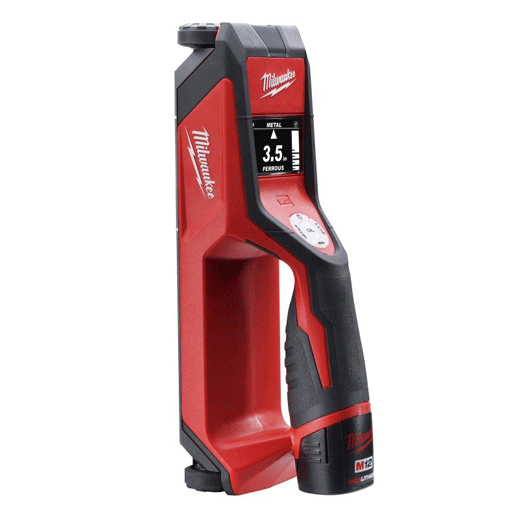
What the kit adds—and what it does not
The manufacturer lists five in-box items: one 2291-20 SUB-SCANNER, one M12 charger (48-59-2401), one REDLITHIUM CP1.5 battery (48-11-2401), one carrying case and one manual. That is a more complete starting package than 2291-20, whose official page lists only the scanner and manual. It is still important to inspect an old or used set: the page does not establish that any unit offered today retains the original battery’s capacity, that every item is still present, or that the battery has been stored correctly.
The added battery and charger solve a power-system question; they do not expand the stud mode’s range or add a live-wire warning. The kit’s sensor is the same 2291-20 described in the manual. Compare it with the bare tool by package condition and what you already own in Milwaukee’s M12 system, not by expecting a different scan result because the box has a kit suffix.
Read the stud-mode setting, not the most impressive depth number
The scanner starts in Metal mode, so select Stud before searching for framing. In Stud mode the 2291 manual lists 0.5-, 1- and 1.5-inch settings; 0.5 inch is the default. It reports a center-accuracy specification of plus or minus 0.5 inch across 0.5–1.5 inches, and describes edge and center cues on the display. That gives the user a boundary-and-center workflow for the supported wall conditions. It is not a guarantee that a stud exists wherever the display responds.
Do not use the separate 6-inch Metal-mode limit as a stud-depth rating. That mode searches for metal targets in concrete, with its own standard and deep settings and its own limitations. The operator manual explicitly warns that increased sensitivity in deep metal mode may show more noise. For a drywall stud question, the relevant comparison ends at the 1.5-inch Stud setting.
Calibration, scanning and surface cautions
Milwaukee instructs the operator to place the scanner flat against the surface and calibrate in a location without a stud. The manual warns that calibration over a stud will not work correctly; it describes using an outlet box as a reference and moving about six inches to either side before calibrating. Keep the scanner flat and in contact as it crosses the wall, and keep the free hand and other objects at least six inches away. Use a pass that traverses the anticipated stud, note the edge signal, continue across the target for the two-arrow center cue, and repeat when conditions permit.
The manual supports wood or metal studs and joists behind wallboard, wooden panels, plaster and other nonmetallic wall materials, but it also lists conditions that may affect readings: variable densities, carpet, wire-metal-mesh backing, damp walls and stucco. Heavy plaster or thick grout can be displayed as metal or studs. The exact instructions do not establish a separate lath-and-plaster plan or the quiz’s combined tile/exterior/metal-mesh requirement. Metal-mode depth through concrete is not evidence of stud detection through tile.
The 2291 sources reviewed do not document an AC-voltage indicator. The predecessor 2290 manual describes a separate AC warning, but that feature cannot be transferred to this later package merely because the names are similar. Milwaukee’s 2291 manual cautions that a wire or metal pipe touching the back of wallboard may appear as a stud. Do not treat a missing signal as evidence of no wiring or a safe drilling location.
Legacy kit assessment
The 2291-21 can be a more complete legacy purchase than the bare 2291-20 when the exact kit really includes the M12 CP1.5 pack, matching charger, case and manual. Its documented scanning function remains that of the 2291-20: selectable Stud mode through 1.5 inches, edge and center display cues, and environmental cautions that narrow the useful conditions. Since Milwaukee marks this kit no longer available, confirm the suffix and all components on any old-stock or used offer, inspect battery condition and compatibility, and read the exact manual. If an included battery is missing or degraded, the package advantage may disappear; do not infer availability, price or warranty eligibility from this review.
Key specifications
Key details at a glance
| Maximum stated stud depth | 1.5 in |
|---|---|
| Depth qualification | The exact 2291 operator manual gives Stud mode settings of 0.5, 1 or 1.5 inches and states ±0.5-inch stud center accuracy across 0.5–1.5 inches. The separate 6-inch metal-mode figure applies to metal targets in concrete, not wood/metal stud depth. |
| Documented scan modes | ['Metal scan', 'Stud scan'] |
| Center and edge indication | Yes |
| Battery requirement | One M12 12V lithium-ion battery pack; exact kit page lists CP1.5 48-11-2401 and charger 48-59-2401. |
Use the exact model’s instructions for operating limits, supplied equipment and version differences.
Sources for this review
Sources for this assessment
Check this model against your wall
Use the finder to compare documented surface limits, center/edge indications and other requirements. A match is not a safety certification.