
Your needs, this model
Does it fit your priorities?
What is the highest documented stud setting on the 2290-20?
Milwaukee's 2290 manual lists 0.5-, 1- and 1.5-inch Stud settings and ±0.5-inch center accuracy from 0.5 to 1.5 inches. The separate 6-inch Metal-mode rating is for metal targets in concrete, not studs.
Explore this need in the finder →Does the 2290-20 show edges and a center?
Yes. The manual describes an edge indicator while crossing a stud and paired arrows at the center. Re-scan and treat the result as a location cue, not proof of material identity.
Explore this need in the finder →Is the Milwaukee 2290-20's voltage warning a safe-to-drill check?
No. The manual documents a V-symbol AC-voltage indicator in Stud mode, but says detection depends on placement and wire direction, may be blocked by metal conduit and may fail to display. It is not clearance to drill; de-energize circuits and use safe work procedures.
Explore this need in the finder →What the 2290-20 suffix means
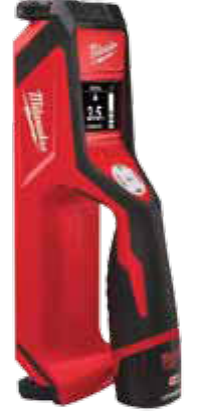
The 2290-20 is the earlier bare-tool version of Milwaukee’s M12 SUB-SCANNER. Milwaukee’s 2010 full-line catalog names it as the tool inside two different packages: the 2290-21 scanner kit and the 2290-23 two-tool combo. This is not a 2291-series scanner, and the 2290-20’s own manual is the source for its controls and limits. The catalog identifies the bare-tool configuration but does not give a separate item-by-item box list. Treat the suffix as a package check, not a guarantee that a seller has a complete tool or a usable battery.
This is a source-based review of archived manufacturer material, not a hands-on test. Milwaukee’s current Inspection & Detection route was not a complete scanner inventory in the prior research checkpoint; no current stock, condition or seller claim follows from the old catalog entry.
Stud mode: three settings, two location cues
The 2290 manual describes Stud mode for locating wood or metal studs and joists behind wallboard, wooden panels, plaster and other non-metallic materials. For the ordinary wallboard routine, the selected depth starts at 0.5 inch and can be changed to 1 or 1.5 inches. The stated center accuracy is ±0.5 inch across that 0.5-to-1.5-inch range. That is a manufacturer comparison figure, not a promise that a particular wall will produce a clean reading.
The display reports a stud edge as the scanner crosses the object and changes to paired arrows at the center. A useful routine is to choose Stud rather than the default Metal mode, set the anticipated scan depth, place the tool flat on a clear part of the wall away from a stud, and calibrate before moving. Keep the face in contact with the surface, scan steadily, and leave the recommended six inches between the tool and your free hand or nearby objects. The manual says it may not calibrate properly over a stud, so locating a clear starting area is part of the job, not a minor setup detail.
Edges and center help bracket a candidate location; they do not identify what is behind the board. The manual warns that a wire or metal pipe touching the back of wallboard may be read as a stud. Repeat the scan, compare from another direction, and use other information about the wall before fastening anything.
Metal mode and the voltage indicator are separate jobs
The 6-inch number is not the stud depth. Milwaukee assigns it to Metal mode, which detects ferrous and non-ferrous metal targets in concrete; the manual gives a separate target-size condition for those claims. Deep metal scans may show more noise. Do not use the concrete-metal rating to imply that the 2290 can locate studs six inches behind drywall or tile.
The manual also documents a non-contact AC-voltage warning in Stud mode: a V symbol lights when the scanner senses a live-wire field. Milwaukee calls this voltage detection, but it is a warning indicator rather than a numeric voltmeter. The manual says the signal is affected by external voltage and how the tool is held; its stated detection conditions depend on wire position and direction, and metal conduit can block the field. It also warns that a symbol may not appear even when a circuit is present. De-energize relevant circuits and follow safe work practices; a quiet display never clears a wall for drilling.
Surface claims need their own boundary
The manual supports a wallboard Stud-mode routine but warns that varying densities, damp walls, carpet, wire mesh and stucco can affect readings; heavy plaster and thick grout may be mistaken for metal or studs. It mentions plaster, but does not establish a lath-and-plaster assembly as a separate operating plan, so this review does not claim that fit.
Milwaukee’s official 2290-21 product page separately says the scanner can locate materials beneath ceramic tile and marble. That is a useful, narrow manufacturer claim for the shared 2290-20 scanner, but the caption does not identify the material target, operating mode, surface thickness or procedure. It does not cover exterior walls or mesh-backed construction. The tile statement therefore cannot be combined with the drywall depth and live-wire figures as if Milwaukee had documented one universal setup.
Who should compare this bare tool
The 2290-20 is worth identifying when a used or stored tool is already under consideration, its condition can be checked, and the buyer can confirm an M12 battery plan. Because the catalog calls it bare tool, do not assume a battery, charger or case is included; the 2290-21 kit and 2290-23 combo have different documented contents. Verify the exact suffix and actual package before paying.
Milwaukee’s later 2291 generation is a separate assessment, not a substitute source for this one. The 2291 manual shares some scan concepts but does not document the 2290’s AC-voltage indicator, so those pages should not be merged. Compare the 2291-20 bare scanner review and 2291-21 kit review only if the model suffix and instructions match what is being considered. The 2290-20’s own strongest differentiators are clear: a 1.5-inch Stud-mode ceiling, both edge and center cues, and a limited AC-voltage warning—alongside a sparse bare-tool package record and real surface caveats.
Key specifications
Key details at a glance
| Maximum stated stud depth | 1.5 in |
|---|---|
| Depth qualification | The 2290 operator manual offers Stud-mode settings of 0.5, 1 and 1.5 inches, with stated center accuracy of ±0.5 inch from 0.5 through 1.5 inches. Its separate 6-inch Metal-mode rating is for metal targets in concrete, not stud depth. |
| Documented scan modes | ['Stud mode', 'Metal mode'] |
| Center and edge indication | Yes |
| Live-wire meter | Yes |
| Battery requirement | One Milwaukee M12 12V lithium-ion battery pack; catalog identifies 2290-20 as the bare tool, but does not enumerate a separate package list for it. |
Use the exact model’s instructions for operating limits, supplied equipment and version differences.
Sources for this review
Sources for this assessment
Check this model against your wall
Use the finder to compare documented surface limits, center/edge indications and other requirements. A match is not a safety certification.