
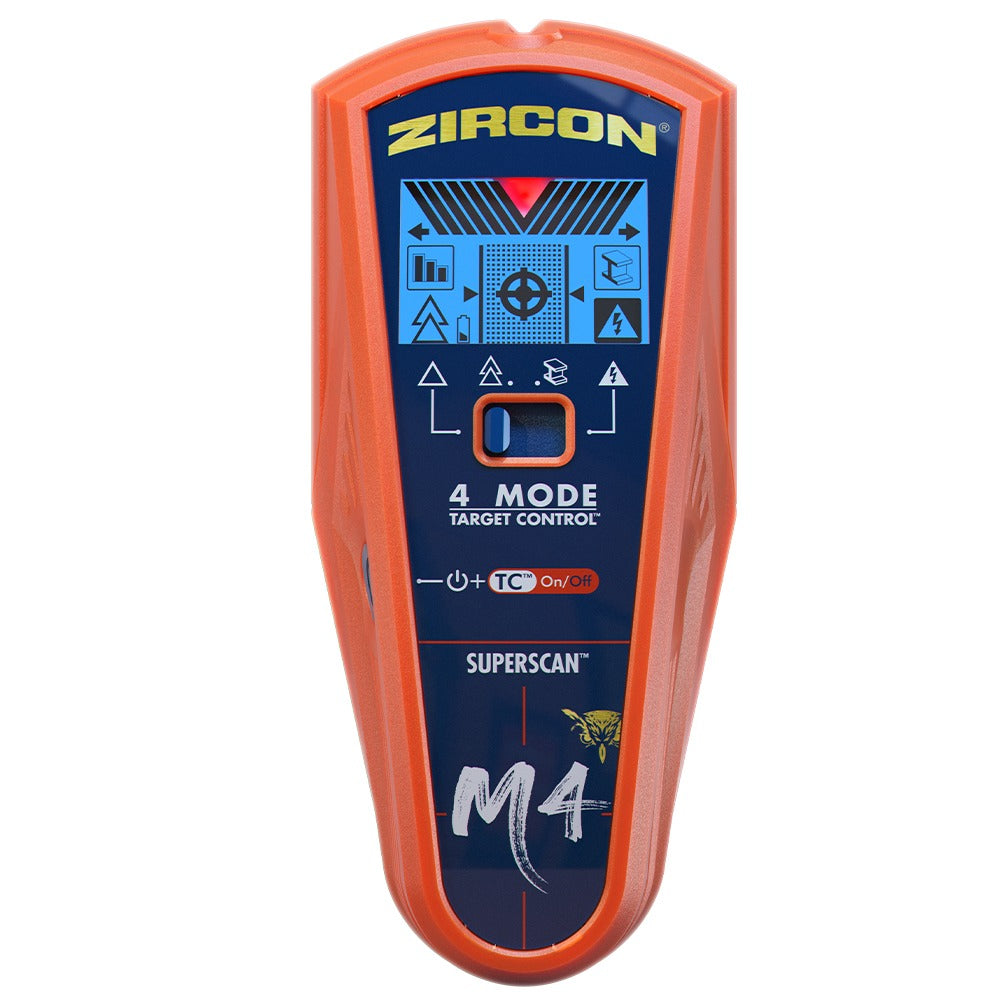
Your needs, this model
Does it fit your priorities?
What does AC Scan add to the M4?
AC Scan is a separate mode for locating and mapping some live, unshielded AC wiring up to the stated 2-inch maximum. It does not identify studs, guarantee that wiring is absent or replace shutting off and independently verifying utilities.
Explore this need in the finder →Does DeepScan keep both center and edge cues?
The product instructions describe center, edges and direction in DeepScan to a stated 1-1/2 inches, but also warn the scanner may not find edges on surfaces thicker than 3/4 inch. That caution matters when both cues are essential.
Explore this need in the finder →Can M4 Metal Scan depth be used as stud depth?
No. Metal Scan's ferrous and non-ferrous distances describe metal detection. StudScan and DeepScan have separate stud limits; even those are comparison ceilings, not a promise of a result through a specific wall.
Explore this need in the finder →The SuperScan M4's clearest reason to compare it with its near-named sibling is one added mode: Zircon lists AC Scan on the M4 and not on the SuperScan M3. That extra mode is separate from stud finding, metal scanning and WireWarning. A long mode list can be useful only if you know which one addresses the job in front of you. This review interprets the current M4 U.S. product page and its linked P/N 71532 Rev C 11/20 instructions; it does not report hands-on use or a field test.
Five modes, but only three are stud arrangements
Target Control, conventional StudScan and DeepScan are the M4's stud-finding arrangements. Target Control is wood-focused and filters metallic or low-signal false positives. Zircon states center, edge and direction cues to 3/4 inch. Switch Target Control off and StudScan includes both wood and metal studs, also to 3/4 inch; metal objects can resemble studs in that conventional mode. This is the most important choice if the framing material is uncertain.
DeepScan is a separate arrangement stated to reach wood or metal studs up to 1-1/2 inches. Its instructions describe center, edge and direction cues, then add a practical qualification: on surfaces thicker than 3/4 inch the tool may not find edges. If edge marks are essential to your workflow, don't read “center and edges” as a guarantee that both appear at the full depth limit. Compare the exact wall instructions and repeat a result at another height.
Metal Scan locates metal, with different published distances for ferrous and non-ferrous targets. It is not the M4's stud mode. AC Scan is the fifth mode and is the M4's distinctive addition over M3: Zircon says it locates and maps live, unshielded AC wiring up to 2 inches. WireWarning is a separate alert that may appear during scanning. Neither is a wall-clearance certificate or a reason to leave power on while working near wiring.
Interpreting the display without overreading it
The ColorTrip LCD changes color with the selected mode; the product page also lists SpotLite, edge and center indicators, signal bars, LoLevel, MetalliWarning and AutoCorrecting technology. The manual explains a calibration sequence and cues for the selected operation. Target Control's fastener-mapping technique can add evidence about a wood stud, but it assumes appropriate fasteners and does not rule out all pipes or electrical routes. A density change is a signal, not a label for the object behind the surface.
WireWarning alerts to some live, unshielded wiring under the maker's stated conditions. AC Scan maps only some unshielded live conductors; insulation, conduit, depth or wall conditions can affect detection. The manual's instruction to turn off utilities and use other information before penetrating a surface remains important. It is possible to miss a hazard even when the scanner displays no warning.
Use limits matter as much as mode count
The standard supported routine is interior drywall; the product page and manual say wall texture, moisture, mineral content, paint and material consistency can change performance. Zircon says lath-and-plaster thickness irregularities make studs difficult to locate in all stud-scanning modes. Metal Scan may find wood-lath fasteners, but it does not establish stud detection through plaster, and metal mesh prevents detection. The instructions also say it cannot scan studs through carpet and padding. A different mode is not proof that a broad tile, exterior or mesh assembly is supported.
The M4 requires a 9V alkaline battery, not included. Its four-position switch controls five functions because the wood-filtering and conventional stud modes share a selector position and use the power button differently. Check for the exact “SuperScan M4” name and SKU 73794, not M3's SKU 74249, and confirm the seller's included instructions and package. Don't infer that a listing with an M4 photograph, another model's manual or accessories is the reviewed configuration.
Is the M4 the right comparison?
The M4 makes sense to investigate when the combination of wood/metal stud modes, separate metal location and a distinct live-wire scan is relevant to one indoor drywall project. It is not the right shortcut if your priority is a guaranteed safe drilling point, guaranteed edges at maximum depth or scanning through a wall the manual excludes. If AC mapping is not useful, compare the less feature-dense SuperScan M3 on the evidence; if a shallow two-mode wood filter is enough, consider the K1 with its separate model-specific limits. These are paper-based comparisons from manufacturer sources, not measured competition, price or availability claims.
Key specifications
Key details at a glance
| Maximum stated stud depth | 1.5 in |
|---|---|
| Depth qualification | The two shallow stud arrangements are stated to 3/4 inch; separate DeepScan is stated to 1-1/2 inches. The instructions caution that edges may not appear on surfaces thicker than 3/4 inch. AC Scan and Metal Scan distances are not stud depth. |
| Documented scan modes | ['Target Control TC', 'StudScan', 'DeepScan', 'Metal Scan', 'AC Scan'] |
| Center and edge indication | Yes |
| Live-wire meter | Yes |
| Battery requirement | One 9V alkaline battery |
Use the exact model’s instructions for operating limits, supplied equipment and version differences.
Sources for this review
Sources for this assessment
Check this model against your wall
Use the finder to compare documented surface limits, center/edge indications and other requirements. A match is not a safety certification.