
Your needs, this model
Does it fit your priorities?
Can Target Control find metal studs?
Target Control is the wood-focused mode and filters metallic signals; use conventional StudScan when metal studs must be included. Both are stated to 3/4 inch, and metal objects may resemble studs in StudScan.
Explore this need in the finder →Does the K1 give a deeper stud result than 3/4 inch?
No deeper stud plan is documented. Zircon gives a 3/4-inch maximum for both Target Control and StudScan; the manual excludes several layered and unusual surfaces.
Explore this need in the finder →Does its fastener-check technique make a location safe to drill?
No. Mapping screws or protector plates can be an extra clue under the manual's assumptions, but nearby plumbing, wiring or other objects may still cause signals. The tool and WireWarning do not certify a safe wall.
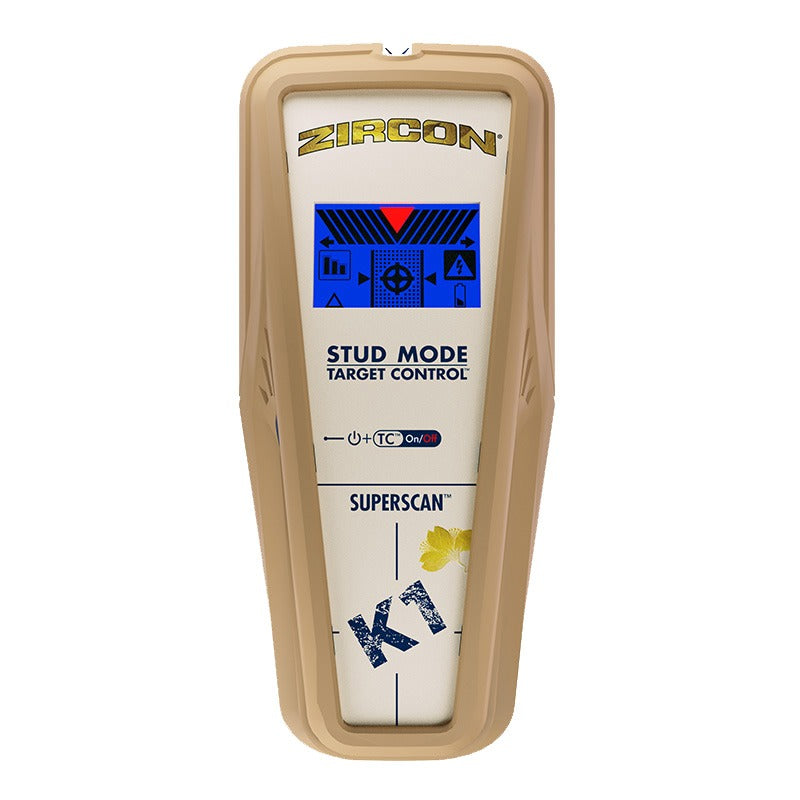
Explore this need in the finder →The Zircon SuperScan K1 is a shallow, two-mode electronic finder built around a meaningful target distinction. Target Control (TC) is tuned for wood studs and filters out many metallic or weak-signal objects; conventional StudScan reports both wood and metal studs. Both modes are stated to 3/4 inch and show edges and a center cue. The LoLevel indicator and WireWarning add information, but neither identifies every hidden object nor makes a drilling location safe. This is a source-based assessment, not a use test.
TC and StudScan answer different questions
In TC mode, the K1 uses a blue display and looks for wood studs while rejecting metallic false-positive objects such as conduit, straps or brackets. The maker describes this as a way to reduce the chance that nearby metal is read as a wood stud. The mode is not intended to locate metal studs. If metal framing is a possibility, use StudScan instead: with TC turned off, the scanner indicates wood and metal studs. The difference is important because a buyer who wants metal-stud capability must not treat the filtering mode as universally better.
Both modes are limited to a stated 3/4-inch (19 mm) maximum for studs, with center, edges and direction indicated. There is no deeper stud setting. The Center crosshairs, edge indicators, SpotLite pointer and beep help mark a likely location, while the LoLevel indicator can flag a weak signal that may be a pipe or another false target. Zircon's manual still warns that nearby pipes and wires can resemble studs. A weak or filtered signal does not prove what is behind the surface.
The instructions recommend starting in TC mode on a standard single layer of drywall, scanning slowly, and mapping targets at several heights. The maker's “Trust but Verify” method checks for the pattern of drywall screws, nails or protector plates along a suspected wood stud. It can help distinguish some metallic targets from wood framing when those fasteners or plates are present and properly installed. That is not a universal safety test: absence of a signal or fastener does not establish that the space is clear of plumbing, wiring or other hazards.
Use the signal as one clue
For a first pass, hold the K1 flat against dry interior drywall and keep it still until calibration is complete. In TC mode, Zircon says calibration takes about one to two seconds and is signaled by a beep and a brief SpotLite flash; do not move it during this interval. Slide the tool slowly while holding the button, mark an edge, continue to the center cue and repeat in another direction or at another height. In StudScan, the mode change is signaled by the display backlight turning off; metal objects may then appear as a stud, which is why the TC and conventional modes must not be conflated.
The K1 is not a multipurpose scanner. It does not provide a separate metal-search mode or an AC Scan mode, and the instructions do not establish any stud depth beyond 3/4 inch. WireWarning is a distinct extra alert for some live, unshielded AC wiring, stated up to 2 inches (50 mm) in typical conditions. The manual warns that wires in conduit, deeper than that, behind metallic or plywood coverings, or affected by moisture may not trigger the warning. Treat a warning as a reason to stop and investigate; its absence cannot clear a wall.
Surface limits are explicit
The 2021 English K1 instructions say the tool is not designed to scan lath and plaster, highly textured walls or acoustic ceilings, wood flooring, subflooring, gypsum drywall over plywood sheathing, carpet or padding. Fresh paint and wallpaper may also need time to dry; foil or metallic fibers can interfere. The current product page supports the same basic drywall-oriented distinction. A wood-filtering feature does not overcome a material the manual excludes, so the K1 is not a documented answer for the site's grouped tile/exterior/mesh category or for lath and plaster.
Even on drywall, moisture, wall texture, mineral content and material consistency can change the response. The tool senses density changes, not stud identity. If a reading is wide, inconsistent, out of sequence or close to a likely pipe or electrical path, stop and consult other information. A stud finder can support layout work, but cannot replace plans, utility inspection or safe-work procedures.
Check the exact identifier before ordering
The current Zircon.com U.S. product page identifies a SuperScan K1 variant as SKU 71960A and links to P/N 72289 Rev A 09/21 instructions. A separate official Zircon shop listing for the same K1 name displays SKU 71204 and describes substantially similar TC and StudScan functions, but I found no manufacturer cross-reference explaining the two codes. Do not assume that a listing showing 71204 is the same package or revision as the current 71960A assessment; check the model label, included manual and return terms. The K1 requires one 9V alkaline battery, which the product page says is not included.
Compared with the MultiScanner HD900c OneStep, the K1 gives a wood-only filtering mode but stops at 3/4 inch; the HD900c's separate DeepScan mode is stated to 1-1/2 inches and retains center-and-edge indications. Compared with the i520 OneStep, the K1's TC mode makes the target material distinction more explicit, while the i520 provides separate metal and AC scanning modes and a deeper center-only stud setting. The K1 is best suited to a simple drywall scan where its wood-focused cue and metal-filtering choice are useful; its shallow range, surface exclusions and unresolved SKU cross-reference deserve equal weight.
Key specifications
Key details at a glance
| Maximum stated stud depth | 0.75 in |
|---|---|
| Depth qualification | Both Target Control and StudScan are stated to 3/4 inch. Target Control is wood-focused and filters metallic/low-signal objects; StudScan indicates wood and metal studs. Neither mode provides a deeper stud plan. |
| Documented scan modes | ['Target Control TC', 'StudScan'] |
| Center and edge indication | Yes |
| Live-wire meter | Yes |
| Battery requirement | One 9V alkaline battery |
Use the exact model’s instructions for operating limits, supplied equipment and version differences.
Sources for this review
Sources for this assessment
Check this model against your wall
Use the finder to compare documented surface limits, center/edge indications and other requirements. A match is not a safety certification.