
Your needs, this model
Does it fit your priorities?
Does the HD900c retain both center and edge cues in DeepScan?
Yes. Its exact instructions describe center and edges of wood or metal studs to 3/4 inch in StudScan and to 1-1/2 inches in DeepScan. The deeper number still belongs only to that mode and varies with wall conditions.
Explore this need in the finder →Does DeepScan make the HD900c a documented lath-and-plaster finder?
No. The current page says it is not recommended for lath and plaster; the manual says plaster thickness irregularities make stud readings difficult and that mesh may block detection. Metal Scan can locate lath fasteners as a separate clue, not as a guaranteed stud scan.
Explore this need in the finder →Does the red WireWarning display confirm the rest of the wall is safe?
No. WireWarning indicates some live, unshielded AC wiring under stated conditions. Shielding, conduit, moisture and depth can prevent an alert, so use other safety information and turn off supplies before penetrating a surface.
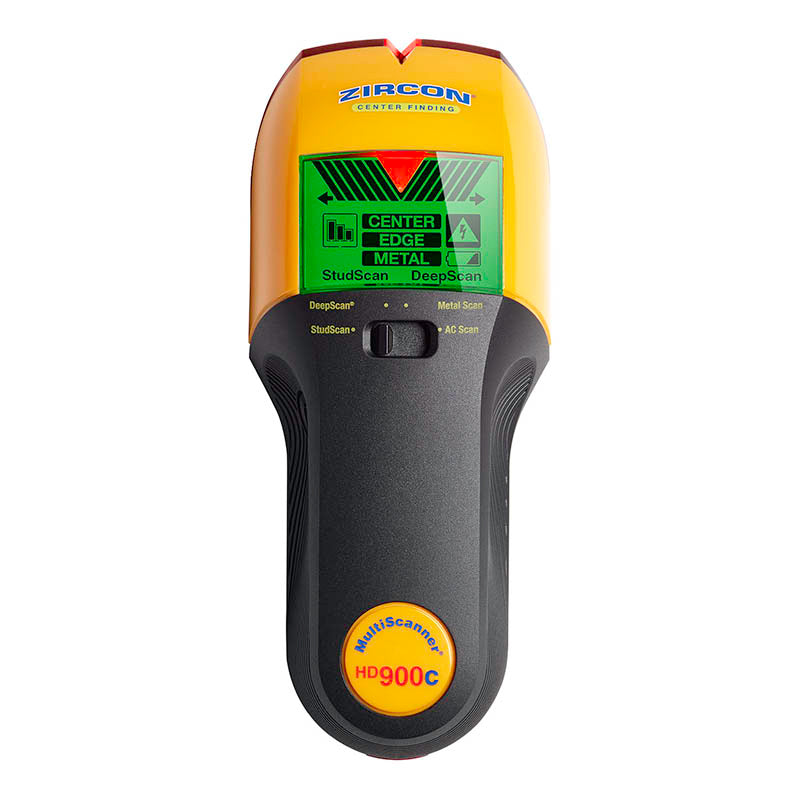
Explore this need in the finder →The MultiScanner HD900c OneStep is a current Zircon U.S. four-mode scanner with a meaningful depth distinction: StudScan is stated to 3/4 inch, while DeepScan is stated to 1-1/2 inches, and the manufacturer describes center-and-edge indications in both. The display changes color by mode, and WireWarning adds a live-wire caution. This assessment is based on the current product page and the linked P/N 68216 Rev B 10/16 instructions for SKU 75396; it is not based on a physical test.
DeepScan keeps both stud cues
StudScan reports the center and edges of wood or metal studs up to 3/4 inch (19 mm). DeepScan is a separate setting for thicker walls and is stated up to 1-1/2 inches (38 mm); unlike some scanners whose deeper mode becomes center-only, the HD900c instructions retain center and edge cues in DeepScan. This distinction is useful if you need to mark boundaries as well as a center on a thicker wall. It does not guarantee that the tool can reach that maximum through a particular installed assembly.
After inserting a 9V alkaline battery, place the tool against the wall before pressing power in either stud mode. Wait for its automatic calibration to finish—Zircon says about one to two seconds—then keep the tool flat and upright and move slowly while holding power. The ColorTrip display uses green for both StudScan and DeepScan; mode text and the selector identify which depth arrangement is active. The SpotLite pointer and audible cue accompany the target indication. Recheck the pattern from both directions and at another height, since a signal can come from an object near the surface rather than a stud.
The same casing also has Metal Scan and AC Scan. Metal Scan is for ferrous metal up to 3 inches and non-ferrous metal up to 1-1/2 inches; those are metal-target limits, not stud-detection depth. AC Scan looks for live, unshielded wiring. WireWarning also operates during stud and metal modes, so the red display alert is an additional caution while scanning rather than a separate guarantee about the wall.
What the display can—and cannot—tell you
ColorTrip helps distinguish the selected function: green for stud modes, blue for Metal Scan and red for AC Scan. Arrows and edge marks help orient the tool; center indication appears when it detects the center. That is more information than a simple edge-only sensor, but it still reports changes in the sensed wall conditions. The instructions note that electrical wiring and metal or plastic pipes close to the surface may be detected like studs. A stronger or more complete indication is not proof of the object's identity.
For a likely framing member, compare both marked boundaries, check expected spacing, and map the same line at several heights. Irregular patterns near doors or windows may reflect headers or doubled framing, but other hidden objects can create signals too. If readings conflict with the known structure, do not force a match: consult plans or other reliable information and use a suitable independent check before cutting or drilling.
Surface restrictions narrow the apparent versatility
The current product page says the HD900c is not recommended for lath and plaster. Its manual explains why: varying plaster thickness can make Stud-mode location difficult; Metal Scan may locate the nails holding wood lath, but mesh reinforcement can prevent detection. That is not equivalent to documented stud scanning through lath and plaster. The manual also says the unit cannot locate wood studs through tile, concrete, carpet or padding. These exclusions matter even though the tool has a deeper mode: deeper mode does not cancel a material restriction.
Some named situations receive more qualified advice. The manual describes DeepScan for wood flooring, subflooring or gypsum drywall over plywood and suggests a thin cardboard shim on uneven or very textured surfaces, with slow scanning. Those are use instructions, not evidence that every flooring or textured-wall arrangement will work. Damp cavities, recently painted walls, fresh wallpaper, metal foil or other dense layers can make detection erratic. The manual specifies indoor use only.
Keep WireWarning in its proper role
The manufacturer describes WireWarning for live, unshielded AC wiring up to 2 inches (51 mm) in typical conditions. It may not indicate wires that are deeper, shielded by conduit or metallic coverings, behind dense construction, or affected by moisture. A warning over an area is reason for caution; no warning is not a clearance result. Turn off the relevant electrical supply before work and take additional precautions around suspected wires, gas or water lines.
There is also an edition detail to check: the current product page states a limited-lifetime warranty for the U.S. and Canada, while the linked 2016 instruction sheet prints a one-year warranty. Confirm the exact unit and the terms offered by its seller rather than assuming that either document governs every package.
Where it sits beside other models
The MultiScanner i520 OneStep has a similar two-depth range, but its instructions describe the deeper StudDeepScan output as center-only. The HD900c's center-and-edge DeepScan indication is the more relevant distinction when both marks matter at that threshold. The SuperScan K1 takes another approach: its Target Control mode is for wood studs and filters many metallic signals, but both K1 modes stop at a stated 3/4 inch. The models are not interchangeable simply because all show a center.
Before ordering, match the title and SKU 75396 to the product in the box, check that it is the HD900c rather than the separate HD900 or another MultiScanner, and confirm whether a 9V battery is included—the manufacturer specifies that one is required but the package contents were not established here. Use the exact manual, surface limits and mode for the wall in front of you. The HD900c is best viewed as a feature-rich indoor scanner whose deeper stud mode preserves edge and center cues, not as a promise of safe drilling or universal material coverage.
Key specifications
Key details at a glance
| Maximum stated stud depth | 1.5 in |
|---|---|
| Depth qualification | StudScan is stated to 3/4 inch; the separate DeepScan plan is stated to 1-1/2 inches and retains both center and edge indications. Metal-target depths are not stud depth. |
| Documented scan modes | ['StudScan', 'DeepScan', 'Metal Scan', 'AC Scan'] |
| Center and edge indication | Yes |
| Live-wire meter | Yes |
| Battery requirement | One 9V alkaline battery |
Use the exact model’s instructions for operating limits, supplied equipment and version differences.
Sources for this review
Sources for this assessment
Check this model against your wall
Use the finder to compare documented surface limits, center/edge indications and other requirements. A match is not a safety certification.