
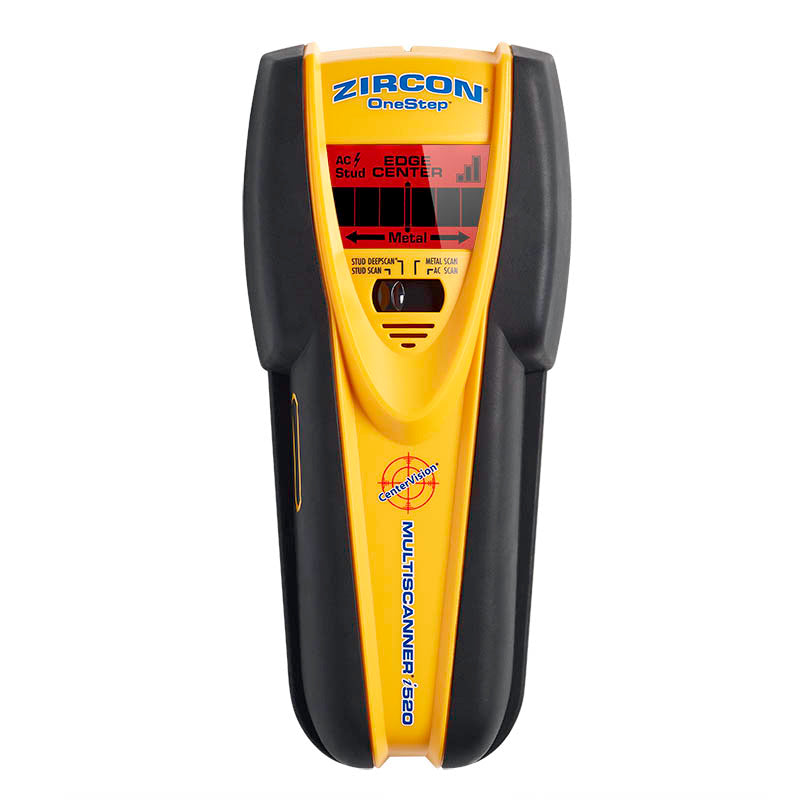
Your needs, this model
Does it fit your priorities?
Can the i520 show both edges and center at its 1-1/2-inch setting?
The instructions distinguish the modes: StudScan gives edges and center to 3/4 inch, while StudDeepScan is described as locating the center to 1-1/2 inches. Do not combine the deeper number with the shallower mode's full cue set.
Explore this need in the finder →Does the 3-inch Metal Scan distance mean the i520 finds studs three inches deep?
No. The 3-inch figure is for ferrous metal in Metal Scan. The stud plans are separate: 3/4-inch StudScan with edges and center, and 1-1/2-inch StudDeepScan with a center indication.
Explore this need in the finder →Does WireWarning make an unlit place safe to drill?
No. It is an alert for some live, unshielded AC wiring. The instructions list shielding, conduit, depth, moisture and dense surfaces as limits; a missing alert does not prove wiring is absent.
Explore this need in the finder →The MultiScanner i520 OneStep is a four-mode wall scanner with a useful distinction between its regular and deeper stud outputs. In StudScan, it identifies both edges and center of wood or metal studs up to 3/4 inch; the separate StudDeepScan mode reaches a stated 1-1/2 inches but the instructions describe a center indication, not the same edge-and-center sequence. Metal Scan and AC Scan are further functions, not extra stud-depth claims. This is a source-based assessment of the current U.S. SKU 75123, not a hands-on test.
Read the mode before you read the number
The i520's central strength is a mode set that can answer different questions, but the numbers cannot be collapsed into a single “depth” claim. In StudScan, the EDGE display identifies a boundary and the CENTER display, signal bars, SpotLite pointer and buzzer mark the middle as the tool continues across a stud. This mode is the clearest choice when you want both boundaries and a center cue on a typical dry interior drywall wall. The instructions give the edge-and-center StudScan plan a 3/4-inch (19 mm) maximum.
When the wall layer is thicker than 3/4 inch, the separate StudDeepScan mode carries a stated maximum of 1-1/2 inches (38 mm). The exact manual describes that deeper mode as locating the stud center. It does not promise the same paired edge cues at that depth, so a request for both edge and center at 1-1/2 inches should not be read as a match to the deeper arrangement. This is the same practical distinction found on the MultiScanner i320 OneStep; the depth figure belongs to a particular mode, not every output the device can show.
Metal Scan has a separate purpose: the maker states up to 3 inches for ferrous metal such as rebar and up to 1-1/2 inches for non-ferrous metal. That is not evidence that a stud can be found three inches deep. AC Scan is a live-wire locating mode, while WireWarning adds a warning during the stud and metal modes. These labels are easy to confuse if a buyer compares a list of maximum numbers without preserving the target and mode that each number describes.
Plan the scan around the wall
For StudScan or StudDeepScan, the manual instructs the user to place the i520 flat against the surface before powering it on, wait for the beep that confirms calibration, keep it upright and parallel to the framing, and slide slowly without rocking or tilting. In StudScan, follow the edge cue through the pass until the center cues appear; reverse direction to check the boundaries and repeat at another height. In DeepScan, use the center indication as a separate, deeper reading and compare the pattern with other information rather than assuming that one signal identifies the object.
Surface limits matter as much as mode selection. The instructions say moisture, wall-cavity humidity, recently applied paint or wallpaper, wall content and texture can disturb readings. The manual allows ordinary dry wallpaper and some plywood-backed or wood-floor situations with DeepScan, and suggests a thin cardboard shim for very uneven surfaces or acoustic ceilings. Those are conditional methods for named surfaces, not a general approval for every layered wall. It says carpet and padding prevent the scanner from finding wood studs and joists.
For lath and plaster, the manual says thickness irregularities make StudScan difficult. It suggests using Metal Scan to find nail heads holding wood lath to studs, which is an indirect fastener clue rather than a stud-sensing plan. It also warns that metal-mesh reinforcement can block detection. The i520 therefore does not meet this site's conditional lath-and-plaster requirement just because it has a metal mode. Nor do the sources establish the broader tile, exterior, metal-mesh or other-difficult-surface group.
WireWarning adds information, not clearance
The product page and instructions describe WireWarning as an alert for some live, unshielded AC wiring, with a typical-wall reach up to 2 inches. The instructions identify blind spots: a wire may be deeper than the stated distance, shielded, inside conduit, behind a metallic covering or plywood shear wall, or affected by moisture. They also caution that a stud-mode signal can be caused by nearby wiring or pipes. The current product page lists broader voltage details than the old linked manual's stated optimum-voltage range, so the manual's exact wording should be checked against the actual unit. A missing warning must never be treated as evidence that a location is safe.
Before drilling, compare multiple marks, inspect likely utility routes and plans, and turn off relevant supplies. When the layout remains uncertain, stop and use an appropriate independent method or qualified help. The i520 is a locator, not a safety instrument and not a means of identifying every hidden object.
What to verify before buying
The current Zircon U.S. product page identifies the MultiScanner i520 OneStep as SKU 75123 and specifies one 9V alkaline battery that is not included. The linked English instructions are an older P/N 62112 Rev B 12/11 sheet; its warranty statement differs from the current page's U.S./Canada limited-lifetime warranty wording. Confirm the exact model label and package, whether a battery is supplied by the seller, and which warranty terms apply to that offer. Do not assume accessories or package contents from a generic “OneStep” title.
Compared with the HD900c OneStep, the i520's deeper mode is center-only; the HD900c manual retains center and edge indications in its 1-1/2-inch DeepScan mode. The i520 remains a meaningful alternative when the exact mode combination and its separate Metal Scan function matter, but its richer selector demands care. The useful question is not whether the tool has the biggest number, but whether one documented plan combines the surface, signal and depth you actually need.
Key specifications
Key details at a glance
| Maximum stated stud depth | 1.5 in |
|---|---|
| Depth qualification | StudScan indicates edges and center up to 3/4 inch. Separate StudDeepScan is stated to 1-1/2 inches and its instructions describe a center indication. Ferrous/non-ferrous Metal Scan distances are not stud depth. |
| Documented scan modes | ['StudScan', 'StudDeepScan', 'Metal Scan', 'AC Scan'] |
| Center and edge indication | Yes |
| Live-wire meter | Yes |
| Battery requirement | One 9V alkaline battery |
Use the exact model’s instructions for operating limits, supplied equipment and version differences.
Sources for this review
Sources for this assessment
Check this model against your wall
Use the finder to compare documented surface limits, center/edge indications and other requirements. A match is not a safety certification.