
Your needs, this model
Does it fit your priorities?
Does DeepScan give the e50 a center indicator?
No. Both StudScan and DeepScan are described as locating edges. Marking the two edges can help estimate a midpoint, but that is a user calculation rather than a device center output.
Explore this need in the finder →What does the e50's 1-1/2-inch depth mean?
It is the stated maximum for the separate DeepScan edge-finding mode. StudScan is limited to 3/4 inch; the deeper mode is not a guarantee through a particular wall and can return a response that needs verification.
Explore this need in the finder →Does WireWarning make this model appropriate for lath and plaster?
No. The exact instructions say the e50 is not designed to scan lath and plaster. WireWarning is an added alert for some live AC wiring; it does not change that wall restriction or clear the wall for drilling.
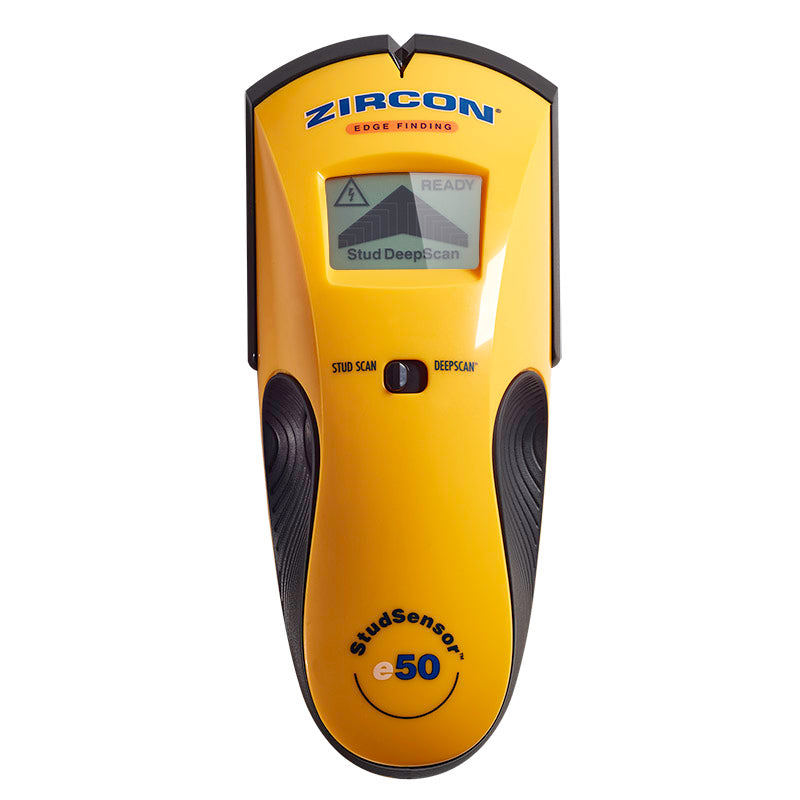
Explore this need in the finder →The Zircon StudSensor e50 is an edge-finding model with two distinct stud modes. StudScan is stated to 3/4 inch; DeepScan raises the maker-stated stud maximum to 1-1/2 inches. Both modes report edges, not a direct center location. The exact U.S. e50 page and its linked instructions also describe WireWarning, an added alert for some live AC wiring. This assessment distinguishes those functions and does not claim hands-on testing.
Two modes, but the output remains an edge
To scan, install a new 9V alkaline battery, select StudScan, place the tool flat against the wall and hold power until it confirms calibration. Move slowly with the button held. Zircon describes the LCD arrow/segments, SpotLite pointer and steady tone as cues for an edge. Continue beyond the response, reverse to locate the other side, and mark both boundaries. The center can be estimated between those marks, but the e50 does not supply a separate center indication.
DeepScan is the separate setting for walls more than 3/4 inch thick and carries the up-to-1-1/2-inch (38 mm) edge-detection statement. That number belongs to this mode, not the standard StudScan setting, and the manual warns that depth and accuracy vary with wall content, moisture, texture and paint. A wider or deeper response is not automatically a better stud reading. Repeat the pattern at another height, compare it with the expected framing, and use another information source if the result is doubtful.
WireWarning is an added cue, not safety clearance
The product page and instructions describe WireWarning in both StudScan and DeepScan. It is intended to indicate live, unshielded AC wiring under the stated conditions; Zircon gives an up-to-2-inch figure for typical wall wiring. The manual lists important blind spots, including moisture, wires beyond the stated depth, shielding, plastic or metal conduit and metallic wall coverings. The absence of a WireWarning icon cannot prove that wiring is absent.
The e50 also does not identify what created a stud-mode response. A wire or pipe close to the surface can resemble a framing member. Keep electrical safety separate from stud layout: consult plans and visible utility routes, turn off relevant supplies, and use appropriate independent checks before drilling. Do not use the e50's alert as a substitute for a service locator or a qualified inspection.
Check the wall before relying on DeepScan
The e50's manual explicitly says it is not designed to scan ceramic floor tile, carpet and padding, metallic-fiber wallpaper, damp new paint, foil-covered insulation, glass or other dense material, or lath and plaster. For plaster, it says thickness variation can prevent reliable scanning; the broader metal-mesh/tile/exterior group is not a documented fit. The guide does list some qualified cases, including dry wallpaper, drywall over plywood, bare wood flooring in DeepScan and uniformly textured ceilings when using thin cardboard as a shim. Those are specific instructions rather than a blanket rating for every surface.
This boundary is important because a manufacturer depth maximum does not erase a material exclusion. If you have plaster, tile, a foil layer or an unusual exterior wall, seek a model and method explicitly supported for that assembly instead of assuming the e50's deeper mode solves it. A consistent pattern from multiple passes is more informative than a solitary reading, but even repeatability is not proof of the hidden object's identity.
What changes from e30—and what does not
The StudSensor e30 is a single shallow edge finder with a READY light and sequential arrow segments; its exact sources do not describe DeepScan. The e50 adds an LCD and a separate deeper edge-finding plan, which can matter when the wall and project justify that mode. It does not add a direct center display, and neither edge model should be treated as a whole-wall inspection tool. For center information and a metal mode, compare the MultiScanner i320 OneStep; its deeper StudDeepScan is center-only, so it trades a different output rather than simply offering more of the same.
The e50's exact product page lists SKU 74935 and a 9V alkaline battery that is not included. It appeared as the same product-detail identity on both pages of the manufacturer's paginated collection, so the second card is not a separate kit or model. The older linked manual and current product page display different warranty language; confirm the warranty that applies to the exact seller package. Do not infer current stock from a past catalogue observation. No physical test, ownership, accuracy measurement, price, rating or customer-experience summary is claimed. The e50 is best understood as a two-mode edge finder whose larger depth figure demands careful wall and mode checks.
Key specifications
Key details at a glance
| Maximum stated stud depth | 1.5 in |
|---|---|
| Depth qualification | StudScan indicates edges to 3/4 inch; the separate DeepScan mode indicates edges up to 1-1/2 inches. This remains an edge finder without a documented center display. |
| Documented scan modes | ['StudScan', 'DeepScan'] |
| Center and edge indication | No |
| Live-wire meter | Yes |
| Battery requirement | One 9V alkaline battery |
Use the exact model’s instructions for operating limits, supplied equipment and version differences.
Sources for this review
Sources for this assessment
Check this model against your wall
Use the finder to compare documented surface limits, center/edge indications and other requirements. A match is not a safety certification.