
Your needs, this model
Does it fit your priorities?
Does the e30 show a stud center?
No direct center indication is documented. The instructions have the user mark both edge indications and take the midpoint between those marks as an estimate; that estimate should be repeated at another height and confirmed with other evidence.
Explore this need in the finder →Can the e30 meet a stated 1-inch depth requirement?
No. Its exact sources state up to 3/4 inch (19 mm) and do not document a deeper mode. The site’s next numeric choice above that limit is 0.8 inches, so an e30-only plan does not meet it.
Explore this need in the finder →Does the wire cue make lath-and-plaster scanning a fit?
No. The e30 manual does not recommend lath and plaster, and its WireWarning alert cannot offset that surface restriction or prove the wall is safe. The listed finder choices therefore do not treat it as a plaster match.
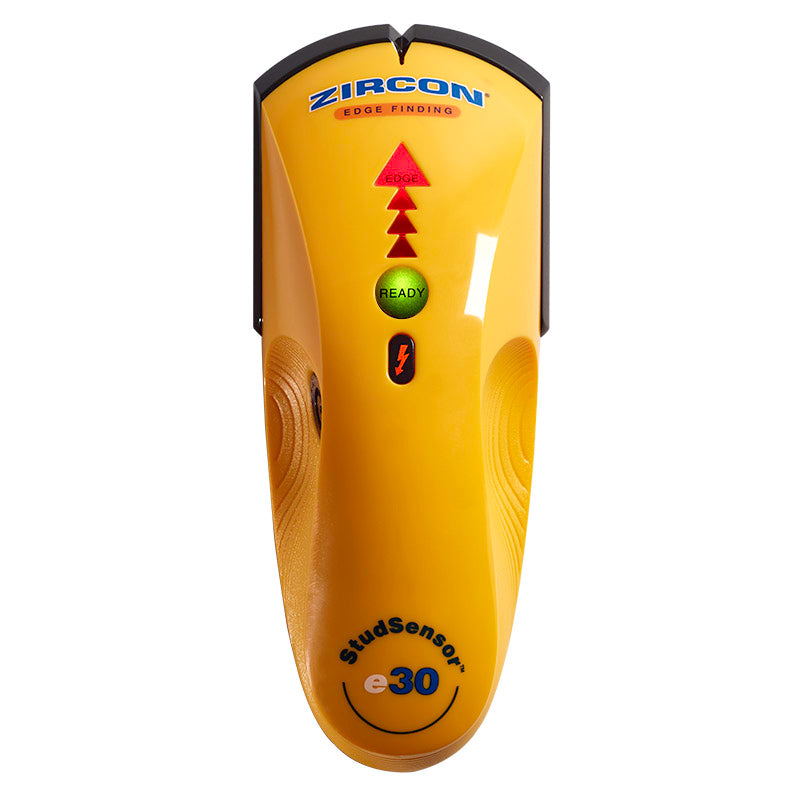
Explore this need in the finder →The Zircon StudSensor e30 is a deliberately narrow electronic finder: it locates stud edges and gives a live-wire warning, but the reviewed sources do not document a direct center readout or a second deep-scanning mode. Its front indicators help show when it is ready and where an edge response occurs. This review follows the exact U.S. e30 product page and the matching e30 instructions, not assumptions drawn from the similar-name e50 or other Zircon sensors. It is a research-based assessment, not a field test.
The e30 marks edges, then leaves center to the user
For an ordinary interior wall, the manual tells the user to install a new 9V battery, place the scanner flat and still against the surface, and hold the power button until the green READY light indicates calibration. Keep the button held while moving slowly across the wall. Arrow segments light as the tool approaches a target; the red EDGE light and SpotLite pointer signal the boundary. Continue past that point, reverse direction and mark the other boundary. The midpoint between those marks estimates a stud center; it is not an electronic center indication from the e30.
That distinction matters if you are laying out a bracket or a series of fasteners. A paired-edge procedure can support an estimate, but the mark should be checked at another height and against other framing clues. Pipes, wiring or a material change near the surface may cause a similar response. If the boundaries are inconsistent, do not promote them to a verified stud just because the finder lights up.
Its depth is a shallow, explicit boundary
Zircon states the e30 locates wood and metal stud edges up to 3/4 inch (19 mm) deep. The product page and its manual do not document a separate DeepScan mode for this model. In this site's numeric finder, a 0.7-inch minimum can include a documented 0.75-inch plan; the next 0.1-inch step, 0.8 inches, exceeds that source limit. This is a useful shortlist boundary, not a promise that the e30 will detect a stud exactly at its maximum through any finish.
Moisture, paint, wall texture and the material itself can affect sensing. The instructions recommend a flat, slow pass and warn that a tool moved or tilted during calibration may produce confusing signals. If the task requires a greater documented depth, compare a model with its own deeper mode—such as the e50—but do not borrow that capability for an e30 package merely because the model names share a family.
WireWarning does not find every wire
The e30 includes Zircon's WireWarning indication for some live AC wiring. The manual says its electrical field locator can miss conductors if moisture is present, if wiring is more than 2 inches from the scanned surface, in plastic conduit, or behind a plywood shear wall or metallic covering. Its electrical signal is therefore an added caution—not a circuit map, a no-wire test or a clearance to drill.
The same operating guide warns that nearby wires and pipes may be sensed in the same way as studs. Before penetrating a surface, inspect likely routes, use construction information or other appropriate methods, and turn off relevant utilities. A quiet e30 cannot show that the wall is safe. If the work is high-consequence or the evidence conflicts, pause for a qualified assessment instead of relying on the detector alone.
Surface restrictions are part of the model choice
The e30 manual specifically says it is not recommended for lath and plaster because plaster thickness varies. It also says the tool cannot scan for wood studs or joists through ceramic tile or carpeting and padding. The instructions describe other conditions that require care: metallic wallpaper or fabric, damp fresh paint, and irregular surfaces can interfere. Those restrictions are more useful than assuming that a similar yellow case means the model supports every wall that another Zircon tool might handle.
The product page describes an edge-finding tool with a READY light, sequential arrows, a SpotLite pointer and a WireWarning cue. It does not establish a screen-based center signal, metal-target mode, ruler or bubble level. For a buyer who only needs a pair of edge marks on a dry interior wall, this is a straightforward set of outputs. It is a weaker fit if the essential requirement is a separate center indicator, a depth above 3/4 inch, or a supported plaster surface.
How it differs from e50 and other edge finders
The e50 is not just another name for the e30: its exact sources describe an LCD, a selector with StudScan and DeepScan, and a 1-1/2-inch maximum in its deeper edge mode. It remains edge-only, but it supports a different depth comparison. The MultiScanner i320 OneStep adds center information in its ordinary StudScan and separate metal scanning; its deeper stud mode is center-focused, not the same full edge-and-center arrangement. These distinctions make the task more important than model-family shorthand.
The exact e30 page lists SKU 75143 and a required 9V alkaline battery; the linked 2011 instructions also specify that cell. Check the retail listing for the precise e30 name and package contents, and use the current instructions for the actual tool. The old manual's warranty footer may not describe a particular seller's offer. No physical testing, ownership, accuracy measurement, price, availability or customer-experience claim is made. The e30's decision case is simple: accept a shallow edge-only routine, make the midpoint yourself, and retain independent checks for both the stud and hidden services.
Key specifications
Key details at a glance
| Maximum stated stud depth | 0.75 in |
|---|---|
| Depth qualification | The e30's single documented stud-edge arrangement is stated up to 3/4 inch (19 mm); no separate DeepScan mode is documented for this exact model. |
| Documented scan modes | ['StudScan edge finding'] |
| Center and edge indication | No |
| Live-wire meter | Yes |
| Battery requirement | One new 9V alkaline battery |
Use the exact model’s instructions for operating limits, supplied equipment and version differences.
Sources for this review
Sources for this assessment
Check this model against your wall
Use the finder to compare documented surface limits, center/edge indications and other requirements. A match is not a safety certification.