
Your needs, this model
Does it fit your priorities?
Does the i320 show both edges and center at the deeper setting?
Not according to the exact instructions. StudScan locates edges and center to 3/4 inch; the separate StudDeepScan description gives a center indication up to 1-1/2 inches. A request for both cues should not be combined with that deeper figure as if both outputs remain available.
Explore this need in the finder →Does its 3-inch Metal Scan claim mean it finds studs three inches deep?
No. The instructions assign the 3-inch figure to ferrous metal targets such as rebar; nonferrous metal has a separate figure, and the stud modes have their own 3/4-inch and 1-1/2-inch limits. Do not substitute the metal target depth for a stud plan.
Explore this need in the finder →Does WireWarning prove a location is safe to penetrate?
No. It is an extra indication for some live, unshielded AC wiring and the manual lists shielding, conduit, depth and wall-construction blind spots. A missing warning is not evidence of a clear wall; shut off utilities and use independent safety checks.
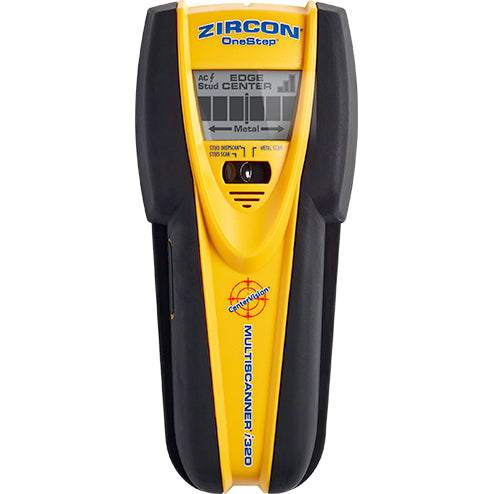
Explore this need in the finder →The Zircon MultiScanner i320 OneStep combines stud location, a separate metal scan and a live-wire warning, but those functions should not be compressed into one “depth” figure. Its exact U.S. product page and linked i320 instructions distinguish a shallow StudScan that reports edges and center from a deeper StudDeepScan that the manual describes as locating center. The separate Metal Scan has its own metal-target limits. This is a source-based assessment of those documented differences, not a hands-on test.
Use StudScan for the full edge-and-center cue set
For ordinary interior drywall, the manual's starting routine is specific: select StudScan, put the tool flat against the wall, hold the power button and wait for the calibration beep before moving. Slide slowly without rotating, tilting or pressing hard. An edge indication appears as the sensor crosses a boundary; when its center signal is located, the center display, middle bars, SpotLite and buzzer respond. The combination is more informative than an edge-only reading, but it still reports a change in the material behind the surface—it does not establish that the target is framing rather than a pipe, wire, patch or another dense object.
Zircon states StudScan is for wood or metal studs to 3/4 inch (19 mm). Calibration and repeated passes are part of that stated arrangement, not optional polish. The manual also says the scanner can recalibrate while scanning, but advises waiting for startup calibration before the first movement. For a heavy mount, compare boundaries at multiple heights and look for a repeatable path rather than relying on a single lit bar.
The deeper mode is not the same edge-and-center plan
StudDeepScan is the i320's alternate stud setting for thicker walls, with a stated limit up to 1-1/2 inches (38 mm). Importantly, the instruction sheet describes that mode as locating the center. It does not establish that the full StudScan edge-and-center cues remain available at that deeper limit. If a project specifically needs both edge and center indications, use the supported StudScan plan; do not combine its indicator set with StudDeepScan's higher number as if they were one simultaneous arrangement.
The larger figure is a maker-stated maximum, not a prediction for a particular wall. Moisture, texture, paint and construction affect sensing, and a deeper signal may come from something other than a stud. The i320's Metal Scan is yet another function: Zircon's instructions describe locating ferrous metal such as rebar up to 3 inches and non-ferrous metal up to 1-1/2 inches. Those target-specific metal figures do not make this a three-inch stud finder. Use the metal mode to investigate a metal response, not to enlarge a stud-depth claim.
WireWarning is a separate, limited alert
The product page and instructions describe WireWarning during StudScan, StudDeepScan and Metal Scan. It can indicate some live, unshielded AC wiring, with a typical-wall limit around 2 inches. The manual warns that deeper wires, metal conduit, shielding, plastic conduit and metallic wall covering can keep an energized conductor from being detected. The alert is a useful additional cue when present; a missing icon cannot establish that the wall is free of wiring.
Do not treat the i320—or any finder—as permission to drill. The instructions advise caution near electrical wiring. Use building information, inspect likely utility routes, turn off relevant supplies and use suitable independent safety methods before penetrating a wall. The scanner locates and characterizes signals; it does not certify a safe drilling location.
Plaster and unusual surfaces need a narrower reading
The i320 manual says irregular plaster thickness makes stud scanning difficult. It suggests Metal Scan to find nail heads holding wood lath, which may provide another clue, but that is not a promise that the stud modes will show reliable edges or centers through plaster. It says metal mesh prevents detection through that material. The manual also excludes carpet and padding for wood-stud scanning. It does provide specific qualified advice for dry wallpaper, fresh paint, uneven texture, wood flooring and drywall over plywood; those cases call for their own modes, drying time or a thin cardboard shim and should not be generalized to tile or exterior walls.
The instructions emphasize a flat, slow scan and explain that objects such as pipes and wiring can be mistaken for studs. If the signal conflicts with the expected framing, stop and seek another clue rather than repeatedly selecting the deeper mode. The product page describes a lightweight handheld unit with an LCD and signal-strength display; there is no built-in bubble level or ruler established in the reviewed sources.
Who should compare it—and what to confirm
The i320 is worth comparing when a project benefits from an edge-and-center reading in the ordinary stud mode, a distinct deeper center cue, Metal Scan, and an added wire alert in the same instrument. Its costs in complexity are the deliberate mode switch, calibration, and the need not to confuse three separate target plans. For a simpler single-depth edge task, compare the StudSensor e30; for a deeper edge-only alternative, the StudSensor e50 keeps its StudScan and DeepScan outputs at edges. Those models solve different signal tasks, and the i320's modes should not be inferred from their specifications.
The product page lists SKU 75165 and a required 9V battery that is not included. Confirm the exact i320 OneStep model, battery and seller package before choosing an offer. Its currently linked instruction sheet is an older English manual, and its warranty footer differs from the current page's warranty statement; check the terms tied to the exact edition and seller rather than assuming one applies to every package. No price, stock, customer rating, measurement, ownership or physical test is claimed here. The useful decision is whether the i320's mode-specific information matches the wall and indication needed—and whether you can verify its reading independently.
Key specifications
Key details at a glance
| Maximum stated stud depth | 1.5 in |
|---|---|
| Depth qualification | StudScan indicates stud edges and center up to 3/4 inch; the separate StudDeepScan plan indicates center only up to 1-1/2 inches. Metal Scan targets metal, not stud depth. |
| Documented scan modes | ['StudScan', 'StudDeepScan', 'Metal Scan'] |
| Center and edge indication | Yes |
| Live-wire meter | Yes |
| Battery requirement | One 9V battery |
Use the exact model’s instructions for operating limits, supplied equipment and version differences.
Sources for this review
Sources for this assessment
Check this model against your wall
Use the finder to compare documented surface limits, center/edge indications and other requirements. A match is not a safety certification.