
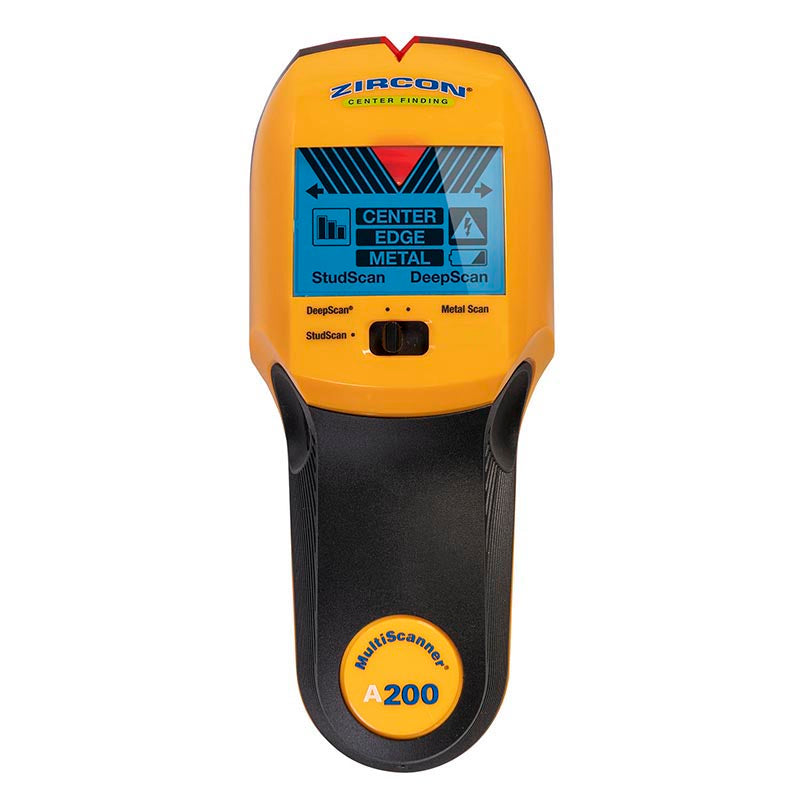
Your needs, this model
Does it fit your priorities?
Does the A200 show both the stud edges and center?
Yes. Zircon's A200 page and instructions describe EDGE and CENTER indications in its stud modes. Start with StudScan, calibrate without moving the tool, scan slowly and use repeatable marks; a center display still does not identify a hidden object.
Explore this need in the finder →What does the A200's 1.5-inch figure mean?
It is the maker's stated maximum for the separate DeepScan stud mode. Its normal StudScan mode is limited to 3/4 inch, and the metal mode uses different target-specific depths. Start in StudScan; do not apply the DeepScan or metal figure to every wall or target.
Explore this need in the finder →Does WireWarning make the A200 a safety test?
No. The manufacturer documents an added live-unshielded-AC warning in the stud and metal modes, with depth and shielding limits. A missing alert cannot establish that wiring is absent or that drilling is safe.
Explore this need in the finder →The MultiScanner A200 is not simply a deeper version of a basic edge finder. Zircon describes three distinct modes: StudScan, DeepScan, and Metal Scan. StudScan and DeepScan report a stud's edge and center; Metal Scan looks for metal as a different target. A200's main appeal is this combination of signals and its WireWarning feature, not a single headline depth number. This assessment is based on the exact U.S. product page and its linked operating instructions, not on a hands-on test.
Start with StudScan, not the largest number
The normal first step is StudScan. The manual asks the user to place the scanner flat on the wall, hold the power button without moving it until calibration completes, and then slide slowly while continuing to hold the button. As the tool crosses the stud, the display reports EDGE and then CENTER. This is a more explicit layout sequence than a device that only signals an edge. The distinction matters if a project needs an approximate centerline: the A200 supplies both indications, though they still describe a density change rather than proving that the hidden object is a stud.
Zircon states StudScan is intended to find wood or metal studs up to 3/4 inch deep. If the wall is thicker or the initial result indicates a deeper target, DeepScan is the alternate stud mode, with a stated maximum of 1 1/2 inches. The instructions specifically say to begin in StudScan because DeepScan may reveal an object farther behind the surface that is not a stud. So the 1.5-inch figure is a conditional mode limit, not a reason to leave the tool in DeepScan for every wall. Signal strength and repeatability matter, and the manufacturer notes that moisture, texture, minerals, and wall consistency can affect results.
Keep Metal Scan separate from stud depth
Metal Scan is useful for a different question: whether a detected area contains ferrous or non-ferrous metal. The manual describes a careful calibration and mark-and-reverse routine, with repeated passes to narrow a broad response. Zircon lists up to 3 inches for ferrous metal such as rebar and up to 1.5 inches for non-ferrous metal such as copper. Those values do not make the A200 a 3-inch stud finder. Metal detection and stud scanning identify different signal patterns, and a pipe, conduit, metal stud, or fastener may need further interpretation. The model's backlit LCD, signal-strength bars, audible signal, arrow-shaped SpotLite beam, and illuminated marker groove assist with locating a response, but do not identify its material by themselves.
WireWarning is an extra cue, not a safety clearance
The A200 adds Zircon's WireWarning detection. The product page describes an indication for live, unshielded AC wiring in stud and metal scanning modes, and the manual describes its warning as active across modes. The stated typical-wire depth is up to about 2 inches in a typical wall; the instructions list important blind spots, including wiring deeper than that, shielded or conduit-enclosed wires, metallic wall covering, concrete, and moisture. In other words, an alert is meaningful when it appears, but no alert cannot show that a wall is free of wiring. Before drilling, use other information about utilities and follow the instruction to turn off relevant supplies; a consumer scanner is not a substitute for a proper safety check.
Wall material narrows the use case
For ordinary interior drywall, the manufacturer's staged routine is clear. The lath-and-plaster paragraph is more cautious: Zircon says it is difficult to locate studs in either stud-scanning mode and suggests Metal Scan to find nails in wood lath. That is a fastener-location workaround, not a supported promise that the A200 will trace stud edges and centers through plaster. If the plaster includes metal mesh, the manual says stud detection is not possible through it. We therefore do not treat the A200 as a match for the broad plaster requirement, even though the Metal Scan can sometimes provide another clue.
Other cases also need care. Wallpaper or fabric may be scanned unless it is metallic or still wet. Fresh paint can take a week or more to dry. For a highly textured wall, the manual describes placing thin cardboard over the surface and using DeepScan; if results remain irregular, Metal Scan may help locate fasteners. It does not promise performance across tile, exterior cladding, or every unusual construction. The manual also says that the unit is for indoor use, and that pipes and wires close to the wall can resemble studs.
Who should compare it—and what to check
The A200 may suit a project where a buyer values center-and-edge feedback, a deeper stud mode, a separate metal mode, and an added live-wire warning in one tool. Its tradeoffs are the button-held calibration routine, the need to select the mode deliberately, and the possibility that a stronger/deeper scan can respond to an object other than the intended stud. By contrast, the StudSensor Basic is an edge-only electronic finder with a much narrower stated depth; the StudScout 2-Pack is a battery-free magnet that locates ferrous fasteners rather than sensing stud density. These alternatives solve different layout tasks, not interchangeable versions of the A200.
The A200 uses one 9V alkaline battery, which Zircon says is not included. Before choosing a particular retailer listing, check that its model name is exactly MultiScanner A200 and confirm the supplied battery and any extras rather than inferring them from a photo. Also read the current A200 instructions for the surface and target mode you actually plan to use. No price, availability, customer rating, accuracy test, or product ownership claim is made here. The sound decision is to use the A200 as a multi-cue locator, confirm a repeatable pattern at more than one height, and keep wall-safety decisions independent from its display.
Key specifications
Key details at a glance
| Maximum stated stud depth | 1.5 in |
|---|---|
| Depth qualification | StudScan is stated to 3/4 inch; the distinct DeepScan stud mode is stated to 1 1/2 inches. Metal Scan has different target-specific limits and is not treated as stud depth. |
| Documented scan modes | ['StudScan', 'DeepScan', 'Metal Scan'] |
| Center and edge indication | Yes |
| Live-wire meter | Yes |
| Battery requirement | One 9V alkaline battery |
Use the exact model’s instructions for operating limits, supplied equipment and version differences.
Sources for this review
Sources for this assessment
Check this model against your wall
Use the finder to compare documented surface limits, center/edge indications and other requirements. A match is not a safety certification.