
Your needs, this model
Does it fit your priorities?
What depth can the 2291 support for studs?
The 2291 operator manual offers 0.5-, 1- and 1.5-inch Stud-mode settings and gives ±0.5-inch center accuracy over that range. Its 6-inch figure belongs to Metal mode for metal targets in concrete; it is not a stud-depth figure.
Explore this need in the finder →Does this Milwaukee scanner show both stud edges and center?
Yes. The 2291 manual describes an edge cue as the scan crosses a stud and a two-arrow cue at the center. These are signal-location aids; a wire or metal touching the back of wallboard may also be identified as a stud.
Explore this need in the finder →Does the 2291 have a live-wire meter?
The exact 2291 manual and official feature list reviewed do not document a voltage detector. Do not transfer the AC-voltage indicator described in the older 2290 manual. For a wire warning, choose a model whose exact documentation establishes one, and never treat a missing alert as safe clearance.
Explore this need in the finder →Milwaukee’s 2291-20 is the standalone SUB-SCANNER M12 detection tool. Its manufacturer page lists the configuration as no longer available and puts one scanner and one manual in the box; a battery, charger and carrying case are not listed for this bare-tool SKU. This is a research-based assessment of the documented arrangement, not a hands-on test or a claim that the product is currently in stock.
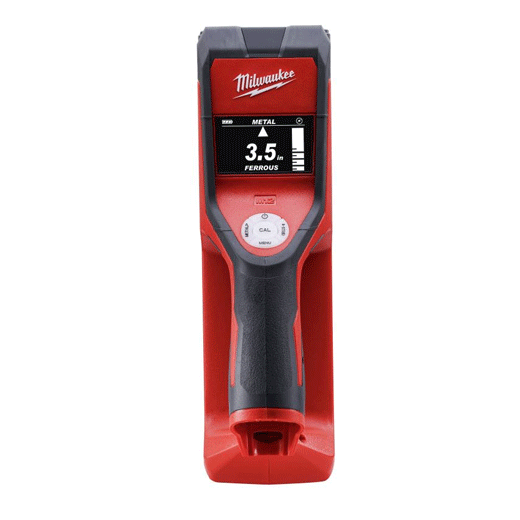
Use the stud mode for framing
The 2291 is a powered wall scanner with separate Metal and Stud modes. The manual says Metal is the default at startup, so a user looking for wood or metal studs needs to select Stud rather than assume the initial mode is appropriate. In Stud mode the manufacturer describes detection of wood or metal studs and joists behind wallboard, wooden panels, plaster and other nonmetallic wall materials. The screen can show an edge as the tool crosses a stud and a two-arrow cue at its center. That combination gives more information than a single attraction point, but the signal still does not identify every dense object as framing.
Keep the two depth numbers separate
For studs, the operator manual lists settings of 0.5, 1 and 1.5 inches, with 0.5 inch as the default. It gives a stud-center accuracy figure of plus or minus 0.5 inch at 0.5 to 1.5 inches. Those statements describe the tool’s documented mode and comparison ceiling; they are not a promise that a particular stud will be detected through every finish. The frequently repeated 6-inch specification belongs to Metal mode, which locates metal targets in concrete. It must not be used as a wood-stud depth figure. The manual says that the deeper metal scan can also show more noise.
Before a pass, hold the scanner flat against the wall and calibrate it away from a stud. Milwaukee’s manual warns that calibration over a stud will not work correctly and suggests moving away from a likely stud location. Keep the tool in contact and flat through the scan, and keep the free hand and other objects at least six inches away to reduce false readings. Select the depth setting intentionally, scan across the target, and compare the displayed edges and center on more than one pass.
Where the documented wall limits matter
The clearest supported scenario is a dry interior wall with a nonmetallic face such as ordinary wallboard. The manual also mentions wooden panels and plaster, but it warns against relying on readings through materials of varying density. Carpet, wire-metal-mesh backing, damp walls and stucco may affect the result. Thick grout lines or extremely heavy plaster over drywall can be displayed as metal or studs. Because the instructions do not establish a separate lath-and-plaster operating plan, this assessment does not turn the general word “plaster” into a positive match for that more specific surface. Nor does the concrete-metal specification establish stud scanning through tile or an exterior assembly.
Milwaukee also warns that electric wires or metal pipes touching the back of wallboard may be identified as studs. The 2291 manual reviewed here does not document a live-wire meter. This is an important distinction from the older 2290 manual, whose functional description and operating section specifically describe an AC-voltage cue under stated conditions. That predecessor’s warning feature is not credited to the 2291. In either case, a scanner indication—or no indication—cannot make a wall safe to penetrate; use independent information and shut off relevant circuits before work.
Check the exact package before considering a used or old-stock unit
The 2291-20 page says no longer available and lists only the tool and manual. The related 2291-21 kit is a separate SKU with a 2291-20 scanner, an M12 CP1.5 battery, charger, carrying case and manual. Those package contents do not make the underlying sensor a different stud finder, but they matter if the user does not already own a compatible M12 battery and charger. On an old-stock or used offer, check that the battery and charger are genuine, compatible and in serviceable condition, and confirm the case and manual rather than assuming they were included with the bare tool.
Assessment
The 2291-20’s useful documented package is a rolling, powered scanner with selectable shallow stud settings, displayed edges and a center cue. Its practical ceiling is the manual’s 1.5-inch stud setting—not its separate 6-inch metal-mode claim. It can suit someone who already has the right M12 power source and can verify exact package condition, but Milwaukee’s no-longer-available notice means this is a legacy reference, not a current-shopping recommendation. Check the exact suffix, manual, battery state and wall construction before relying on it, and verify any candidate location independently.
Key specifications
Key details at a glance
| Maximum stated stud depth | 1.5 in |
|---|---|
| Depth qualification | The exact 2291 operator manual gives Stud mode settings of 0.5, 1 or 1.5 inches and states ±0.5-inch stud center accuracy across 0.5–1.5 inches. The separate 6-inch metal-mode figure applies to metal targets in concrete, not wood/metal stud depth. |
| Documented scan modes | ['Metal scan', 'Stud scan'] |
| Center and edge indication | Yes |
| Battery requirement | One Milwaukee M12 12V lithium-ion battery pack; the bare 2291-20 box does not include one. |
Use the exact model’s instructions for operating limits, supplied equipment and version differences.
Sources for this review
Sources for this assessment
Check this model against your wall
Use the finder to compare documented surface limits, center/edge indications and other requirements. A match is not a safety certification.