
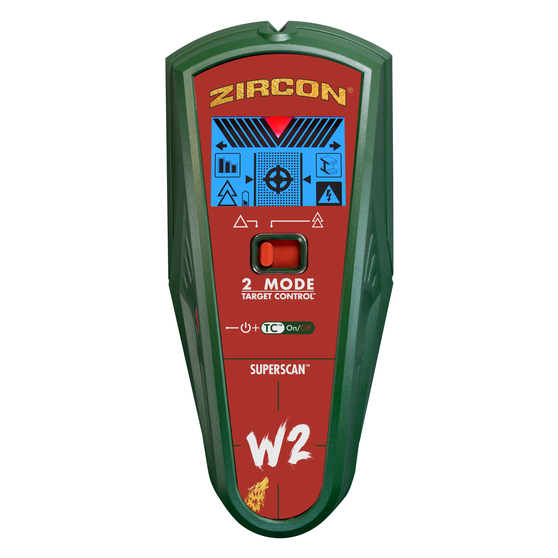
Your needs, this model
Does it fit your priorities?
Does the W2 provide both center and edge indications on drywall?
Yes. The W2-specific manual documents both cues in the wood-focused TC arrangement and in conventional StudScan through the stated 3/4-inch maximum; ordinary StudScan also includes metal framing, while TC filters metal. The separate deeper arrangement should not be treated as a reliable edge cue beyond that shallow range.
Explore this need in the finder →Does its 1-1/2-inch DeepScan number mean both edges are assured at that depth?
No. DeepScan is the source-backed deeper stud arrangement, but the W2 instructions specifically caution that edge indicators may not register through surfaces thicker than 3/4 inch. Compare the selected minimum with the chosen indication instead of treating the largest number as every-mode depth.
Explore this need in the finder →Can WireWarning tell me a drywall spot is safe to drill?
No. It is a limited added alert for some live, unshielded AC wiring, with the maker's depth figure up to 2 inches. Shielding, conduit, surface/build-up and other conditions may hide wiring; shut off services and check other wall information before penetrating a surface.
Explore this need in the finder →What the W2 changes, and what it does not
The SuperScan W2 is an electronic wall scanner, not a magnetic locator. Zircon's U.S. shop identifies this retail model as SKU 71684 and links instructions labelled for SuperScan W2, P/N 71683, revision A from December 2020. That bridge matters because the W2 shares the SuperScan name with several different tools. Its manual and page describe a screen-led, multi-arrangement scanner: wood-selective Target Control (TC), conventional StudScan for wood or metal framing, and a separate DeepScan setting. The extra settings are not interchangeable depth claims, and the W2 is not the K-series unit with a separate Metal Scan function.
This assessment is based on the model-specific maker page, W2 instructions and datasheet. It does not report hands-on scanning, ownership, detection measurements or tests of a sample. The manufacturer's maximum is a comparison ceiling; it cannot promise what a particular wall will reveal.
Three arrangements behind a two-position control
The W2 gives the same control position two different jobs depending on how its power button is used. In Target Control, the ColorTrip display is pale blue and the device is tuned to wood while suppressing metal and weak-signal false positives. The instructions describe center, edge and direction cues. For the typical drywall task, the maker recommends beginning in this mode: keep the tool flat, let it calibrate without moving, and then move slowly while holding the power control as directed.
Switch TC off and the conventional StudScan arrangement reads both wood and metal studs, also with center, edge and direction information. That can be useful where metal framing is plausible, but it changes what an indication means: metal in the wall may appear as a stud-like signal. The device has MetalliWarning and a signal-strength display, not an X-ray view of what the target is. A horizontal line of signals is only a candidate until repeated wall mapping and other construction clues support it.
DeepScan is the third arrangement. The W2 instructions and datasheet give it a stated stud-finding maximum of 1½ inches (38 mm), compared with ¾ inch (19 mm) for both TC and StudScan. That is a useful screening distinction, not a direct measurement of the wall or a guarantee of finding a stud at that distance. Importantly, the instructions caution that the device may not find edges on surfaces thicker than ¾ inch. So the deeper claim should not be read as “both center and edges at 1½ inches.” At greater depths, use the higher-sensitivity mode to look for a center candidate and seek independent confirmation.
WireWarning is one limited clue, not a clearance tool
The maker lists WireWarning for live, unshielded AC conductors up to 2 inches (50 mm) behind drywall. That is a supplemental warning with conditions, not a separate electrical test or promise that every wire will trigger it. Shielding, conduit, wire depth, moisture and wall construction can interfere. A missing alert cannot show that a drilling path is clear. The same caution applies to the manufacturer's Trust-but-Verify technique: mapping fasteners on a likely stud may help avoid some metal plates or screws, but it does not rule out plastic pipe, concealed wiring, plumbing or other hazards.
Surface choice also matters. The W2 manual explicitly says it is not designed for lath and plaster. It recommends scanning at several heights and comparing repeatable indications; the signal can change with moisture, texture, mineral content and material consistency. It also says the finder cannot scan studs or joists through carpet and padding. These limits are more useful than a generic claim that it works on “walls.” Follow the exact W2 procedure for fresh paint, wallpaper, textured surfaces and any changed operating conditions rather than assuming the drywall maximum carries over.
Battery, screen and ownership checks
The listed W2 configuration uses one 9V alkaline battery, sold separately on the maker's page. Zircon calls for a fresh cell with a long expiration window to power its LCD. The three arrangements produce distinct display cues: pale blue for TC, an unlit display in conventional StudScan, and green for DeepScan; the tool also has a Target Spotlight, a surface SpotLite pointer and audible cues. This information-rich display is a meaningful difference from Wood Stud SuperScan's simpler indicator interface, but it also makes a sound battery part of basic setup.
Before comparing any offer, check that the label and instructions identify SuperScan W2 SKU 71684 and P/N 71683 Rev A 12/20, then confirm whether a usable 9V cell is actually supplied. Verify condition, return terms and the exact tool in the package; this assessment does not verify seller inventory, bundle contents or a current price. For a shallow drywall scan with a wood-filtering mode, the W2's TC setting has a clear documented role. If the project instead requires both center and edge indications through a thicker finish, or dependable performance on plaster, this model's deeper number does not settle the issue. Read the manual, compare the operating plan with the wall, and corroborate the location before making a hole.
Key specifications
Key details at a glance
| Maximum stated stud depth | 1.5 in |
|---|---|
| Depth qualification | Target Control and conventional StudScan are stated up to 3/4 inch (19 mm); DeepScan is separately stated up to 1-1/2 inches (38 mm). In DeepScan the manual cautions that edge indications may not register through surfaces thicker than 3/4 inch, so the deeper matching plan is represented as a center cue. These are comparison ceilings, not predicted results for an individual wall. |
| Documented scan modes | ['Target Control TC', 'StudScan', 'DeepScan'] |
| Center and edge indication | Yes |
| Live-wire meter | Yes |
| Battery requirement | One 9V alkaline battery |
Use the exact model’s instructions for operating limits, supplied equipment and version differences.
Sources for this review
Sources for this assessment
- SuperScan W2 Advanced Stud Finder — exact Zircon U.S. shop listing, SKU 71684
- SuperScan W2 English instructions, P/N 71683 Rev A 12/20
- SuperScan W2 datasheet, linked from the exact Zircon shop page
- Zircon official-shop SuperScan collection, six listed tools
- Exact Zircon shop image for SuperScan W2 SKU 71684

Check this model against your wall
Use the finder to compare documented surface limits, center/edge indications and other requirements. A match is not a safety certification.