
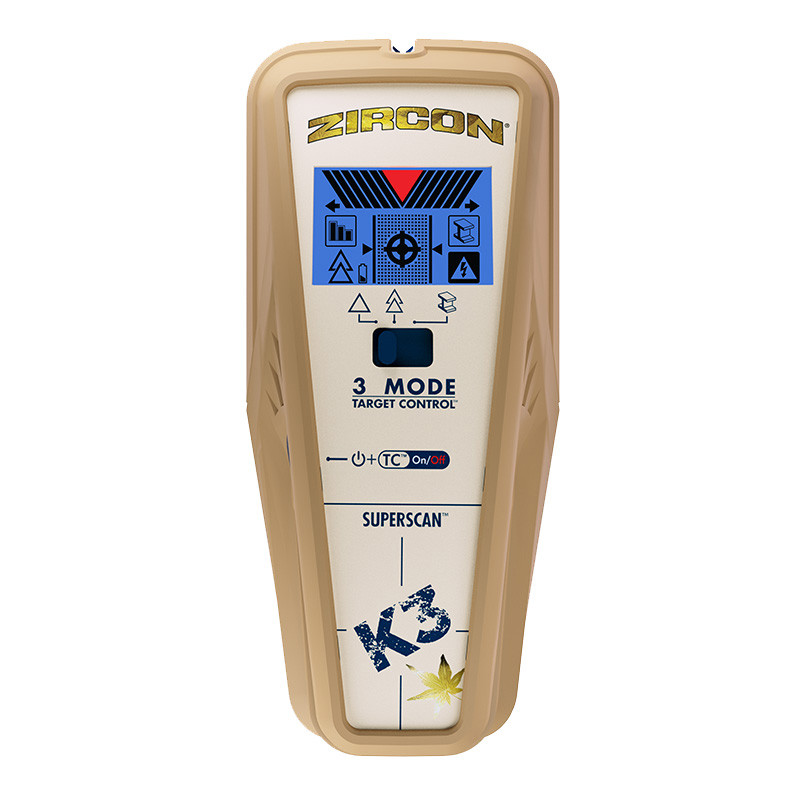
Your needs, this model
Does it fit your priorities?
What does K3 add beyond the K2?
The K3 adds a separate Metal Scan for locating ferrous and non-ferrous metal; those distances do not extend its stud-depth limit. Its TC, StudScan and DeepScan roles remain distinct from that metal-target mode.
Explore this need in the finder →Does K3 offer a direct stud plan for lath and plaster?
No. The instructions say irregular plaster thickness makes stud location difficult in either stud mode. Metal Scan can locate wood-lath nail heads as another clue, but it is not a depth-rated stud arrangement through plaster.
Explore this need in the finder →What does DeepScan show, and what does WireWarning not prove?
DeepScan is the separate 1-1/2-inch stud ceiling; WireWarning is a limited alert for some live, unshielded AC wires. The manual cautions that deep edge cues can be absent on thicker surfaces, and neither a scan nor a warning certifies a safe drilling location.
Explore this need in the finder →The Zircon SuperScan K3 is identified in the official U.S. shop as SKU 71220 and links to model-specific English instructions P/N 71217, Revision A, September 2020. Its stud-finding arrangements resemble the K2's, but the K3 adds a separate Metal Scan mode. This assessment compares documented functions and limits; it is not a hands-on test and reports no field result.
The stud modes remain distinct from Metal Scan
Target Control is tuned for wood studs and filters metal. Zircon gives that mode center, edge and direction indications to a stated three-quarter inch on standard single-layer drywall. Conventional StudScan includes wood and metal studs to the same stated depth, without the same metal filtering. A metal object can resemble a stud in the ordinary scan, so the user has to decide whether filtering or including metal framing fits the wall before scanning.
DeepScan is the third stud arrangement, with a separate one-and-a-half-inch stated maximum. The instructions caution that edge indications may not appear through surfaces thicker than three-quarter inch, even when the deeper mode is selected. The K3's fourth arrangement—Metal Scan—is for metal targets, not studs. The manual gives up to three inches for ferrous metal and one-and-a-half inches for non-ferrous metal. Those target-specific numbers do not extend stud range or identify framing on their own.
Its clearest difference from K2 is another target workflow
Both K2 and K3 provide wood-focused Target Control, conventional StudScan, DeepScan, WireWarning and center/edge-style stud indications. The K3's added value is that a user can narrow the location of metal separately; this can help investigate a suspected metal object or look for ferrous fasteners. That function can be useful as another clue, but it is not a stud-sensing upgrade and does not convert a target indication into an explanation of what is behind the wall.
The three-position selector and button sequence are worth checking against the K3 manual: Target Control and StudScan share a position, while DeepScan and Metal Scan are separate settings. ColorTrip display cues differ by arrangement. A listing that says “SuperScan” without a model suffix is not enough to establish that a K2, K3 or another family tool is included.
Use the surface and calibration limits, not the headline depth
The manual calls for a fresh 9V alkaline battery; the official product page says the battery is not included. Hold the finder flat and motionless during calibration, then move slowly and mark repeatable results at several heights. Mapping the wall and comparing with other available construction information can help test a hypothesis. The manufacturer's “Trust but Verify” fastener technique is an additional clue under the manual's assumptions, not proof that an area is safe to drill.
K3 is not a straightforward plaster recommendation. Its instructions say irregular plaster thickness makes stud location difficult in either stud-scan mode. Metal Scan may locate nail heads in wood lath, but that is an indirect fastener clue rather than a documented lath-and-plaster stud-depth arrangement. The instructions also exclude stud scanning through carpet and padding and describe cautions for wallpaper, fresh paint, highly textured surfaces, and other conditions. Neither the general description nor the metal-target limits establish support for tile, exterior materials or metal mesh as a stud-finding surface.
Where the K3's extra mode helps—and where it cannot
The K3 is a documented drywall choice when the user wants both wood-selective and conventional stud scanning, a separate deeper stud arrangement, and a separate metal-target scan in one device. The deeper mode is not a guaranteed reading through the actual wall, and the edge caveat is especially relevant when considering a thick finish. If a task requires only wood or metal studs, the K2 and K3 share those three broad stud arrangements; the K3 difference is its additional Metal Scan, not a larger published stud ceiling.
WireWarning is another limited cue. It is intended to alert to some live, unshielded AC wiring; shielding, conduit, depth, moisture and wall construction can prevent a signal. Its presence or absence cannot certify a safe drilling location. Confirm the exact K3 SKU 71220, matching P/N 71217 instructions and package contents before buying, and use independent service information and proper precautions before penetrating any wall.
Key specifications
Key details at a glance
| Maximum stated stud depth | 1.5 in |
|---|---|
| Depth qualification | Target Control and conventional StudScan are each stated to 3/4 inch (19 mm); DeepScan is a separate stud mode stated up to 1-1/2 inches (38 mm), with a caution that edges may not register through surfaces thicker than 3/4 inch. Metal Scan is a separate target mode: up to 3 inches for ferrous and 1-1/2 inches for non-ferrous metals, not stud depth. |
| Documented scan modes | ['Target Control TC', 'StudScan', 'DeepScan', 'Metal Scan'] |
| Center and edge indication | Yes |
| Live-wire meter | Yes |
| Battery requirement | One 9V alkaline battery |
Use the exact model’s instructions for operating limits, supplied equipment and version differences.
Sources for this review
Sources for this assessment
Check this model against your wall
Use the finder to compare documented surface limits, center/edge indications and other requirements. A match is not a safety certification.