
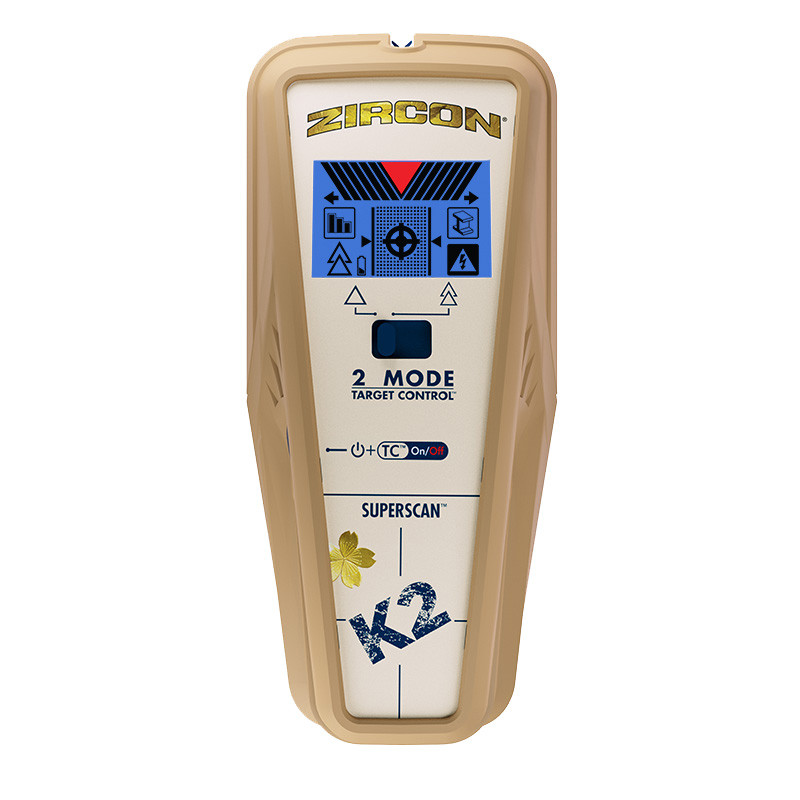
Your needs, this model
Does it fit your priorities?
Does Target Control find metal studs?
No. Target Control is wood-focused and filters metal; use conventional StudScan to include metal framing. Both of those arrangements are stated to 3/4 inch, while DeepScan is a distinct deeper stud mode.
Explore this need in the finder →What does DeepScan add on the K2?
It raises the maker-stated stud ceiling from 3/4 inch in Target Control/StudScan to 1-1/2 inches. The instructions caution that edge cues may not show through surfaces thicker than 3/4 inch; the figure is not a wall-specific promise.
Explore this need in the finder →Does WireWarning certify that a point is safe to drill?
No. It is a limited alert for some live, unshielded AC wiring. Shielding, conduit, depth, moisture and surface conditions can suppress a response, and the manufacturer advises using other wall information before penetrating a surface.
Explore this need in the finder →The Zircon SuperScan K2 is a three-arrangement electronic wall scanner identified by the official U.S. shop as SKU 71212. Its linked English instructions are P/N 71209, Revision A, September 2020. This review follows the model-specific product page and instructions; it is not a hands-on test, and no claim is made about a particular wall reading.
Target Control and StudScan solve different framing questions
Target Control is the K2's wood-focused arrangement. Zircon says it filters metallic targets and reports wood-stud edges, center and direction through standard single-layer drywall up to a stated three-quarter inch. That filter can be useful when the task is to distinguish a likely wood stud from nearby metal fasteners or hardware, but it is not a metal-stud detector and it cannot identify every nonmetallic object behind a wall.
Conventional StudScan is the alternative when both wood and metal studs must be included. It has the same stated three-quarter-inch ceiling and the same kind of center/edge cues, but it does not use Target Control's wood-selective filter. A metal object can therefore look like a stud in that mode. The two arrangements share a selector position and the manual uses a separate button sequence to move between them; the display's backlight also distinguishes the wood-focused setting from ordinary StudScan. A buyer should not treat the words “two mode” on the casing as two equivalent stud scans.
DeepScan is a separate depth ceiling, not a promise
K2's DeepScan arrangement raises the manufacturer's stated stud limit to one and a half inches. That is the useful difference for a thicker wall or a target beyond the two shallower modes' published limit. It is still an “up to” figure, not a measured result on an installed wall. Zircon specifically cautions that edges may not register through surfaces thicker than three-quarter inch. A deep center response should not be interpreted as proof that the entire edge pattern remains visible at that depth.
The three-quarter-inch and one-and-a-half-inch figures are for stud scanning in their named arrangements. The separate WireWarning cue concerns some live, unshielded AC wiring, not additional stud depth. K2 does not have the independent Metal Scan found on the K3, and no K2 metal-target distance should be inferred from that sibling.
Calibration and repeated passes are part of the comparison
The instructions call for a fresh 9V alkaline battery, which the official shop page says is not included. Begin flat against a suitable wall surface and keep the tool still while it calibrates; the K2's manual warns against touching or moving the face during that stage. Then move slowly, mark the changes, and repeat the scan at several heights. A consistent vertical pattern can support a stud hypothesis, while the manufacturer's fastener-mapping technique is only an extra clue under its stated assumptions. None of these steps turns a consumer scanner into an object-identification device.
Surface fit is narrow. The K2 manual says it is not designed for lath and plaster and says it will not scan studs through carpet or padding. It gives additional cautions for metallic or damp wallpaper, fresh paint, uneven texture, and other wall assemblies. Those limits matter more than a single maximum number. The product page describes ordinary drywall use; it does not establish the broad tile, exterior or metal-mesh requirement in this site's finder.
What the K2 is—and is not—a fit for
The K2 is a reasonable documented candidate for dry interior drywall when the user wants a wood-filtering mode, a conventional wood/metal stud alternative and a separate deeper scan. Its ColorTrip display, center/edge indications, SpotLite pointer, and audible response are information channels, not independent proof that a target is a stud. For metal framing or a deeper target, select the documented arrangement deliberately and interpret the limitation that goes with it.
WireWarning is an added caution, not a safety clearance. The instructions list situations in which the scanner may not alert, including shielded or conduit-enclosed wiring, greater depth, moisture and certain dense or metallic surfaces. The manufacturer advises using other information before penetrating a surface and shutting off services before work. Check that an offer is actually SKU 71212 with K2 instructions and the needed 9V battery; a similar-looking K-series name is not a substitute for verifying the exact model and manual.
Key specifications
Key details at a glance
| Maximum stated stud depth | 1.5 in |
|---|---|
| Depth qualification | Target Control and conventional StudScan are each stated to 3/4 inch (19 mm); DeepScan is a separate stud mode stated up to 1-1/2 inches (38 mm). The instructions caution that edges may not register through surfaces thicker than 3/4 inch. No K2 Metal Scan target depth is claimed. |
| Documented scan modes | ['Target Control TC', 'StudScan', 'DeepScan'] |
| Center and edge indication | Yes |
| Live-wire meter | Yes |
| Battery requirement | One 9V alkaline battery |
Use the exact model’s instructions for operating limits, supplied equipment and version differences.
Sources for this review
Sources for this assessment
Check this model against your wall
Use the finder to compare documented surface limits, center/edge indications and other requirements. A match is not a safety certification.