
Your needs, this model
Does it fit your priorities?
Does Pro35 indicate both edges and a live-wire warning?
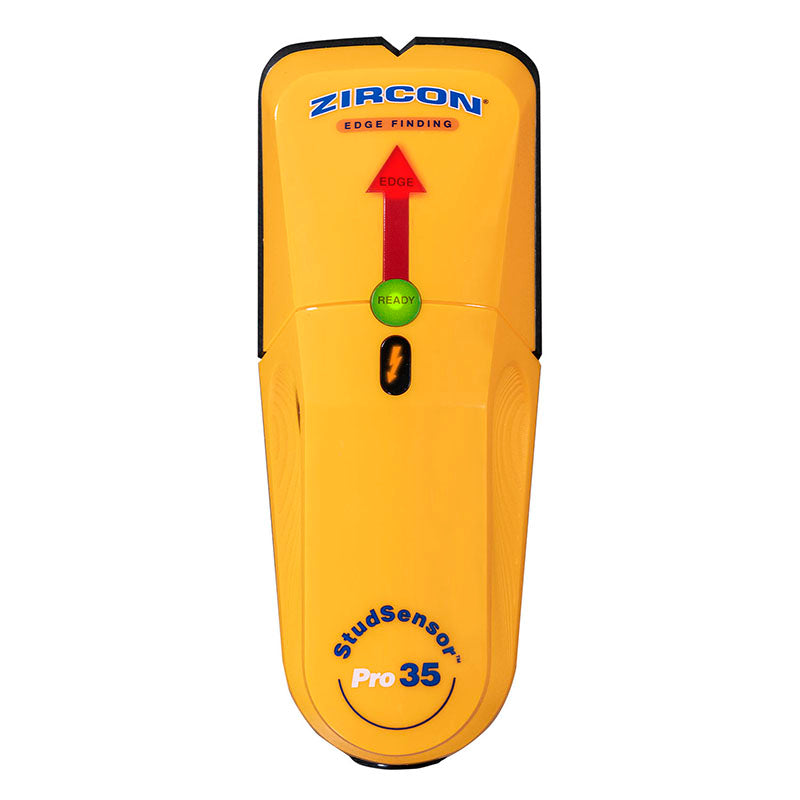
Its exact page and manual show the EDGE cue for stud boundaries and a separate WireWarning indicator for live, unshielded AC. The two signals serve different purposes; neither identifies every hidden object.
Explore this need in the finder →How deep is the Pro35's stud mode?
StudScan is stated up to 3/4 inch (19 mm). The manual's separate WireWarning depth is not a stud-detection depth and must not be used as one.
Explore this need in the finder →Does the WireWarning prove there are no wires if it stays dark?
No. The instructions warn that live wiring may be missed when deeper than about 2 inches, shielded or in conduit, behind barriers, or where moisture interferes. The maker says to treat a negative reading cautiously and independently verify services.
Explore this need in the finder →The Zircon StudSensor Pro35 is an edge-finding electronic stud tool with a second, separate warning function. Its exact U.S. product page and linked instructions describe StudScan for wood or metal stud edges up to 3/4 inch (19 mm), along with WireWarning for live, unshielded AC. The two cues answer different questions: EDGE marks a boundary; WireWarning signals a possible electrical condition. Neither identifies every object behind a wall, and neither makes a drilling location safe. This is a source-based assessment, not a report of personal use or measured performance.
Edge finding, not center finding
During StudScan, the READY light indicates calibration completion, then the EDGE arrow, SpotLite pointer and audible signal identify a detected edge. Mark one side, keep scanning until the signal clears, reverse direction and mark the other side. Their midpoint can help estimate the framing center, but the Pro35 does not show a dedicated center reading. This distinction matters when comparing it with center-capable options: a two-mark calculation is a user step, not a feature that the display supplies.
Its StudScan maximum remains 3/4 inch. The page’s unrelated specification block also includes a rebar/copper-pipe target and a six-inch figure; those lines conflict with the page’s own clearly labelled stud feature and the directly linked Pro35 operating instructions. I have not treated that material-scanner data as a Pro35 stud depth, and it must not be confused with the manual’s separate WireWarning depth. A wall-specific result is not guaranteed even within the stated StudScan range.
WireWarning is an added cue with blind spots
The product page says WireWarning indicates live, unshielded AC wiring up to two inches deep in a typical wall. The instructions explain that wiring may be missed if it is deeper than the limit, shielded, inside conduit, behind a plywood or metallic barrier, or where moisture affects the surface or surroundings. Wires may also not be live at the time of scanning. That makes the alert useful as a reason to stop and investigate, not proof that a wall is clear when the indicator stays dark.
Keep the two readings conceptually separate: an edge indication does not locate wiring, and WireWarning does not confirm that a stud is present. Follow the manual and standard precautions, inspect likely utility paths, consult construction information where available, and shut down and independently verify electrical, gas and water services before penetrating the surface. For critical work or uncertain construction, use an appropriate verification method or qualified help.
Operation and wall conditions
To calibrate, hold the Pro35 flat against the wall and keep it still while pressing the power button. The instructions say not to touch the scanned surface during calibration or scanning. Move slowly with the button held, maintain full contact with the pads and repeat the scan at another height. If a scan begins directly over a stud or another dense area, the tool can beep repeatedly; move away and restart rather than interpreting that response as a clean edge.
The manual is direct about surface limits: interior use only, no recommendation for lath and plaster, and no use with tile, rock, carpet/padding, metallic wallpaper, damp newly painted walls, foil-covered insulation, glass or other dense material, or bathtub/shower inserts. It describes some narrower handling conditions for dry wallpaper/fabric and uneven texture, but those conditions should not be stretched to cover the broad category of metal-mesh, exterior or tiled work. Moisture, minerals, texture and wall consistency affect both depth and accuracy.
The page says the required 9V alkaline battery is not included. Use the exact package information when planning a purchase. A battery is an operating requirement, not an optional accessory, and seller bundles should not be inferred from a photograph of the tool.
How it differs from neighboring Pro models
Pro25 has the same single 3/4-inch edge-finding StudScan role but does not document WireWarning in its product features or model comparison. Pro35 adds the warning without adding a deeper stud mode or center indicator. Pro45 adds a second edge-finding mode, DeepScan, with a stated 1 1/2-inch ceiling; it also documents WireWarning. That makes the Pro35 a middle configuration by capability, not an asserted performance ranking.
If the task is simply to mark two boundaries on dry, ordinary drywall, Pro25 and Pro35 share the same headline stud depth. If a live-wire warning is a required feature, Pro35’s documented alert is relevant, but its warnings are conditional and incomplete. If the requested threshold exceeds 3/4 inch, Pro35 does not meet it; compare the Pro45 or another model with a supported plan rather than borrowing the higher number from the product family.
Buying checks and evidence boundary
Confirm the name “StudSensor Pro35” and SKU 73847, not the neighboring Pro25 or Pro45. Verify that the included manual corresponds to Pro35; the current page links a PDF with that filename and the sheet identifies the model. Check the exact package for its required 9V battery, since the manufacturer says that cell is not included. Review the seller’s return and package terms directly. No test result, price, stock status, customer experience or bundle content is claimed here.
The Pro35’s useful distinction is its separate WireWarning cue in a compact one-mode edge finder. Its main limits are its shallow 3/4-inch StudScan ceiling, the absence of a center display, incomplete electrical detection and a firm plaster restriction. Use the tool as one part of a careful mapping process rather than as an object identifier or safety instrument.
Key specifications
Key details at a glance
| Maximum stated stud depth | 0.75 in |
|---|---|
| Depth qualification | The Pro35 page and linked instructions identify one StudScan mode up to 3/4 inch (19 mm); the separate WireWarning depth is not stud depth. |
| Documented scan modes | ['StudScan'] |
| Center and edge indication | No |
| Live-wire meter | Yes |
| Battery requirement | One new 9V alkaline battery is required. |
Use the exact model’s instructions for operating limits, supplied equipment and version differences.
Sources for this review
Sources for this assessment
Check this model against your wall
Use the finder to compare documented surface limits, center/edge indications and other requirements. A match is not a safety certification.