
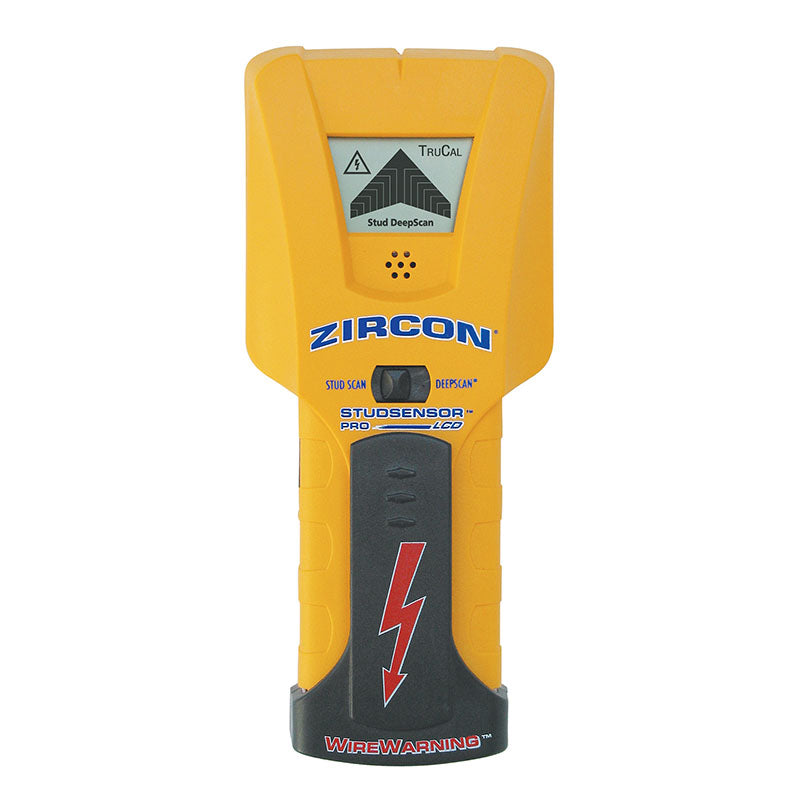
Your needs, this model
Does it fit your priorities?
Does the Pro LCD directly show a stud center?
No direct center cue is documented. It reports the edges; mark the two sides by scanning in opposite directions and estimate the midpoint yourself.
Explore this need in the finder →What does the Pro LCD's 1-1/2-inch claim refer to?
It belongs to DeepScan, a separate edge-finding mode. Stud Scan is specified to 3/4 inch; neither figure guarantees a reading through every wall.
Explore this need in the finder →Is WireWarning proof a wall is safe to drill?
No. It is a limited live-wire cue that can miss deeper, shielded or conduit-encased wiring. Use other information and safe utility procedures before penetrating a surface.
Explore this need in the finder →The StudSensor Pro LCD is an edge-finding model, not a center-indicating version of the i65 OneStep or the more recent Pro SL family. Zircon’s current U.S. collection identifies this exact name as SKU 75138. Its page and data sheet describe two separate stud modes: Stud Scan for wood or metal edges through a stated 3/4 inch, and DeepScan for edges through a stated 1-1/2 inches. The display, SpotLite beam and tone help locate an edge; they do not identify the object behind the wall.
Two edge ranges, not a center display
In Stud Scan, the manufacturer states a maximum of 3/4 inch (19 mm). The distinct DeepScan selection is described as doubling that figure to 1-1/2 inches (38 mm). Zircon’s published typical-position claims are tied to the dual-scan-and-mark procedure, not an independent measurement. A 1-1/2-inch printed ceiling is not a promise that the device will find a member through any particular plaster, finish, patch or cavity.
The Pro LCD signals an approaching and reached edge. To estimate a centerline, mark one edge, keep moving past it, reverse direction and mark the other edge; the midpoint is a calculation made by the user. That distinction matters when fastening a narrow bracket: this model does not give the direct center cue described for the i65 in its ordinary Stud Scan routine. For a more dependable layout, repeat the edge pattern at the intended fastener height and another point above or below it.
Use calibration and scanning as a single routine
The instructions call for a 9V alkaline battery, which the product page says is not included. Select the mode that fits the documented wall condition, place the tool flat against a dry interior surface, wait for its calibration cue, and then move slowly while holding the power button. The manual says to keep the tool upright and parallel to the stud. When the edge cue appears, mark it; continue until the response recedes, then reverse the pass for the opposite edge. Starting over a stud or on an unusually dense area can upset calibration, so move to a different spot and begin again rather than treating a continuous display as a valid reading.
A detector responds to changes, not to a named material hidden inside the wall. A pipe, wire, patch or uneven surface can produce a confusing pattern. Compare marks at different heights and consider visible outlets, switches and likely service routes. A repeated indication supports a hypothesis; it does not prove that the target is a wood stud or that the location is safe to penetrate.
WireWarning is an extra clue, not clearance
The Pro LCD’s WireWarning function is described as operating in both stud modes and alerting to live, unshielded AC wiring. Zircon gives a typical-wall reach up to 2 inches, while the instructions warn that wiring deeper than that, inside conduit, behind a plywood shear wall or behind metal wall coverings may not be detected. Moisture can also interfere. A false-negative reading therefore cannot establish that a wall is clear, and the warning can spread beyond the actual conductor. Turn off relevant power and use independent information before drilling or fastening near electrical work.
Do not confuse this feature with a dedicated AC Scan mode or a more general wiring locator. The Pro LCD lists a limited WireWarning cue; the separate Pro SL-AC is a different model and is not evidence about this one. Missing or present warning lights are not a safety certification.
Respect the wall restrictions
The instructions specify dry interior walls and say the Pro LCD is not designed for lath and plaster. They also list ceramic tile, carpeting and padding, metallic-fiber wallpaper, foil-covered insulation board, glass and other dense material as unsuitable. Uniform textured ceilings and some sheet materials receive conditional instructions, but those allowances do not turn the model into a universal wall scanner. If the wall is damp, recently painted, unusually dense or made of a construction Zircon does not describe, do not extrapolate from the maximum depth.
Compare it with the cue you actually need
The i65 OneStep is the more relevant comparison when direct center indication matters: its manual shows edge and center cues in ordinary Stud Scan, but its deeper procedure describes the center rather than a deep edge cue. The Pro LCD instead retains edge finding in its listed DeepScan plan and lacks a direct center display. The Pro SL also reports edges and has a deeper mode, but its reviewed sources do not document WireWarning; it should not inherit the Pro LCD’s meter. These names are close enough that the full model label matters.
Check the exact package before choosing
Confirm the offer says StudSensor Pro LCD, SKU 75138, not Pro SL, Pro SL-AC or i65. The exact manufacturer page specifies one 9V alkaline cell and says it is not supplied; check the seller’s package rather than assuming otherwise. Compare your actual wall with the separate Stud Scan and DeepScan limits, and decide whether edge marks are sufficient for your layout. This assessment is based on Zircon’s product page, instructions and data sheet; it does not report ownership, hands-on use, testing or measured performance.
Key specifications
Key details at a glance
| Maximum stated stud depth | 1.5 in |
|---|---|
| Depth qualification | The exact page and data sheet assign edges of wood or metal studs to Stud Scan through 3/4 inch and a separate DeepScan edge plan through 1-1/2 inches. These are manufacturer maxima, not guarantees for every wall. |
| Documented scan modes | ['Stud Scan', 'DeepScan'] |
| Center and edge indication | No |
| Live-wire meter | Yes |
| Battery requirement | One 9V alkaline battery |
Use the exact model’s instructions for operating limits, supplied equipment and version differences.
Sources for this review
Sources for this assessment
Check this model against your wall
Use the finder to compare documented surface limits, center/edge indications and other requirements. A match is not a safety certification.