
Your needs, this model
Does it fit your priorities?
Does L70 show a center and both edges?
In ordinary StudScan, the manual describes both edge indications and a center indication, with direction cues. That arrangement is stated to 3/4 inch. The deeper plan changes the indications, so the dual-cue promise should not be extended to DeepScan.
Explore this need in the finder →Does L70 keep the same display in DeepScan?
No. The separate 1-1/2-inch DeepScan procedure is center-oriented: the manual describes signal/target bars and a center indication, not the shallow mode’s pair of edge cues. The two-mode difference matters when an edge signal is required at depth.
Explore this need in the finder →What do ACT and WireWarning establish?
ACT may recalibrate during scanning, while WireWarning alerts to live, unshielded AC voltage within the maker’s stated limit. Neither identifies every object nor proves a wall free of wiring. The tool still needs a flat, stationary calibration start and cautious repeatable passes.
Explore this need in the finder →The Zircon StudSensor L70 OneStep gives both edge and center indications in its ordinary StudScan arrangement, then uses a different display pattern when DeepScan is selected. The exact U.S. page identifies SKU 74947 and links instructions whose cover names the L70 OneStep and whose footer reads P/N 66529, Rev B, October 2014. That exact manual is important: the page's 1-1/2-inch DeepScan maximum should not be read as a promise of the shallow center-and-edge pattern at that depth. This is a document-based review, not an account of using the tool.
StudScan gives the L70 its direct center-and-edge appeal
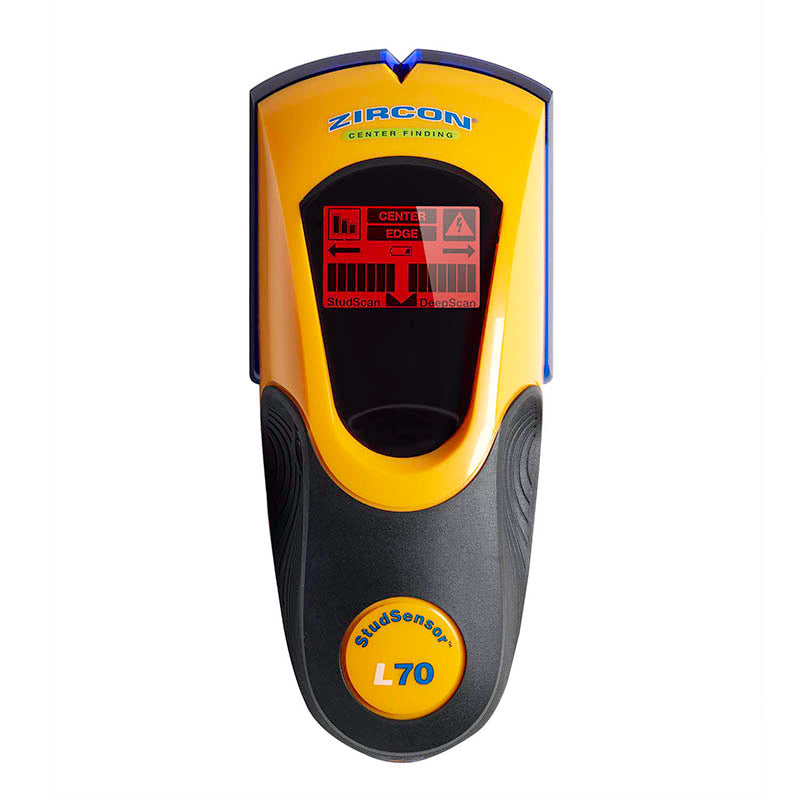
In ordinary StudScan, the product page states center, edges, and direction for wood or metal studs up to 3/4 inch (19 mm). As the scanner moves slowly across the wall, the EDGE indication marks a boundary; the CENTER indication, SpotLite pointer and buzzer identify the center response. This gives the L70 a useful advantage over the L20, L30, L40 and L50 when the job benefits from an on-tool center cue rather than a midpoint estimated from two edge marks.
The front LCD also shows signal-strength bars, a low-battery indicator, mode icons, WireWarning and Auto Correcting Technology status. The maker says ACT can silently recalibrate when needed and gives a directional arrow if the tool was calibrated near or over a stud and then moved away. These cues help interpret the instrument's process; they do not identify the hidden object with certainty. Pipes, wires and other dense materials can cause signals that resemble studs.
DeepScan is center-oriented, not the same two-cue plan
The L70 page states that DeepScan doubles scanning depth to 1-1/2 inches (38 mm). The linked manual describes a deeper target with a narrower pattern: when the center is located, only two signal-strength bars and selected target bars illuminate, with the SpotLite pointer and buzzer. It does not document the ordinary complete edge-and-center sequence at that deeper limit. For matching and comparison, the deeper L70 arrangement is therefore treated as a center indication, not paired edge finding.
That distinction separates the L70 from the edge-only L40 and L50. Their own manuals describe DeepScan edges to 1-1/2 inches, while the L70 offers direct center plus edges at the shallower 3/4-inch plan and a center-oriented deeper plan. If your task requires both edge marks at a 1-1/2-inch threshold, compare the L40 or L50. If direct center guidance at ordinary depth is the priority, the L70 is the more relevant L-series configuration.
WireWarning helps, but never clears a wall
WireWarning works continuously and the product page gives a typical maximum of 2 inches (50 mm) for live AC wiring. The instructions warn that deeper wiring, conduit, metallic coverings, plywood shear walls, or moisture may prevent detection. When AC is detected, the display alerts; when it is not, the wall may still contain wiring. The maker explicitly warns not to assume that no live wire is present.
Do not use the L70 as the only basis for drilling. Check construction plans and visible service entry points, turn off power near electrical wires, and use appropriate independent checks. A stud indication and a WireWarning response answer different questions. The display cannot confirm the identity of a target or guarantee a safe penetration point.
Use only on a compatible surface and follow calibration
The manual does not recommend the L70 on lath and plaster because irregular plaster thickness interferes with scanning. In StudScan it cannot pass through dense materials such as glass, ceramic tile or foil, and it cannot find wood studs through concrete, carpet, or padding. Fresh paint and damp wall material can also interfere; dry nonmetallic wallpaper may work. A thin cardboard layer can help on an uneven surface when scanned in DeepScan, but that special procedure does not establish general tile, exterior, or metal-mesh support.
Install a new 9V battery, place the scanner flat and motionless against the surface, press power and wait for the beep before moving. The manual says calibration takes about one to two seconds. Hold the tool parallel to the studs, move slowly, and repeat the pattern at another height if it is uncertain. When entering DeepScan, the instructions describe releasing and pressing the button again while the tool remains on the wall; the mode icon changes. Follow that sequence rather than assuming that a deeper result came from StudScan.
Who should compare it with another L-series tool?
The L70 is a source-supported candidate when a buyer wants direct center and edge cues, an LCD, and a limited live-AC alert on a compatible interior wall. Its tradeoff is mode-specific: the deeper 1-1/2-inch arrangement is not credited with the same full cue set as shallow StudScan. The L50 also has an LCD and a deeper edge-finding plan; the L70 adds shallow center/direction cues, but the L50's deeper mode retains the documented edge output. Compare the exact SKU, manual, wall, and needed cue before choosing between them.
The official image shows the exact L70 OneStep housing and display. It is not a test photograph and does not establish accuracy or retail package contents.
Key specifications
Key details at a glance
| Maximum stated stud depth | 1.5 in |
|---|---|
| Depth qualification | The 1-1/2-inch figure belongs only to the named DeepScan plan; the shallow StudScan plan remains limited to 3/4 inch. It is a manufacturer ceiling, not a guaranteed reading through a specific wall. |
| Documented scan modes | ['StudScan', 'DeepScan'] |
| Center and edge indication | Yes |
| Live-wire meter | Yes |
| Battery requirement | One 9V battery |
Use the exact model’s instructions for operating limits, supplied equipment and version differences.
Sources for this review
Sources for this assessment

Check this model against your wall
Use the finder to compare documented surface limits, center/edge indications and other requirements. A match is not a safety certification.