
Your needs, this model
Does it fit your priorities?
What does the L50 LCD add?
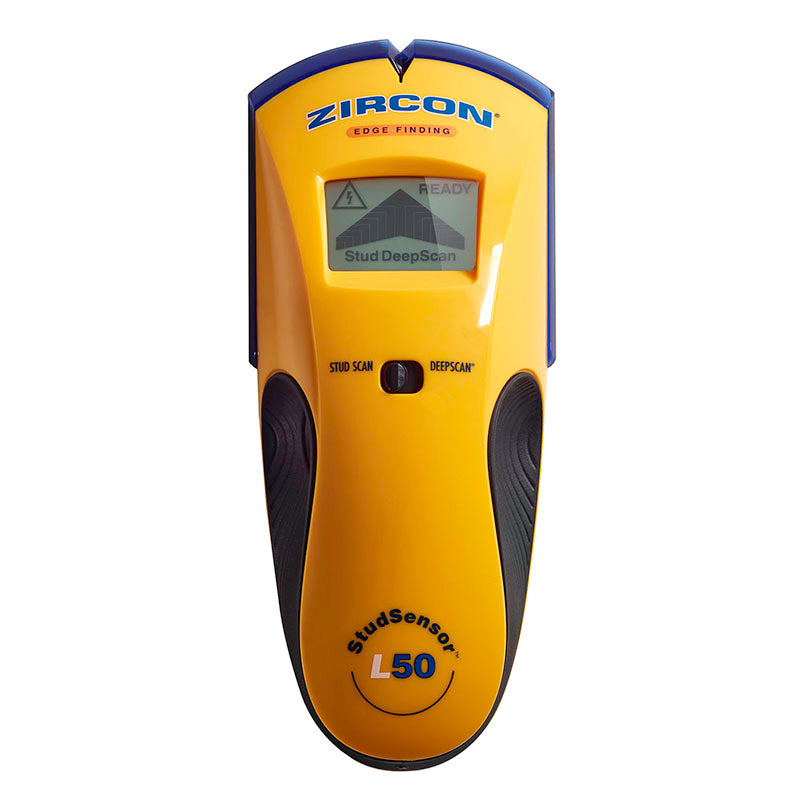
The L50 has an LCD that reports its scan mode and approaching/located edge status. It remains an edge-finding tool; the screen does not make its 1-1/2-inch DeepScan plan a direct center finder.
Explore this need in the finder →Which L50 mode reaches 1-1/2 inches?
The exact manual separates shallow StudScan (up to 3/4 inch) from DeepScan (up to 1-1/2 inches), and both arrangements locate edges. Start in StudScan and use DeepScan only as directed; a maximum is not a reading guarantee.
Explore this need in the finder →Is the WireWarning display a wiring clearance?
No. It is a limited indicator for live, unshielded AC voltage during either stud mode. Shielding, depth and construction can defeat detection, so use additional wiring information and never treat a silent meter as permission to drill.
Explore this need in the finder →The Zircon StudSensor L50 pairs an LCD display with separate shallow and deeper edge-finding modes. The exact U.S. product page identifies SKU 74941; its directly linked instructions name StudSensor L50 and P/N 72375, Rev A, September 2021. This is not the L40 under a new label: the documented stud depth arrangements are similar, but the L50 presents its signals on an LCD and must still be read as an edge finder. No hands-on use or measurement is claimed.
Read the shallow and deep modes separately
StudScan locates wood or metal stud edges to a stated 3/4 inch (19 mm). DeepScan is a distinct arrangement, with the maker-stated edge-finding maximum of 1-1/2 inches (38 mm). The manual tells users to use StudScan first and move to DeepScan when a thicker or denser wall makes the shallow scan difficult. That is a model-specific workflow, not permission to treat the deeper ceiling as guaranteed on every wall.
Neither mode documents a center cue. The L50 uses the top EDGE indicator to mark a boundary; its two-pass procedure locates both sides, and the center is the midpoint between the marks. The LCD changes how the signal is displayed, not the underlying fact that the L50 reports edges. If you need a direct center line at ordinary depth, compare the L70's StudScan; if you need a center cue at depth, examine its distinct plan rather than transferring the L50's edge behavior.
The LCD is a real distinction, not a range upgrade
The L50's display provides a readable mode and target indication, alongside READY, EDGE, and WireWarning cues. That may be easier to interpret than a small group of lights, especially when choosing between StudScan and DeepScan, but it does not prove that the hidden material is a stud. Zircon cautions that nearby pipes, wiring, or other objects can produce a similar signal. Repeat the scan at another height and follow the exact mode instructions before marking.
For comparison, the L40's official page and image describe an edge finder with a mode selector and WireWarning but no L50-style LCD. Both have the same stated 3/4-inch StudScan and 1-1/2-inch DeepScan limits in their own documents. The L30 has WireWarning but no deeper stud mode. These are configuration differences, not reasons to assume a different tool will fit your hand or show the same cues.
WireWarning is helpful only within its limits
The L50 manual says WireWarning works continuously in both stud modes for live, unshielded AC. The page states a typical reach of up to 2 inches (50 mm). The instructions warn that wiring deeper than 2 inches, shielded, in conduit, behind metallic coverings, or behind plywood shear walls may be missed; moisture and other surface conditions can also interfere. A flashing AC indicator is a reason to stop and investigate, not a complete utility map. A quiet display is not proof that a wall contains no live wire.
Keep the electrical cue separate from the stud decision. Zircon cautions against relying exclusively on the detector before penetrating a surface and instructs users to shut off power when working near electrical wiring. Use building plans, visible service routes, and other independent safety checks. No combination of a deeper stud scan and WireWarning turns the L50 into a wall-clearance instrument.
Wall limits and repeatable setup
The exact manual does not recommend lath and plaster because thickness irregularities make scanning unsuitable. It also lists dense surfaces, foil-backed insulation, glass, tile, carpet or padding, damp new paint, and recently applied wallpaper among the limits or caution cases. Dry nonmetallic wallpaper may be scanned, and a thin cardboard layer can help on an uneven surface when using DeepScan, but those directions do not establish support for exterior walls or metal mesh.
For the documented routine, hold the tool flat, place it before pressing power, wait for calibration, and scan slowly without tilting or rotating. Use the selected mode's cue and repeat the pass at a separate height if the result is uncertain. The maximum depth is one factor; moisture, wall texture, material, and the presence of nearby objects can change the response.
Fit and purchase checks
The L50 is a plausible choice for a buyer who wants an LCD and live-wire warning together with a separately documented deeper edge scan. It is less compelling when the task needs direct center indication, and its 1-1/2-inch figure should not be mistaken for the shallow StudScan range. Confirm SKU 74941, check the seller's exact package and battery inclusion, and use the manual linked to that specific page. The reviewed sources do not establish seller-specific accessories or battery inclusion and make no price, stock, or customer-experience claim.
The exact manufacturer image shows the L50 LCD and mode switch. It is an identification image, not proof of a scan result.
Key specifications
Key details at a glance
| Maximum stated stud depth | 1.5 in |
|---|---|
| Depth qualification | The 1-1/2-inch figure belongs only to the named DeepScan plan; the shallow StudScan plan remains limited to 3/4 inch. It is a manufacturer ceiling, not a guaranteed reading through a specific wall. |
| Documented scan modes | ['StudScan', 'DeepScan'] |
| Center and edge indication | No |
| Live-wire meter | Yes |
| Battery requirement | One 9V alkaline battery |
Use the exact model’s instructions for operating limits, supplied equipment and version differences.
Sources for this review
Sources for this assessment

Check this model against your wall
Use the finder to compare documented surface limits, center/edge indications and other requirements. A match is not a safety certification.