
Your needs, this model
Does it fit your priorities?
How are the L40 modes different?
StudScan finds wood or metal stud edges up to 3/4 inch; DeepScan is a separate edge-finding arrangement stated up to 1-1/2 inches. Zircon recommends starting in StudScan because a deeper signal may be another object.
Explore this need in the finder →Does L40 show both edges and a center?
The exact L40 manual describes edge arrows and SpotLite in both stud modes, not a direct center indicator. To estimate a center, mark both boundaries on repeatable passes and measure their midpoint independently.
Explore this need in the finder →What does its WireWarning mean?
WireWarning operates continuously in StudScan and DeepScan and alerts to live, unshielded AC voltage within its stated limits. It is not a standalone AC scan or a safe-to-drill test; shielded, deep or otherwise difficult wiring may not be detected.
Explore this need in the finder →The Zircon StudSensor L40 has two edge-finding arrangements: shallow StudScan and a separate deeper DeepScan mode. Its exact U.S. product route identifies SKU 72190 and links instructions marked P/N 66308, Rev C, November 2018. Both the product page and manual describe an edge-finding tool; the deeper setting does not turn it into a center finder. The following analysis is based on those documents, not product use or testing.
Two edge ranges, not one enlarged promise
StudScan is stated for wood or metal stud edges to 3/4 inch (19 mm). DeepScan is stated to locate edges to 1-1/2 inches (38 mm). The manual tells the user to start in StudScan and switch modes when the wall is thick or the shallow arrangement has difficulty. That separation matters: the 1-1/2-inch figure belongs to DeepScan, not every L40 scan and not every wall surface. DeepScan can also respond to an object farther behind the wall that may or may not be a stud.
The L40 reports an EDGE light, SpotLite pointer, and tone at a boundary. Marking a center requires two edge marks and a midpoint estimate. Its model page calls it an edge-finding stud finder and does not document an on-screen center cue. A buyer needing direct center indication should compare the L70's ordinary StudScan, but should also note that the L70's own instructions describe a center-only deep response. If edge signals must remain available at the 1-1/2-inch ceiling, the L40 is more directly documented for that task than the L70.
WireWarning remains a separate, limited signal
WireWarning operates continuously in both L40 stud modes and indicates live, unshielded AC. Zircon's instructions warn that wiring more than 2 inches (50 mm) beneath the scanned surface may not be detected, and list conditions such as metal coverings, a plywood shear wall, conduit, and moisture as important limitations. The alert cannot certify that an area is free of wiring. A deeper stud scan and an electrical warning may be active together, but their ranges are separate claims and neither makes drilling safe.
For the stud task, first find the shallow edge pattern, then use DeepScan only when the instructions call for it. Keep the tool flat, wait for calibration, move slowly, and compare a possible stud at different heights. A consistent vertical pattern is more informative than a single response, because pipes and wires can make local density changes that resemble studs. Do not use a stud scan as a substitute for plans, utility checks, or turning off electrical power.
The L40's place beside the L30 and L50
All three models support edge finding, but their documented ranges differ. The L30 is a one-mode, 3/4-inch edge finder with WireWarning. The L40 adds a selector for StudScan and DeepScan, both of which locate edges according to its instructions. The L50 also has the separate 1-1/2-inch edge arrangement and adds an LCD display. Those distinctions are more useful than grouping them as interchangeable yellow Zircon tools.
The L40's visible READY, EDGE and WireWarning cues are comparatively direct. A display screen is not the feature that separates it from a basic model; depth mode and warning behavior do. If a digital readout is part of the decision, compare the L50's exact page. If a direct center-and-edge indication at shallow depth is important, the L70 has that ordinary StudScan arrangement, although its deep plan is center-oriented rather than a deeper both-edge mode.
Surface support is narrower than the mode names suggest
The maker says the L40 is not recommended for lath and plaster because uneven thickness interferes. The instructions also list dense surfaces such as ceramic tile, slate, granite, marble, and foil insulation, and say the tool cannot scan through carpet or padding. Dry, nonmetallic wallpaper may be possible; recently applied paint and moisture can still affect results. For uneven surfaces, Zircon describes a thin cardboard layer and DeepScan procedure, but that special workflow is not a blanket compatibility promise for tile, exterior walls, or metal mesh.
The published maximums are conditional on the scanned assembly and the correct mode. A 1-1/2-inch ceiling does not say how thick every wall is, which material lies behind it, or whether the detected response is a stud. If the finder gives an inconsistent or unexpected result, stop and confirm with independent information.
Check the exact model and power source
The linked manual specifies a new 9V alkaline battery; the current product listing identifies the L40 SKU separately from its instruction part number. The available sources do not establish battery inclusion in a particular seller package. Check the exact SKU and package contents rather than inferring them from a product photograph. This assessment makes no claim about current stock, offer-specific accessories, or measured performance.
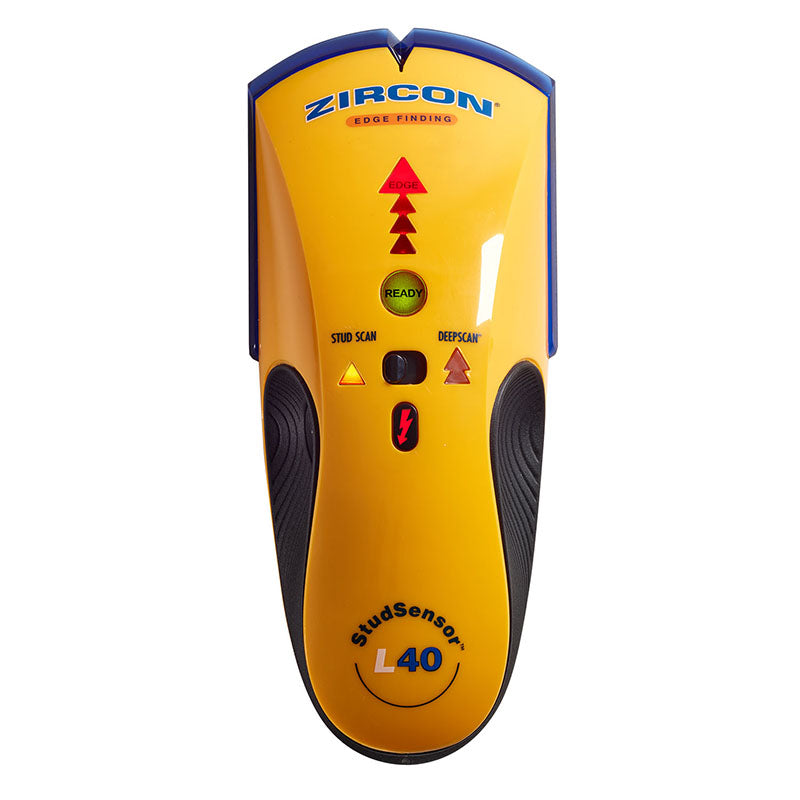
The official image shows the L40's mode selector and edge indicator. Those visible controls identify the product but are not evidence of a successful scan.
Key specifications
Key details at a glance
| Maximum stated stud depth | 1.5 in |
|---|---|
| Depth qualification | The 1-1/2-inch figure belongs only to the named DeepScan plan; the shallow StudScan plan remains limited to 3/4 inch. It is a manufacturer ceiling, not a guaranteed reading through a specific wall. |
| Documented scan modes | ['StudScan', 'DeepScan'] |
| Center and edge indication | No |
| Live-wire meter | Yes |
| Battery requirement | One 9V alkaline battery |
Use the exact model’s instructions for operating limits, supplied equipment and version differences.
Sources for this review
Sources for this assessment

Check this model against your wall
Use the finder to compare documented surface limits, center/edge indications and other requirements. A match is not a safety certification.