
Your needs, this model
Does it fit your priorities?
Does the i65 provide both edge and center indications?
Yes, in its ordinary Stud Scan procedure. The manual shows an edge indication followed by a center display; keep the 3/4-inch Stud Scan limit attached to that cue set.
Explore this need in the finder →What does the i65 show for a very deep stud?
The product page states a 1-1/2-inch DeepScan maximum, while the linked manual calls its deep-target procedure High Sensitivity and describes the center cue. Do not assume deep edge indication from the shallow scan.
Explore this need in the finder →Is the i65 recommended for lath and plaster?
No. Its manual specifically says irregular plaster thickness makes this tool not recommended for lath and plaster; verify with another method rather than borrowing a sibling model's capability.
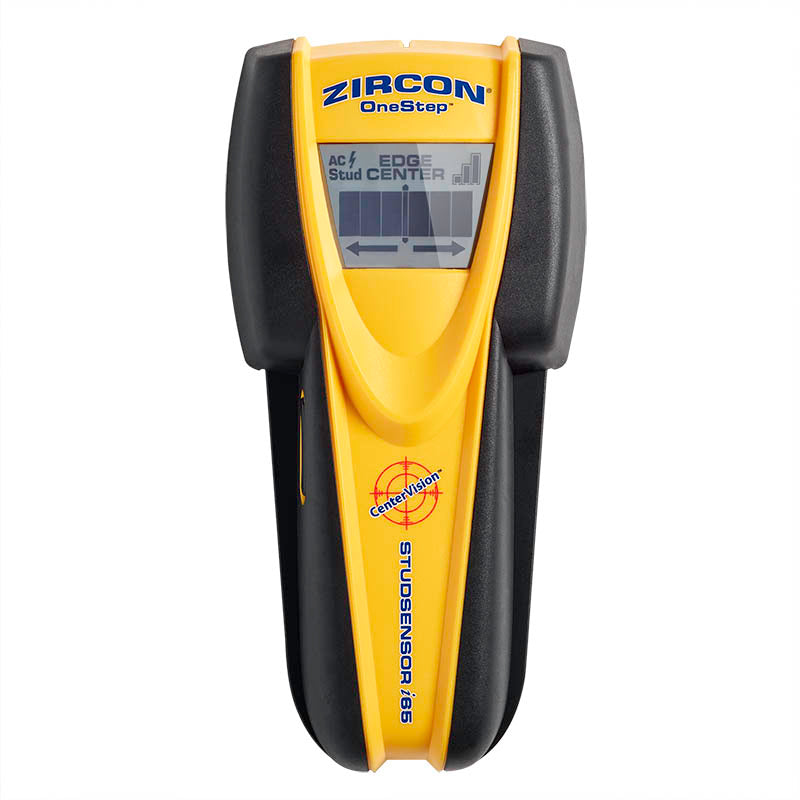
Explore this need in the finder →The StudSensor i65 OneStep is a center-finding electronic stud detector with an LCD signal-strength display, edge and center indications, SpotLite pointer and WireWarning. Zircon’s U.S. collection identifies the exact retail model as SKU 73756. Its page states ordinary Stud Scan to 3/4 inch (19 mm) and a deeper 1-1/2-inch (38 mm) DeepScan figure. The linked operating instructions add a useful distinction: they describe the very-deep-target routine as High Sensitivity and explain how its center appears, rather than documenting a deep edge indication.
Shallow Stud Scan shows the edge and center
For an ordinary scan, start with the i65 flat against the wall and wait for the calibration sequence to finish before moving it. The manual gives roughly one to two seconds. Move slowly and keep the tool upright and in contact with the surface. The LCD first indicates an edge; as the signal strengthens, the center display and SpotLite illuminate and the buzzer sounds. This center cue is a direct output from the instrument, unlike taking the midpoint of two marks from an edge-only finder. Repeating the scan at another height is still prudent because an indicated center does not name the hidden object.
The data sheet gives typical position figures at the shallow stated depth, but labels them as manufacturer specifications and cautions that moisture, wall texture, material content and paint affect sensing. They are not independent measurements. In the questionnaire’s depth range, the documented combination of both edge and center indications is the 3/4-inch Stud Scan plan. Keep that limitation attached to the cue set instead of assuming every cue remains available at every depth.
Deep target means a different signal pattern
The product page calls the 1-1/2-inch arrangement DeepScan. In the linked 2012 manual, however, the deeper-target procedure is described as High Sensitivity: if ordinary scanning has trouble with a deep stud, quickly release and press the power button again while the tool remains flat against the wall. The manual says the center of a very deep stud is indicated by the middle bars and SpotLite. The data sheet’s deeper accuracy statement is also for center location. The sources therefore support a deeper center response, not a promise of a deep edge cue. A user who requires both center and edges at that threshold should compare a model whose instructions explicitly retain both in its deeper plan.
This naming difference is worth checking when comparing retail descriptions with an older instruction sheet. The page supplies the 1-1/2-inch maximum; the manual describes the steps for a deep target and the cue that appears. Neither source promises a result through every wall assembly. The tool can also recalibrate when it detects a common positioning error, but that correction does not identify whether the signal comes from a stud, pipe or another object.
WireWarning remains separate from stud finding
The i65 includes WireWarning for live AC. Zircon’s data sheet gives a typical distance and depth for a hot, unshielded conductor in a typical wall. The instructions caution that a wire may not be detected if it is more than 2 inches from the surface, shielded by conduit or metal, behind plywood shear wall or affected by moisture. The warning zone can also spread beyond a wire. Treat it as a limited alert rather than a circuit map, and do not take a negative result as permission to drill. Check other utility information, shut off relevant supplies before penetrating a surface and seek qualified help when the work is critical or uncertain.
Material fit is narrower than the product family
The instructions say lath and plaster is not recommended because plaster thickness is irregular. They also warn that the tool cannot scan wood studs through carpet and padding and that Stud Scan will not scan through dense glass, ceramic tile or foil. Wood flooring, drywall over plywood and highly textured walls receive a High Sensitivity procedure, but those are conditional operating notes, not an endorsement of every dense or exterior assembly. The product page also says indoor use only. The optimum voltage range in the manual is 110–127 V, a detail not to confuse with the WireWarning feature.
Battery and setup deserve a listing check
The current product page specifies one 9V alkaline battery and says it is not included. The instructions emphasize a flat, stationary start, a wait for calibration and slow movement; rotating, rocking or lifting the tool can affect the reading. The official product page and older data sheet differ slightly in their listed dimensions and weight, so those values are not used here to distinguish the model. The collection SKU and exact page identify the reviewed configuration more reliably than a copied spec table alone.
Choose it for the right indication
The i65 is a candidate when edge and center cues in ordinary Stud Scan and an additional wire warning are useful together. It is not a simple substitute for edge-only models at deeper thresholds: the manual’s deep response is center-focused. If your wall is plaster, tiled, wet or otherwise unsupported, its 1-1/2-inch headline does not solve that surface mismatch. Verify the exact name and SKU 73756, check that the battery is supplied if needed, and consult the linked instructions before use. This is a research-based paper assessment of manufacturer material, not a claim of personal ownership, hands-on use, testing or measured accuracy.
Key specifications
Key details at a glance
| Maximum stated stud depth | 1.5 in |
|---|---|
| Depth qualification | The product page/data sheet state Stud Scan to 3/4 inch and a separate 1-1/2-inch DeepScan maximum. The linked manual explains a deep target through High Sensitivity and describes its deep center indication; it does not document a deep edge cue. |
| Documented scan modes | ['Stud Scan', 'High Sensitivity for a deep target (product page labels its 1-1/2-inch plan DeepScan)'] |
| Center and edge indication | Yes |
| Live-wire meter | Yes |
| Battery requirement | One 9V alkaline battery |
Use the exact model’s instructions for operating limits, supplied equipment and version differences.
Sources for this review
Sources for this assessment
Check this model against your wall
Use the finder to compare documented surface limits, center/edge indications and other requirements. A match is not a safety certification.