
Your needs, this model
Does it fit your priorities?
Does the HD70 show both center and edges?
Yes. The exact instructions describe EDGE, CENTER and direction indications in both StudScan and DeepScan. Repeat the pattern at the intended mounting height; the LCD reports a sensor response and does not identify every object behind the wall.
Explore this need in the finder →Can I use the HD70's 1 1/2-inch figure for every scan?
No. The 1 1/2-inch (38 mm) maximum is for DeepScan; StudScan is stated up to 3/4 inch (19 mm). The instructions say to start in StudScan because DeepScan may detect something other than a stud, and wall conditions affect sensing.
Explore this need in the finder →Does HD70 WireWarning make a wall safe to drill?
No. WireWarning is an added indication for live unshielded AC under the manual's conditions and can miss wiring behind barriers, in conduit, deeper than its limit or where moisture interferes. Shut down and verify services independently; the tool also is not recommended for plaster.
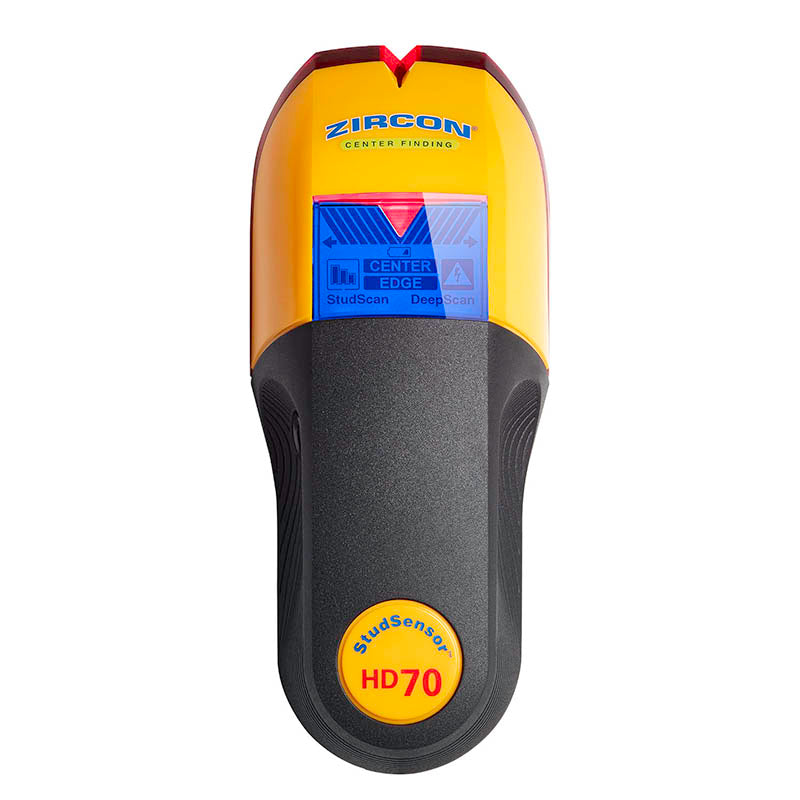
Explore this need in the finder →The Zircon StudSensor HD70 OneStep is a two-mode electronic finder with a backlit LCD, center and edge indications, Signal Strength display and WireWarning. Its exact U.S. product page identifies SKU 72791 and links matching P/N 72791 instructions. This assessment explains how those documented features differ from the edge-only HD25, HD35 and HD55; it is not a hands-on review or a claim of measured performance.
Center and edges, with a second depth mode
In StudScan, the manufacturer states up to 3/4 inch (19 mm) for finding the center, edges and direction of wood or metal studs. The separate DeepScan mode is stated up to 1 1/2 inches (38 mm). The two numbers describe different operating settings; DeepScan's headline figure is not a universal promise for every finish or target. Zircon directs users to start in StudScan because a deeper response may belong to an object other than a stud.
The display's EDGE response helps show the boundary, and CENTER illuminates when the center response is reached. This is more explicit than the HD55's edge-only Target Spotlight, but it still reports a sensor pattern rather than naming the material behind the drywall. Signal-strength bars can help compare the response, not measure an exact distance or certify that a target is structural framing. ACT (Auto Correcting Technology) addresses common calibration errors such as beginning over a stud; it is not an object-recognition system.
A careful routine is more useful than a fast pass
The current product page states one 9V alkaline battery is required and not included. Begin with the tool flat and still against the wall; hold the power button through its short calibration period, then move slowly while keeping the control pressed. Start with StudScan. Mark a clear edge and observe the center and opposite edge while passing through the likely stud. Repeat the pattern at a second height and compare the results before trusting a line for a mounting point.
Choose DeepScan only if the wall or initial response calls for it. The page describes a quick re-press of the power control for the mode, and the instructions give the exact selection procedure. Keep the face in full contact and scan slowly. If deeper results do not agree with the StudScan pattern, do not resolve the disagreement by assuming the more powerful mode is correct. DeepScan can respond to a non-stud object, and wall materials can change the response. Step back, use building information or another confirmation method, and do not drill based only on the larger number.
WireWarning is not a safety clearance
WireWarning operates in both stud modes for live, unshielded AC under the manufacturer's stated conditions. The manual describes a typical depth limit around two inches and explains that shielding, metal conduit, barriers, concrete, moisture and wire placement may interfere. It warns directly against assuming that a wall contains no live wiring. The HD70 does not map every electrical service, and the alert should not be interpreted as permission to work near a negative reading.
As with the other HD models, pipes, firestops and other dense objects may create a stud-like response. Keep the electrical function separate from the stud function. Turn off power when working near wires, look for outlets and service paths, check construction records and use an appropriate independent method for critical work.
Where the HD70 should not be stretched
The instructions recommend interior use and expressly do not recommend lath-and-plaster scanning because thickness is irregular. Moisture, minerals, texture and material consistency can affect depth and accuracy. The manual also mentions metallic wallpaper or foil, damp new paint, dense surfaces and uneven ceilings as conditions that need caution or a special handling step. It names certain deeper-scan situations, including wood flooring or drywall over plywood, but those do not make the tool suitable for every layered wall.
In the configured finder, the supported surface is dry interior drywall. A request for tile, exterior, metal mesh or the broad difficult-surface group should not match this model merely because it has DeepScan, a bright display or a wire alert. For an unknown wall assembly, identify the material first or choose a method whose exact instructions address it.
How it differs from other HD sensors
The HD25 is a simple edge-only tool with one stated 3/4-inch StudScan and no documented WireWarning. HD35 retains that edge-only depth but adds WireWarning. HD55 adds an LCD and a 1 1/2-inch DeepScan maximum, yet its indications remain edges. HD70 adds center reporting, signal-strength context, ACT and a backlit LCD while retaining a mode-specific 1 1/2-inch ceiling and WireWarning. These are actual functional distinctions, not evidence that one model will outperform another in a particular wall.
HD70 is worth considering on paper when both center and edge cues are useful alongside the optional warning and the deeper setting. It is not necessary for every picture-hanging job, and its more elaborate display does not eliminate calibration, mapping or utility checks. For buyers who only need an edge cue on ordinary thin drywall, HD25 or HD35 has a narrower set of functions to compare.
Package and final checks
Verify the exact HD70 OneStep name, SKU 72791 and the matching instructions when reviewing an offer; a listing that says “HD” is not enough to establish the included model. The maker specifies a required 9V battery and says it is not included. Confirm seller package contents and return terms directly. No price, current seller availability or bundle contents are assessed in this review.
The HD70's core advantage is the documented combination of center and edge readouts with a deeper separate mode. Its limitations remain material: mode choice, wall condition, non-stud responses, plaster exclusion and WireWarning's blind spots. Repeatable mapping helps, but a stud finder cannot identify all hidden hazards or make a wall safe to penetrate.
Key specifications
Key details at a glance
| Maximum stated stud depth | 1.5 in |
|---|---|
| Depth qualification | The exact HD70 sources state up to 3/4 inch (19 mm) in StudScan and up to 1 1/2 inches (38 mm) in the separate DeepScan mode. |
| Documented scan modes | ['StudScan', 'DeepScan'] |
| Center and edge indication | Yes |
| Live-wire meter | Yes |
| Battery requirement | One 9V alkaline battery |
Use the exact model’s instructions for operating limits, supplied equipment and version differences.
Sources for this review
Sources for this assessment
Check this model against your wall
Use the finder to compare documented surface limits, center/edge indications and other requirements. A match is not a safety certification.