
Your needs, this model
Does it fit your priorities?
Does HD55 DeepScan provide a center indication?
No. The HD55's LCD and Target Spotlight support edge finding in both StudScan and DeepScan. To estimate center, locate both edges with repeatable passes and use their midpoint; DeepScan changes the stated ceiling, not the indication type.
Explore this need in the finder →What does the HD55's 1 1/2-inch specification apply to?
It is the stated maximum in the separate DeepScan stud mode. StudScan is stated to 3/4 inch, and neither number guarantees a reading through every wall assembly; the manual warns that a deeper signal can be another object.
Explore this need in the finder →Does WireWarning operate in both HD55 stud modes?
Yes. The exact page says WireWarning indicates live unshielded AC up to its stated conditions in both StudScan and DeepScan. It may miss conductors, and the instructions do not recommend lath-and-plaster use or treat the alert as a safety clearance.
Explore this need in the finder →The Zircon StudSensor HD55 separates ordinary StudScan from a deeper DeepScan mode, but it remains an edge finder. Its exact current U.S. page lists SKU 74901 and links P/N 74901 instructions. This assessment uses those sources to distinguish depth, display and surface limits; it is not based on hands-on testing, ownership or independent measurements.
Two stud depths, one kind of indication
In StudScan, Zircon states up to 3/4 inch (19 mm) for locating wood and metal stud edges. DeepScan is stated up to 1 1/2 inches (38 mm). The distinction matters: the larger figure is not the normal mode's ceiling, a guaranteed result through every wall, or proof that a deeper density change belongs to a stud. The instructions warn that DeepScan can respond to another object behind the wall.
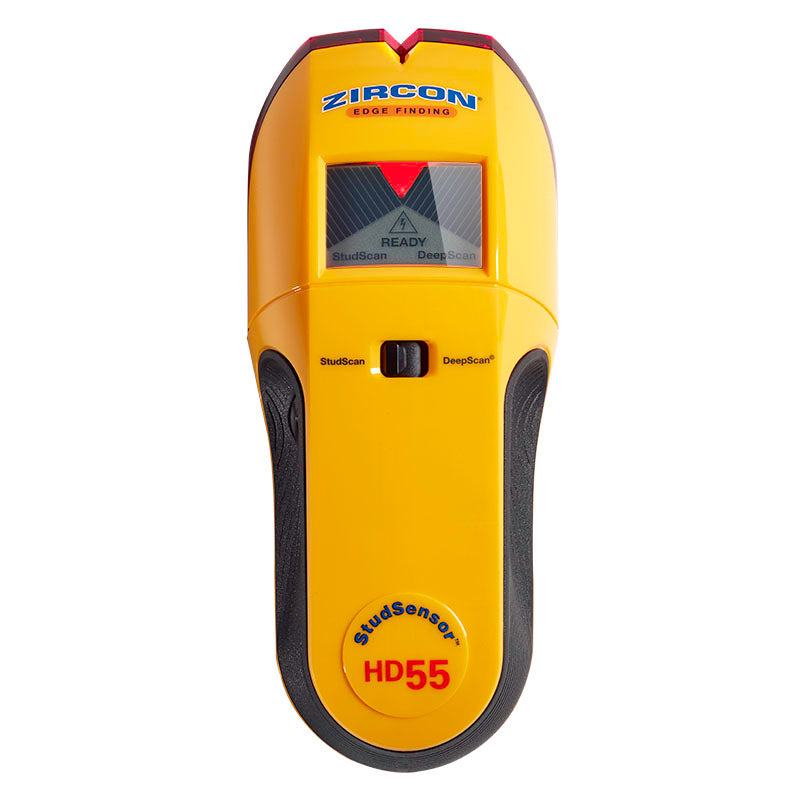
The HD55's LCD shows approaching target bars and a Target Spotlight when an edge is found, while its SpotLite pointer helps place a mark on the surface. The instructions do not describe a center indicator. To estimate a centerline, mark both boundaries by continuing through a signal and scanning back in the other direction, then use the midpoint only if the edge marks are consistent. Repeat at another height. The useful information is a repeatable pattern across the wall, not the presence of an illuminated screen alone.
Calibration, mode choice and mapping
The product page specifies a 9V alkaline battery as required. In StudScan, place the HD55 flat against the wall and keep it still while holding power for calibration; then slide slowly while continuing to hold the control. Select DeepScan with the mode switch when the actual assembly or initial signal calls for the deeper mode, and use the same careful surface contact and slow pass. Mark the first and opposite edges, then repeat the mapping at more than one height to check whether the band continues like framing usually does.
Calibration over a stud or an unusually dense wall area can produce a confusing response. If the pattern is inconsistent, move away and restart as the instructions direct. Moisture, texture, paint, mineral content and wall consistency influence sensing. The screen can communicate signal change, but not whether that change is wood, a pipe, a wire, a seam or blocking. Check plans and visible utility routes before deciding where to penetrate.
WireWarning has a separate job
WireWarning is documented in both stud modes as an alert for live, unshielded AC. The page gives a typical detection figure of up to two inches with standard Romex conditions and also describes the type of nearby wire for which the position warning is specified. The instructions list reasons detection can fail, including shielding, depth, barriers and moisture. That is a limitation statement, not a reliable service map. A warning icon should prompt caution; no warning does not prove a wall clear.
Do not use the electrical depth number as though it raised the stud-finding depth, and do not confuse this alert with a dedicated AC Scan. The HD55 sources describe an edge finder with WireWarning, not a multifunction scanner that identifies all wiring or metal.
Surface limits and specific allowances
The HD55 is intended for dry interior wall surfaces, and its product page expressly says lath and plaster are not recommended. Its manual lists several other conditions that can defeat or complicate sensing: ceramic tile, carpet and padding, metallic-fiber wallpaper, foil-covered insulation board, glass, dense material and fresh paint that has not dried. Sensing depth also changes with the wall. The stated DeepScan maximum does not override any of those restrictions.
The instructions do name some separate material situations, such as bare wood flooring in DeepScan, linoleum on a wood base, gypsum drywall over plywood, dry wallpaper and uniformly textured ceilings scanned over thin cardboard. Those directions should be applied only to the named arrangement and mode. They do not support the questionnaire's broad combination of tile, exterior, metal mesh and other difficult surfaces.
Comparing the HD55 with the HD35 and HD70
HD35 and HD55 both indicate edges, and both list WireWarning. HD35 is limited to a single StudScan depth up to 3/4 inch, while HD55 adds the separate 1 1/2-inch DeepScan setting and an LCD target display. HD70 also has two stud modes and WireWarning, but its manual and page describe center as well as edge and direction indications, plus ACT and a backlit LCD. A buyer who needs an on-tool center cue should not mistake the HD55's Target Spotlight for one.
The HD55 is a considered match when edge-only output suffices, the wall is within its recommended use and a separate deeper stud mode matters. It is not automatically a better choice for a standard wall; Zircon instructs users to interpret the wall and select modes carefully. If the project needs a center readout, consult a model whose exact sources document one. If the surface is plaster or tile, use a method with evidence for that actual construction.
Check the exact offer and keep verification independent
Confirm SKU 74901 and the matching P/N 74901 instructions, rather than relying on a listing that says only “deep-scanning stud finder.” The reviewed page specifies a required 9V battery but does not confirm every seller's package contents. Check the included items and the seller's terms directly; no specific offer, availability or price is assessed here.
In short, HD55's meaningful distinction is its combination of edge-only reporting, a shallow StudScan ceiling, a separate deeper mode, LCD guidance and WireWarning. Each feature has its own scope. Repeat marks, map the surface and check services independently; neither a centered pattern nor an electrical warning certifies a safe fastening point.
Key specifications
Key details at a glance
| Maximum stated stud depth | 1.5 in |
|---|---|
| Depth qualification | StudScan is stated up to 3/4 inch (19 mm); the distinct DeepScan stud mode is stated up to 1 1/2 inches (38 mm). |
| Documented scan modes | ['StudScan', 'DeepScan'] |
| Center and edge indication | No |
| Live-wire meter | Yes |
| Battery requirement | One 9V alkaline battery |
Use the exact model’s instructions for operating limits, supplied equipment and version differences.
Sources for this review
Sources for this assessment
Check this model against your wall
Use the finder to compare documented surface limits, center/edge indications and other requirements. A match is not a safety certification.