
Your needs, this model
Does it fit your priorities?
Does the HD35 indicate stud center or only edges?
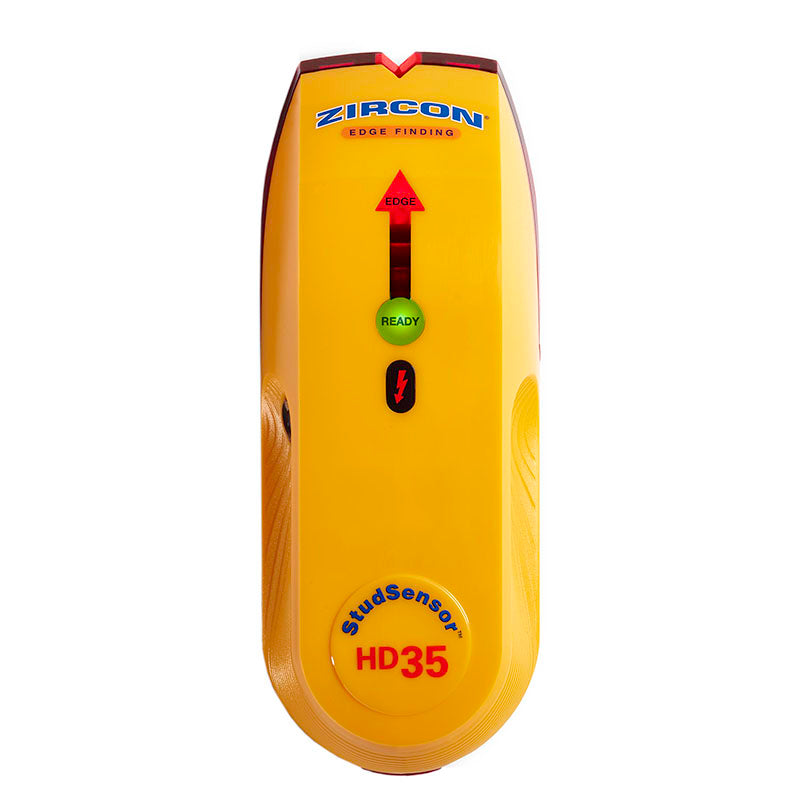
The exact HD35 sources describe an EDGE light and SpotLite pointer, not a center readout. Mark both edge responses and estimate a midpoint only after checking the pattern again; its wire warning is a different signal.
Explore this need in the finder →Is a 1.0-inch depth requirement supported by the HD35?
No. The HD35 StudScan ceiling is 3/4 inch (19 mm). Its WireWarning electrical depth claim is not a stud-detection depth, so it does not make a one-inch stud threshold fit.
Explore this need in the finder →What does the HD35 WireWarning do?
It gives an added alert for live, unshielded AC under the manual's stated conditions. The exact instructions warn that wires can be missed, and they do not recommend lath-and-plaster use; switch off utilities and confirm hazards independently before penetrating a wall.
Explore this need in the finder →The Zircon StudSensor HD35 is an electronic edge finder for dry interior walls, with a single StudScan depth and an added WireWarning cue. Its current U.S. product page identifies SKU 72151 and the matching instructions carry P/N 72151. The comparison here follows those model-specific sources; it does not claim physical testing, personal ownership or measured accuracy.
The HD35 adds a warning, not a center display
StudScan is stated to locate wood and metal stud edges up to 3/4 inch (19 mm) deep. A red EDGE light and SpotLite pointer mark a boundary; the HD35 does not supply a center indication. To estimate a centerline, mark one edge, pass beyond the response, reverse to find the other edge and calculate the midpoint yourself. That midpoint is only useful if both marks repeat consistently, so check the pattern at another height and compare it with the wall's visible layout.
The product page and manual identify WireWarning as a separate indication for live, unshielded AC under the conditions Zircon specifies. It is not the same as an active AC scan mode or a circuit tracer. A detected warning merits caution, but the instructions warn that wiring may be shielded, too deep or otherwise missed. Absence of the icon cannot be used as permission to drill. Keep the product's 3/4-inch stud figure separate from the electrical warning's stated up-to-two-inch wire depth; they refer to different signals.
Follow the calibration and scan sequence
The exact instructions require one 9V alkaline battery. Match its direction to the compartment marking, set the tool flat against the wall and hold it still while holding power until the READY indication appears. Then move slowly while continuing to hold the button. As the tool approaches an edge, the EDGE light progresses; mark the position when the full edge cue and SpotLite indicate detection. Continue past the stud and reverse to check the second side. If the scanner begins directly over a stud, Zircon describes a continuous-beep condition and tells the user to start from a different location.
Do not hurry the pass or use the device at a tilted angle. The manual notes that surface condition, moisture, mineral content, texture and nearby material can affect sensing. When a response does not make sense, move a few inches and recalibrate as instructed. A stud-like width and a vertical repeat pattern are useful checks, but neither substitutes for construction information or an independent look at possible services.
Drywall is a better fit than plaster or tile
The HD35 instructions say the tool is not recommended for lath and plaster. They also caution about metallic wallpaper, damp new paint, glass and dense materials; Zircon recommends its finder for interior use only. This is not a general-purpose difficult-surface scanner. A wall with metal mesh, foil-backed material or an unknown layered finish does not become compatible because the electronic display lights up.
Even for ordinary drywall, the scanner senses changes rather than identifying wood. A pipe, electrical line, firestop or other near-surface object may look like a stud response. The manual urges users to map likely framing at multiple heights, consider the location of outlets and plumbing, and turn off power around electrical work. Treat WireWarning as one additional prompt in that process, not the entire process.
How its feature split compares
Compared with the HD25, the HD35 retains edge-only output and the same stated 3/4-inch stud depth, while adding the WireWarning feature. That makes the HD35 more relevant when a buyer specifically wants an electronic warning cue, but it does not solve a request for center indication or a deeper mode. The HD55 adds an LCD and separate DeepScan mode up to 1 1/2 inches while remaining edge-only; the HD70 adds center and edge indications, ACT and two scan depths. Those models should not be treated as interchangeable merely because all are StudSensor products.
The HD35 may suit a small layout job on standard interior drywall when edge marks are sufficient and an added AC warning is desired. If the required task is to find a center directly, scan beyond 3/4 inch for studs, or address an atypical finish, the product sources point to a different tool or a different verification method. Do not infer those capabilities from the HD35 name.
Offer checks and safety boundaries
Verify that the package is the HD35 with SKU 72151 and obtain the P/N 72151 instructions. The product page states that a 9V alkaline battery is required but does not establish what every seller includes. Check the actual offer contents and return terms; do not assume a battery, case or accessories. This assessment does not establish ongoing seller availability, price or a particular bundle.
The HD35's actual proposition is narrow: one edge-finding mode, a stated 3/4-inch stud ceiling and WireWarning. Its warning does not identify every conductor, and its stud display does not identify every object. Before drilling, use construction records and independent utility checks, and turn off relevant services. For uncertain wiring or wall construction, stop and use an appropriate specialist method rather than trusting a negative finder result.
Key specifications
Key details at a glance
| Maximum stated stud depth | 0.75 in |
|---|---|
| Depth qualification | The exact product page and P/N 72151 instructions state up to 3/4 inch (19 mm) for StudScan; WireWarning is a separate added cue, not stud depth. |
| Documented scan modes | ['StudScan'] |
| Center and edge indication | No |
| Live-wire meter | Yes |
| Battery requirement | One 9V alkaline battery |
Use the exact model’s instructions for operating limits, supplied equipment and version differences.
Sources for this review
Sources for this assessment
Check this model against your wall
Use the finder to compare documented surface limits, center/edge indications and other requirements. A match is not a safety certification.