
Your needs, this model
Does it fit your priorities?
Does the A150 provide a center indication as well as edges?
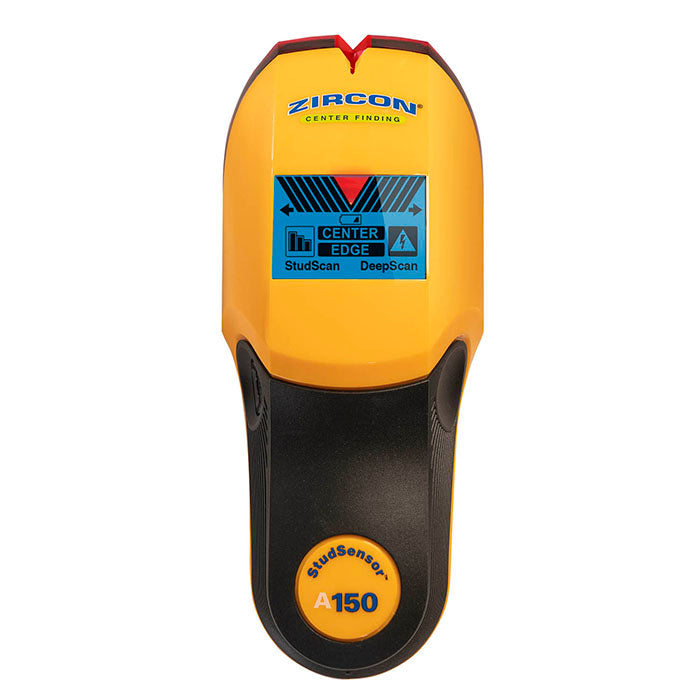
Yes. Its exact page and instructions describe EDGE and CENTER indications in both StudScan and DeepScan. A center cue is still a signal pattern; verify it with repeated passes at the intended height.
Explore this need in the finder →Does the A150 have a live-wire warning?
Yes. WireWarning is documented in its two stud modes for live unshielded AC, within the manual's limits. The tool has no separate AC Scan mode, and its warning cannot prove a wall is safe.
Explore this need in the finder →What changes when I select DeepScan?
The stated maximum changes from 3/4 inch in StudScan to 1 1/2 inches in DeepScan, while both modes keep center and edge indications. The manual cautions that DeepScan can reveal non-stud objects and does not recommend plaster use.
Explore this need in the finder →The Zircon StudSensor A150 is a two-mode electronic stud finder with both edge and center indications. The exact U.S. product page identifies SKU 72297, and the linked instructions describe the A150's own scanning routine. This model is not the edge-only A100: the distinction affects how a buyer marks a centerline. The assessment below is documentary, based on those primary sources rather than on a physical test or ownership.
What the A150 adds to an edge signal
StudScan is stated up to 3/4 inch, and DeepScan up to 1 1/2 inches. Both modes report the center and edges of wood and metal studs, while a Signal Strength Indicator helps compare relative response. That indicator is not a direct measurement of how far away a target is, and the center cue does not identify whether a density change is a stud. Use the edge and center signals as a repeatable pattern, not as a label for the material behind the wall.
The manual describes an initial calibration against the wall: hold the tool flat and motionless while holding power until the beep confirms calibration, then scan slowly while keeping the button pressed. In StudScan, mark an edge and continue the pass to observe the center and other edge. For DeepScan, the instructions select the mode with a quick double press and holding after the second press. The broader 1 1/2-inch number belongs to this separate mode, not to every scan or wall condition. The manual warns that a deeper signal may be an object other than a stud, so repeat the scan at another height and compare the boundaries.
Warning and surface constraints
WireWarning operates in the two stud modes and alerts to live, unshielded AC under the maker's stated conditions. The manual warns that wiring may not be detected when it is deeper than about two inches, shielded, in conduit, behind some barriers, in concrete, or when moisture affects the surface. A flash should prompt caution; no flash does not establish that the wall is clear of wiring. The A150 has no separate AC Scan mode or Metal Scan mode, so it should not be treated like the MultiScanner A250c.
The A150 instructions expressly say not to use it on lath and plaster. They also discuss foil or metallic wallpaper, damp new paint and uneven surfaces as potential problems, and recommend interior use. The 1 1/2-inch maximum cannot turn an unsupported surface into a supported one. If the wall material differs from the manual's scope, pause and find a source that addresses that exact construction rather than assuming a deeper mode will solve it.
How it compares with A100 and A200
The A100 is the closer comparison: it also uses StudScan and DeepScan and has WireWarning, but its product page says edge finding and lacks a center indication. A150's model-specific page adds center-and-edge reporting and a signal-strength display. The A200 uses a separate Metal Scan mode with its own target limits, whereas the A150's source set does not document dedicated metal scanning. The A250c has still more mode separation, with dedicated Metal and AC scans and a color-changing display. Those comparisons help explain the A150's role without borrowing another model's specification.
For a straightforward interior drywall job, the A150 may make sense when the operator wants a center cue as well as edge marks and is willing to use the selected mode carefully. A center reading can save a calculation compared with the A100, but both still need repeatable wall scans and independent confirmation. If a buyer requires metal detection, a separate AC scan, or documented lath-and-plaster use, the A150 is not a substitute for a model whose exact manual supports that task.
Battery, availability and offer checks
The product page specifies one 9V alkaline battery and says it is not included. Check the exact A150 name and SKU 72297 on an offer, confirm the package and return terms directly with the seller, and obtain the matching instructions. The current manufacturer page showed a temporary out-of-stock state during research, but that observation is not a prediction about future availability and is not a reason to substitute a different model. Do not accept a listing labeled only “StudSensor” as proof that it is an A150.
The A150's documented strengths are specific: two stud modes, center and edge indications, signal-strength context and a live-wire warning. The tradeoffs are its mode-specific depth ceiling, the manual's no-plaster recommendation and the limits of any electrical warning. It is a more informative layout aid than an edge-only version, not a wall scanner that can verify the identity or safety of every hidden target.
Key specifications
Key details at a glance
| Maximum stated stud depth | 1.5 in |
|---|---|
| Depth qualification | StudScan is stated up to 3/4 inch and the separate DeepScan mode up to 1 1/2 inches; the exact page/manual describe both center and edge indications in these modes. |
| Documented scan modes | ['StudScan', 'DeepScan'] |
| Center and edge indication | Yes |
| Live-wire meter | Yes |
| Battery requirement | One 9V alkaline battery |
Use the exact model’s instructions for operating limits, supplied equipment and version differences.
Sources for this review
Sources for this assessment
Check this model against your wall
Use the finder to compare documented surface limits, center/edge indications and other requirements. A match is not a safety certification.