
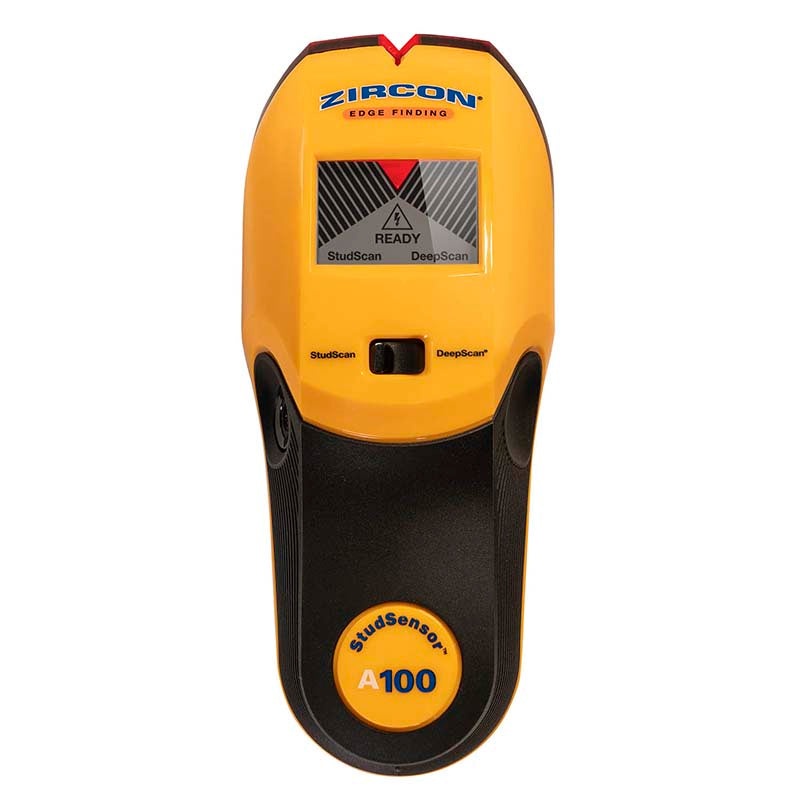
Your needs, this model
Does it fit your priorities?
Does the A100 show the stud center?
No. The product is explicitly an edge-finding model. Mark both boundaries in the prescribed passes and estimate a midpoint only after the two edge marks agree; that is not an on-screen center indication.
Explore this need in the finder →What does DeepScan add on the A100?
DeepScan raises the manufacturer's stated stud-finding limit from 3/4 inch in StudScan to 1 1/2 inches, but it still reports edges only and may not work through every wall assembly.
Explore this need in the finder →Does the A100 have a wire warning?
Yes. WireWarning is documented in both stud modes for live, unshielded AC under stated conditions. It is not a clearance test; the manual warns that shielded, deep or otherwise obscured wires can be missed.
Explore this need in the finder →The Zircon StudSensor A100 is an electronic edge finder with two stud-scanning modes and an added live-wire warning. Its U.S. product page identifies SKU 72296. It is important not to confuse it with the adjacent A150: Zircon describes the A100 as edge-finding and marks center-finding as absent, while the A150's own documentation describes both center and edge indications. This assessment follows the exact A100 page and manual; it is not based on a hands-on test.
Edge finding is its defining capability
StudScan is stated to detect stud edges up to 3/4 inch deep. DeepScan is a separate mode, stated up to 1 1/2 inches. The second mode raises the documented maximum; it does not add a center indication. If the project needs a centerline, mark one edge, scan back to locate the other, then estimate the midpoint from those marks. That is a user calculation, not a center display or a promise that the hidden object is a stud.
The manual's procedure is straightforward but still requires a deliberate pass: select StudScan or DeepScan with the mode switch, hold the unit flat and still against the wall while pressing the power button through its calibration beep, then slide slowly while continuing to hold power. Mark the edge indicated by the display and pointer. Reversing direction helps locate the second boundary. Repeat at another height and compare the line of readings before deciding where a likely stud runs. Pipes, wire, repairs or uneven material can also create a signal.
DeepScan changes the limit, not the surface rules
The 1 1/2-inch figure belongs to DeepScan. It should not be treated as a guarantee through every wall thickness, finish or framing arrangement. The manufacturer says that sensing depth and accuracy can vary with moisture, material, texture and paint. Its instructions describe ordinary sheet materials and some specific limitations, but explicitly do not recommend this tool for lath and plaster. They also caution about damp fresh paint, metallic-fiber wallpaper, foil-covered board, glass and other dense surfaces. If the wall is plaster, tiled, exterior or otherwise unlike the described materials, do not extend the A100's drywall guidance by analogy.
The A100 has WireWarning in both StudScan and DeepScan, but it is not a dedicated AC scanner. The warning is for live, unshielded wiring and the manual lists circumstances in which current may be missed, including deeper, shielded or obstructed wires and moisture. A warning is useful as an extra cue; its absence does not establish that a wall is safe to drill. Shut off relevant utilities and use an appropriate independent service-location method before making an opening.
Compared with simpler and more capable neighbors
Compared with Zircon's StudSensor Basic, the A100 adds a separate DeepScan mode and WireWarning, while both are edge-oriented. Compared with the A150, it gives up the documented center cue, signal-strength indicator and automatic correction features; the A150's model-specific manual is required to support those traits. The A250c is a different kind of choice, adding dedicated metal and AC scan modes alongside stud scanning. These differences are why an A100 review should not inherit a neighboring model's features simply because the housings look similar.
For someone who only needs an edge indication on a compatible interior wall, the A100's two depth settings may be sufficient. If an on-screen center cue is essential, this is not the right A-series model. If selecting a deeper mode, be ready to make two consistent edge marks and verify the line at more than one height.
Battery and purchase checks
The exact product page specifies one 9V alkaline battery and says it is not included. Check the exact A100 model name and SKU 72296 on an offer rather than relying on a short title or a product photograph; packages and seller descriptions can differ. Read the matching manual before scanning, particularly if the wall has unusual finish or nearby wiring. No package contents beyond the stated manufacturer listing, current seller stock, price or warranty status for a specific offer are assumed here.
The A100's strongest fit is a buyer who values an edge-only signal, a selectable deeper scan and an added live-wire warning without needing center, metal or dedicated AC scanning. Its constraints are equally plain: the midpoint is estimated manually, the deeper depth is mode-specific, the manual excludes lath and plaster, and WireWarning cannot certify a safe location. Used with those limits in mind, it can serve a focused drywall-marking task without pretending to identify every object inside a wall.
Key specifications
Key details at a glance
| Maximum stated stud depth | 1.5 in |
|---|---|
| Depth qualification | Both modes indicate stud edges only. StudScan is stated up to 3/4 inch and the separate DeepScan mode up to 1 1/2 inches. |
| Documented scan modes | ['StudScan', 'DeepScan'] |
| Center and edge indication | No |
| Live-wire meter | Yes |
| Battery requirement | One 9V alkaline battery |
Use the exact model’s instructions for operating limits, supplied equipment and version differences.
Sources for this review
Sources for this assessment
Check this model against your wall
Use the finder to compare documented surface limits, center/edge indications and other requirements. A match is not a safety certification.