
Your needs, this model
Does it fit your priorities?
Does the StudSensor 70 show both center and edges?
Yes in its ordinary StudScan arrangement: the EDGE light marks a boundary and CENTER/SpotLite plus a tone indicate the center. At the deeper high-sensitivity setting, the manual says only the middle LEDs and CENTER illuminate, so do not assume that deeper setting gives the same edge pattern.
Explore this need in the finder →Can the 70's 1-1/2-inch setting still show stud edges?
The linked instructions describe only the three middle LEDs and CENTER for a deeper stud at High Sensitivity. Its product page calls this DeepScan, but the edge cue is not documented there; choose a shallower threshold if both edge and center cues are essential.
Explore this need in the finder →What voltage range does its WireWarning cover?
The manual says the tool is intended only for an optimum voltage range of 110-127 V; the product page states WireWarning detection for live, unshielded AC wiring up to 2 inches in typical conditions. It remains an added cue, not proof that wiring is absent or a wall is safe.
Explore this need in the finder →The Zircon StudSensor 70 is a center-finding stud tool with LED indications, a SpotLite pointer, a buzzer and an erasable marker built into the housing. The current U.S. product page identifies SKU 75118 and links instructions whose cover names the StudSensor 70 and whose footer reads P/N 67390, Revision A, October 2015. That page-to-manual link is the evidence bridge used here; the retail SKU and the manual part number are different identifiers. This assessment does not claim ownership or hands-on testing.
The ordinary pass shows an edge and a center
In StudScan, the product page states center and edge finding for wood or metal studs to 3/4 inch (19 mm). The instructions describe a simple sequence: place the tool flat against the wall, press power, wait for the calibration beep, then slide slowly. The EDGE light marks a boundary; the CENTER light, SpotLite and tone indicate the center response. Keeping the tool upright and flat matters because tilting, rocking or touching the sensor area can interfere with the reading.
The marker button can make a mark without putting down the tool, which is a small but relevant workflow difference from models that only display a signal. It does not make the reading more certain. The manual says nearby pipes or wiring may be sensed like studs, and recommends checking a consistent pattern at other heights rather than acting on one light. A center cue is a location signal, not proof of what lies behind the surface.
DeepScan is not the same indicator pattern
The current product page calls the deeper arrangement DeepScan and gives a maximum of 1-1/2 inches (38 mm). In the linked manual, that high-sensitivity procedure is described after the normal StudScan pass: when deeper material is suspected, the user releases and quickly presses the button again. Crucially, the instructions say that for deeper studs only the three middle LEDs and CENTER illuminate. The 1-1/2-inch figure therefore should not be read as a promise of the ordinary edge-and-center pattern at that depth.
This matters when both boundaries are needed to mark a centerline. At a shallow threshold, the 70 provides the direct edge and center sequence. If a deeper reading is necessary, the center indication may be useful, but the manual does not credit that high-sensitivity arrangement with the same edge display. Its higher sensitivity may also detect something other than a stud. Compare it with an exact model whose deeper mode explicitly retains edge cues if that is essential to the job.
WireWarning comes with a voltage qualification
Zircon describes WireWarning as a continuous indication of live AC wiring and gives a typical maximum detection depth of 2 inches (50 mm). The instruction sheet adds a notable restriction: the product is intended only for an optimum voltage range of 110–127 V. That condition belongs in the buying decision for anyone relying on the alert. As with other non-contact warning features, an alert does not map every wire and no alert does not establish that wiring is absent. The manual warns against relying exclusively on the detector before penetrating a wall and says to turn off power when working near electrical wiring.
Choose a wall the instructions can address
The maker says not to use the StudSensor 70 on lath and plaster because irregular plaster thickness makes stud finding unsuitable. It also says StudScan will not pass through dense materials such as glass, ceramic tile or foil, and the scanner cannot locate studs through concrete, carpeting or padding. Dry wallpaper or fabric may be scanned if it is not metallic and is no longer wet; textured ceilings may need a thin cardboard layer and the high-sensitivity procedure. A fresh coat of paint or moisture can interfere, so do not interpret a depth number as proof the surface is compatible.
The tool requires a new 9V alkaline battery. The available official sources reviewed here do not establish that a particular retail offer includes one. The manual also calls for a flat, motionless start and a one-to-two-second calibration; repeatable technique is part of the documented routine, not a guarantee of accuracy. The small LED array, built-in marker and two different indicator patterns are more useful comparison points than the generic phrase “deep scan.”
Who should compare it with another model?
The StudSensor 70 is a reasonable candidate when a buyer wants ordinary center-and-edge cues, an erasable mark and an additional live-wire alert on a compatible interior wall. Its deeper setting has a narrower center-only indication, and the 110–127 V optimum range and plaster exclusion may be decisive drawbacks. Compare the exact SKU 75118 and its linked instructions with the separately reviewed HD70 OneStep, Pro LCD or other models rather than transferring a sibling's display or surface behavior. No numerical maximum predicts performance on a particular wall, and a finder should not be the sole basis for drilling.
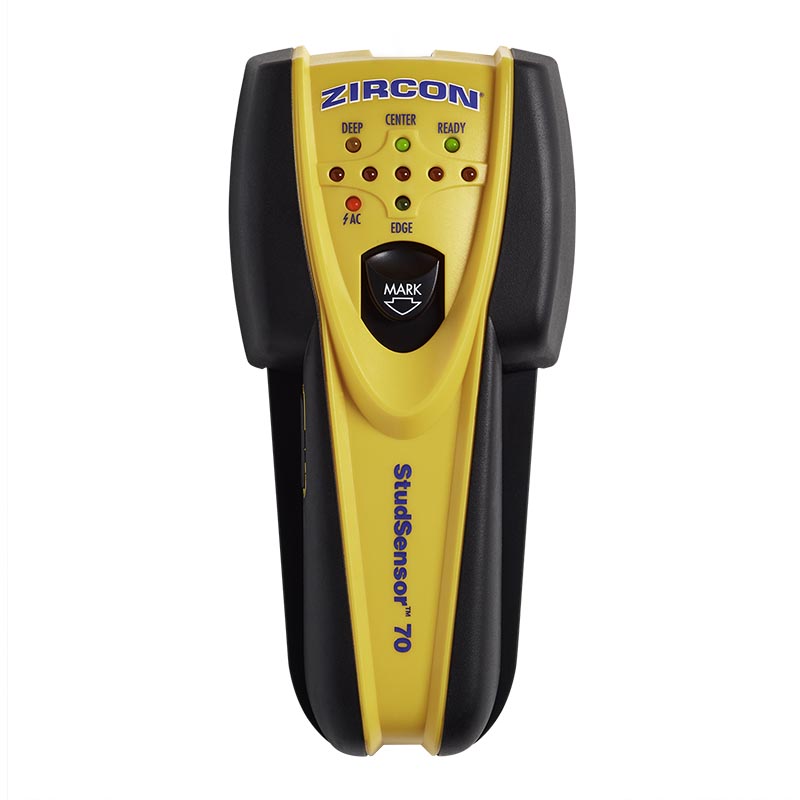
This is a documentation-based assessment. The official image shows the exact yellow-and-black StudSensor 70 and its marker and LEDs; it does not represent a test result.
Key specifications
Key details at a glance
| Maximum stated stud depth | 1.5 in |
|---|---|
| Depth qualification | StudScan locates center and edges to 3/4 inch (19 mm); the product page calls the higher-sensitivity arrangement DeepScan to 1-1/2 inches (38 mm). The linked manual describes High Sensitivity at that deeper level and says only the three middle LEDs and CENTER illuminate for a deeper stud, so the deep plan is not treated as edge-indicating. |
| Documented scan modes | ['StudScan', 'High Sensitivity / DeepScan'] |
| Center and edge indication | Yes |
| Live-wire meter | Yes |
| Battery requirement | One new 9V alkaline battery |
Use the exact model’s instructions for operating limits, supplied equipment and version differences.
Sources for this review
Sources for this assessment

Check this model against your wall
Use the finder to compare documented surface limits, center/edge indications and other requirements. A match is not a safety certification.