
Your needs, this model
Does it fit your priorities?
How is HD900 StudScan different from DeepScan?
StudScan is the manual's recommended starting mode, with center and edge cues to 3/4 inch. DeepScan is a separate 1-1/2-inch maximum arrangement, but the manual warns it can detect something other than a stud and may not show edges on surfaces thicker than 3/4 inch.
Explore this need in the finder →Are Metal Scan and AC Scan distances stud depths?
No. The HD900's metal distances apply to metal targets and AC Scan addresses live, unshielded wiring. Its separate stud plans are 3/4 inch in StudScan and 1-1/2 inches in DeepScan, with their own wall and edge-display caveats.
Explore this need in the finder →Does WireWarning certify that the wall is clear?
No. The instructions warn that wiring deeper than 2 inches, in conduit or concrete, behind certain barriers, or affected by moisture may not be detected. AC Scan and WireWarning are extra indications, not electrical clearance or permission to drill.
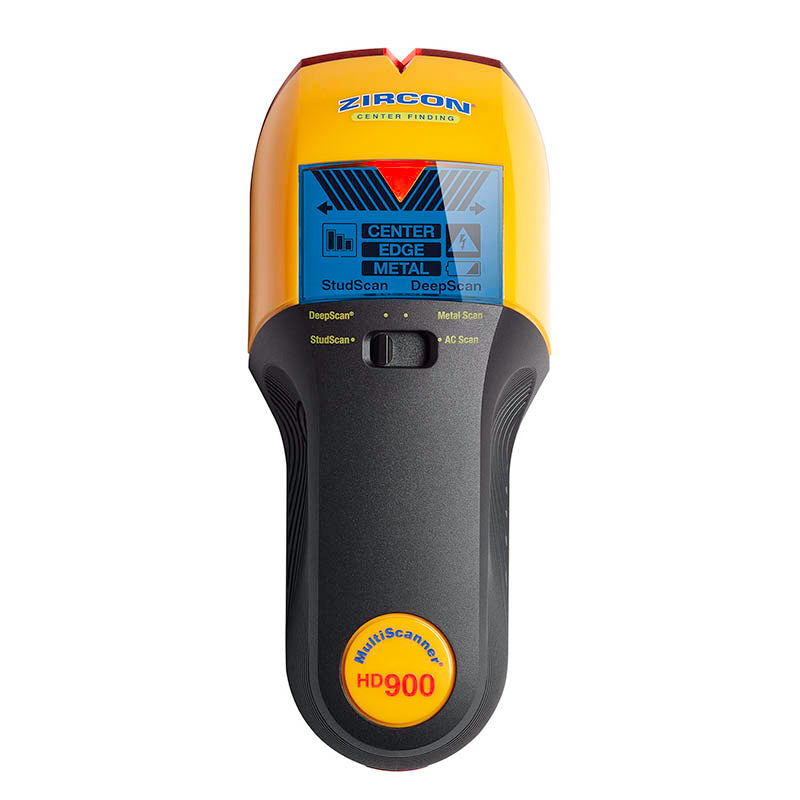
Explore this need in the finder →The Zircon MultiScanner HD900 OneStep is a multifunction wall scanner with four selector modes: StudScan, DeepScan, Metal Scan and AC Scan. Its current U.S. product page identifies SKU 75116 and links English instructions P/N 73223, Revision A, February 2023. The exact product is the HD900 without a “c”; Zircon also lists a separate HD900c with its own SKU and page. This review follows the HD900's own page, manual and photograph rather than borrowing the c model's configuration. It is a source-based assessment, not a hands-on test.
Start with StudScan and read the signal in context
StudScan is the maker's recommended starting mode. It locates wood or metal stud centers and edges to a stated 3/4 inch (19 mm). The instructions direct the user to place the scanner flat on the wall before pressing power, wait about one to two seconds for calibration, then move slowly while holding the button. The center/edge indicators, audible tone, SpotLite pointer and Signal Strength bar help describe a response; they do not identify every hidden object. The manual calls for repeatable passes at different heights and warns that pipes, wiring or other objects can resemble a stud.
The Signal Strength display provides some context about a shallow or deeper target, but it is not a measurement of the wall or a classification label. “OneStep” in the model name should not be interpreted as zero setup: the instructions still require a flat, still calibration and controlled scanning.
DeepScan is a separate stud arrangement
For thicker surfaces or deeper targets, the HD900 has DeepScan with a stated ceiling of 1-1/2 inches (38 mm). The manual warns that this higher-sensitivity mode may detect an object farther behind the wall that is not a stud. Although it describes center and edge indications in DeepScan, it also cautions that the scanner may not find edges on surfaces thicker than 3/4 inch. That makes the higher number a comparison limit, not a guarantee of a full edge-and-center pattern through a particular wall.
This distinction is important if the task requires both cues at the intended depth. The shallow StudScan figure and DeepScan figure are not combined into a single uniformly reliable range. A repeated map that agrees with likely stud spacing and other wall information is a better basis for judgment than one strong signal. Moisture, paint, mineral content and texture can all change results.
Metal Scan and AC Scan answer different questions
Metal Scan is designed for metal targets, not a deeper stud rating: the product page gives up to 3 inches (76 mm) for ferrous metal such as rebar and 1-1/2 inches (38 mm) for non-ferrous metal such as copper. AC Scan searches for live, unshielded wiring to a stated 2 inches (51 mm). WireWarning is an additional alert that works during StudScan, DeepScan and Metal Scan; it is not the same thing as selecting AC Scan. The manual lists conditions where wiring can be missed, including depth, conduit, concrete, certain barriers and moisture. Neither the presence nor absence of a signal is a safety clearance.
The mode switch makes these functions accessible, but each one has its own calibration and interpretation procedure. Do not use a metal-target distance to claim deeper stud detection, and do not treat the AC response as proof that the rest of a wall is free of electrical service. Turn off utilities before penetrating a surface and consult other information about the construction.
Surface restrictions are more important than mode count
The instructions say plaster-thickness irregularities make it difficult to locate studs in either stud mode. Metal Scan may locate the nails holding wood lath, but the maker says metal mesh reinforcement prevents stud detection. The manual also says the HD900 cannot scan studs through tile, concrete, carpet or padding. For some wood flooring, subfloor or drywall-over-plywood situations it recommends DeepScan and a slow scan, but that exception does not turn every layered surface into a supported one. The product page says use it indoors and describes the unit as splash- and water-resistant, not waterproof.
The product page requires a 9V alkaline battery; the sources reviewed here do not establish battery inclusion for every offer. Keep the exact package and instructions in view when comparing sellers. The official image's bright display and mode labels are product artwork, not an observed test outcome.
Compare the exact HD900, not its neighbor
The MultiScanner A250 is another four-mode Zircon scanner with distinct shallow StudScan and deeper DeepScan arrangements, while the HD900's current sources describe its own Signal Strength display and calibration routine. The separately named HD900c is a different configuration; its display, SKU and associated accessories should not be transferred to this HD900 record. If the attractive feature is a 1-1/2-inch claim, compare the mode, cue limits and exact surface warnings rather than the headline number. The HD900 can suit a buyer who wants center/edge indications plus dedicated metal and AC searches, but its own manual conditions still govern the task.
This assessment makes no claim of ownership, field accuracy, customer experience or a seller-specific package. It summarizes the exact manufacturer's current U.S. page and linked instructions.
Key specifications
Key details at a glance
| Maximum stated stud depth | 1.5 in |
|---|---|
| Depth qualification | StudScan is the recommended starting mode and locates center/edges to 3/4 inch (19 mm); DeepScan is separately stated to 1-1/2 inches (38 mm). The instructions warn DeepScan may detect an object that is not a stud and may not show edges through surfaces thicker than 3/4 inch. Metal Scan and AC Scan distances are not stud depth. |
| Documented scan modes | ['StudScan', 'DeepScan', 'Metal Scan', 'AC Scan'] |
| Center and edge indication | Yes |
| Live-wire meter | Yes |
| Battery requirement | One 9V alkaline battery |
Use the exact model’s instructions for operating limits, supplied equipment and version differences.
Sources for this review
Sources for this assessment

Check this model against your wall
Use the finder to compare documented surface limits, center/edge indications and other requirements. A match is not a safety certification.