
Your needs, this model
Does it fit your priorities?
Does the A250c show both the stud edges and center?
Yes. The exact A250c page and manual describe edge and center signals in its two stud modes. Begin in StudScan, hold still until calibration finishes, and scan slowly; verify the pattern at another height because the cue does not identify every hidden object.
Explore this need in the finder →What does the A250c's 1.5-inch depth refer to?
That is the stated maximum for DeepScan stud mode; normal StudScan is stated to 3/4 inch. The separate metal and AC mode limits refer to other targets, not deeper stud detection.
Explore this need in the finder →Does WireWarning prove a wall is safe to drill?
No. WireWarning is an added alert for live unshielded AC under the manual's conditions, and AC Scan also has documented blind spots. Neither a positive alert nor a quiet display clears a wall for drilling.
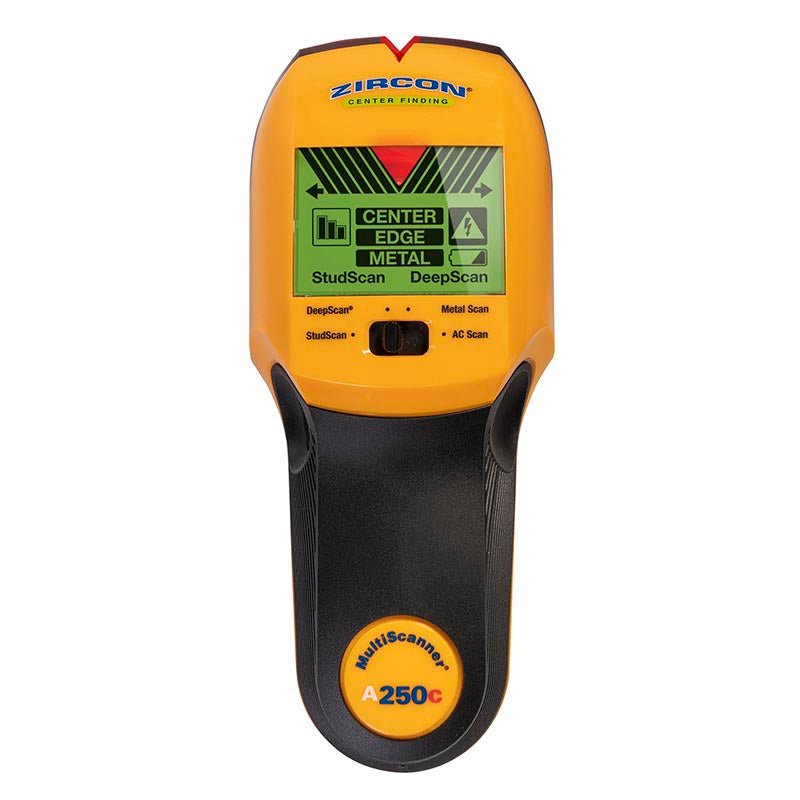
Explore this need in the finder →The MultiScanner A250c is best understood as a small wall-scanning system rather than a single-purpose stud finder. Zircon documents four selector modes: StudScan, DeepScan, Metal Scan and AC Scan. The suffix matters: the exact U.S. listing identifies SKU 72300 and is separately named from the A250 and A200. This is a source-based assessment of that model and its instructions, not a hands-on test or a claim that a particular seller has the same package.
Four modes, with separate jobs
StudScan and DeepScan both locate stud edges and center. The manufacturer states StudScan to 3/4 inch and DeepScan to 1 1/2 inches. Metal Scan has other target limits: the product page gives up to 1 1/2 inches for copper and up to 3 inches for rebar. Those are not deeper stud readings. AC Scan is described for live, unshielded electrical wiring; the page also documents WireWarning alerts during stud and metal scans. Treat the alert and the dedicated AC scan as distinct functions, neither of which maps every service inside a wall.
The ColorTrip display changes color by mode, while the LCD, tone and SpotLite pointer help communicate a detected target. Those cues can make it easier to notice which mode is selected, but they do not identify the material behind the wall. Zircon's own instructions caution that other nearby objects can trigger a response. A regular-looking stud pattern across several heights is more persuasive than a single flash, yet it is still a clue to verify.
Use the ordinary stud mode first
The manual says to begin in StudScan. Hold the unit flat and motionless against the wall while holding the power button until the calibration beep. Then keep the button pressed and slide slowly. The tool reports an edge and then a center; mark both and repeat at another height. DeepScan is a separate choice for thicker material or when the normal scan suggests a deeper target. It doubles the documented depth, but a response farther behind the surface may be something other than a stud. That is a reason to compare the pattern carefully, not a reason to treat the larger number as a guarantee.
Calibration and the held-button scan make the process more deliberate than a simple edge-only device. The A250c's four-position selector also asks the user to keep track of the intended target. When using Metal Scan or AC Scan, follow that mode's own procedure and limits; do not carry a result from one mode into another. The current product page specifies one 9V alkaline battery and says it is not included.
Surface and electrical limits matter more than a headline maximum
The manual says stud finding is difficult in lath-and-plaster walls, and that metal mesh reinforcement prevents the scanner from detecting studs through the material. Metal Scan may help locate nails that hold wood lath, but finding a fastener is a different task from establishing stud edges and center through plaster. For that reason, the A250c is not a match for a broad request covering tile, exterior material, mesh and other difficult surfaces. Uneven texture, moisture, metallic layers and fresh coatings can also affect results; the maker recommends interior use.
WireWarning can alert to live, unshielded AC, and the manual gives typical depth guidance, but it also names conditions that can hide wiring: shielding, depth, conduit, concrete, plywood or metallic coverings, and moisture. A quiet display does not prove the wall is clear. De-energize relevant services before penetrating a surface and consult a qualified person when a location remains uncertain. A stud finder is not a safety instrument.
Where it sits among the A-series
The A250c is more mode-rich than the A200: both have separate stud and metal functions, but the A250c also documents a dedicated AC Scan and a ColorTrip display. It is unlike the StudSensor A100, which reports edges only, and unlike the A150, whose page and manual document center and edge indications but do not list separate metal or AC scan modes. These are real functional differences, not just alternate names. The A250c may be useful when those several target types are part of the same project and the user is prepared to select and interpret each mode carefully. Someone wanting a simpler edge workflow may not benefit from its extra controls.
What to check before choosing one
Confirm the exact A250c suffix and SKU 72300 rather than an A250, A200 or seller-described bundle. Check that the item includes the expected instruction sheet, confirm the required 9V alkaline battery situation, and read the instructions for the actual wall and target. Do not compare the A250c's metal-depth figures with stud-finder limits or use its wire warning as permission to drill. The useful case for this model is its documented combination of center-and-edge stud cues, separate metal and AC scans, and a deeper stud mode. The tradeoff is a more involved selection and verification routine, with the same surface and signal uncertainty that applies to consumer wall scanners generally.
Key specifications
Key details at a glance
| Maximum stated stud depth | 1.5 in |
|---|---|
| Depth qualification | The separate StudScan mode is stated up to 3/4 inch; DeepScan is stated up to 1 1/2 inches for stud finding. Metal Scan has different target-specific limits, and AC Scan is for live unshielded wiring; neither is a stud-depth claim. |
| Documented scan modes | ['StudScan', 'DeepScan', 'Metal Scan', 'AC Scan'] |
| Center and edge indication | Yes |
| Live-wire meter | Yes |
| Battery requirement | One 9V alkaline battery |
Use the exact model’s instructions for operating limits, supplied equipment and version differences.
Sources for this review
Sources for this assessment
Check this model against your wall
Use the finder to compare documented surface limits, center/edge indications and other requirements. A match is not a safety certification.