
Your needs, this model
Does it fit your priorities?
Why begin an A250 stud search in StudScan?
The manual says to start with StudScan, which is specified through 3/4 inch. DeepScan is a separate up-to-1-1/2-inch mode for a thicker surface or deeper target; it can find objects that are not studs, so a stronger or deeper response still needs confirmation.
Explore this need in the finder →Does A250's 3-inch Metal Scan figure mean it finds studs that deep?
No. The 3-inch figure is for ferrous metal in Metal Scan. Stud finding tops out at the separate DeepScan ceiling of 1 1/2 inches, with a 3/4-inch StudScan mode; metal-scan depth is not wood-stud depth.
Explore this need in the finder →How should I use the A250 wire functions before drilling?
AC Scan actively searches for live, unshielded wiring, while WireWarning is an added alert during stud and metal scans. The manual lists blind spots such as conduit, shielding and deeper wires, so neither a positive nor a negative display proves a location is safe. Shut off utilities and use other evidence before penetrating a wall.
Explore this need in the finder →The MultiScanner A250 is an electronic wall scanner with more than one job, and its four-position selector makes the mode distinctions part of the buying decision. The exact Zircon U.S. product page variant is SKU 72299; the linked English instructions are P/N 69339, Revision C (March 2022). That is a different listing from the A250c, which has its own page, suffix and model-specific documentation. This assessment is for the A250 alone, not a package assembled by a retailer.
Keep the four modes in separate columns
For studs, StudScan is the manual's starting setting and is specified up to ¾ inch. It detects wood and metal studs with separate edge and center indicators. DeepScan is a second stud-finding mode, stated up to 1½ inches. The manufacturer cautions that a deeper response may be an object other than a stud, so the larger ceiling should not be treated as more certain just because the signal is stronger or the wall is thick.
Metal Scan is a separate target search. Its 3-inch ferrous-metal figure and 1½-inch non-ferrous-metal figure describe metal detection, not stud depth. AC Scan is another distinct arrangement for locating live, unshielded wiring. A250 also has WireWarning during stud and metal scans, so a wire alert can be present while those modes are being used. That does not mean the AC Scan maximum is a stud-finding capability or that every conductor will be found.
Read the screen as a workflow aid
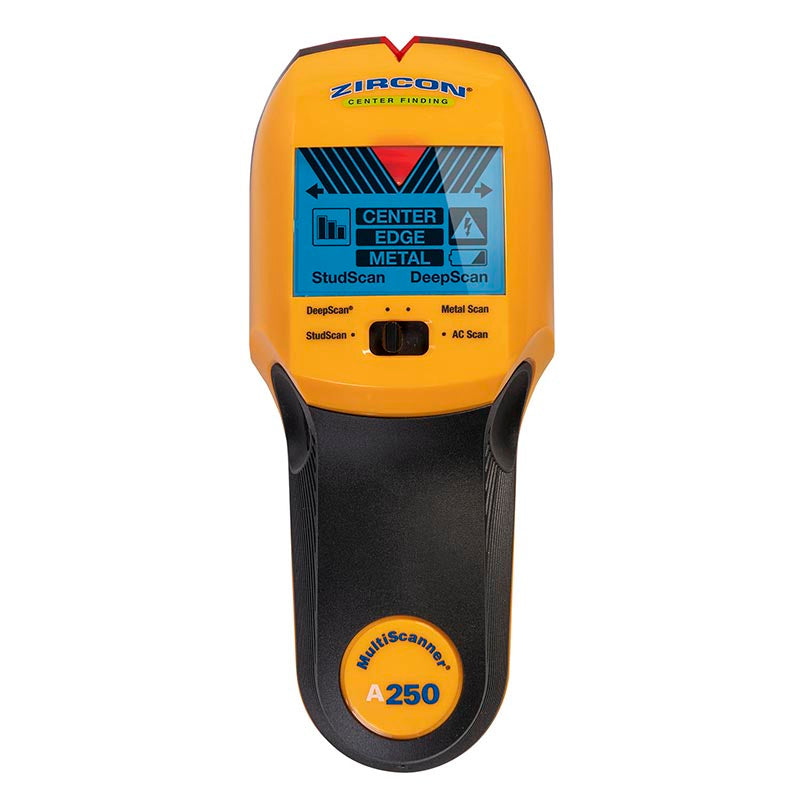
The A250 uses a backlit monochrome LCD with mode and signal-strength bars, center/edge cues, audio and a SpotLite pointer. The display is not the ColorTrip scheme used by A250c, and the original A250 image visibly carries the A250 name. The translucent base and illuminated marking groove are intended to help mark a location. These features may make the reading easier to transfer to a pencil mark, but they do not establish what is behind a wall.
The instructions recommend beginning in StudScan, holding the tool flat and still through calibration, then sliding slowly while holding the power control. Mark the edge and center cues separately and repeat the path at another height. Use DeepScan only when the surface or initial result calls for it; use Metal Scan or AC Scan when those are the actual targets. The modes do not become interchangeable just because a single tool contains all of them. The scanner uses one 9V alkaline battery, which the manufacturer says is not included.
Surface conditions remain the limiting factor
Zircon describes the A250 for indoor use. The manual says irregular plaster thickness makes studs difficult to locate in either stud mode and that metal mesh reinforcement prevents stud detection. It notes that Metal Scan may find nail heads in wood lath, but that is a clue to a fastener line, not proof of stud finding through plaster. The instructions also caution that the scanner cannot detect wood studs or joists through carpet and padding. Moisture, foil or metallic fibers, fresh paint and uneven texture can change results as well.
WireWarning and AC Scan deserve the same caution. The manual identifies cases where wiring may be obscured, including shielding, conduit, depth and wet conditions, and explains that an AC field can appear wider than the actual wire. A warning should lead to safer investigation, not permission to make a hole. If a scan does not show voltage, that does not prove a wall is wire-free. Turn off electrical, gas and water supplies before penetrating a surface and use construction details and other appropriate checks.
How it differs from close alternatives
The A250 shares a family name and some mode logic with A250c, but it should not be merged with that product. The current A250 page describes a traditional backlit LCD and a four-mode selector; A250c has a different suffix, a distinct SKU and a ColorTrip display. A200 is also a separate scanner. Their similar StudScan and DeepScan numbers do not make the model identities or interface details interchangeable. Meanwhile, the SuperScan ID takes a different approach: it reports several signal classes in one One Touch mode rather than asking the user to choose among the A250's four modes.
Practical assessment
The A250 is worth considering for someone who will use both shallow and deeper stud scans and wants separate metal and live-AC searches on the same tool. It is a less compelling fit if you want a single uncomplicated edge finder or if your wall is lath-and-plaster, tile, metal-mesh-backed or otherwise undocumented. Its strongest practical feature is not one isolated maximum; it is the ability to choose a mode matched to the target. Its main responsibility is to make that choice correctly, then confirm the result with more than one pass and more than one source of information.
This assessment uses Zircon's exact A250 product page and linked English instructions, checked October 31, 2026. No hands-on test, measurement, ownership, customer-experience summary, current seller availability or offer-specific package check was performed.
Key specifications
Key details at a glance
| Maximum stated stud depth | 1.5 in |
|---|---|
| Depth qualification | The exact page and manual state up to 3/4 inch for StudScan and up to 1 1/2 inches for DeepScan stud finding. Metal Scan has separate target-specific distances and AC Scan is for live wiring; those do not extend stud depth. A deeper scan may report an object that is not a stud. |
| Documented scan modes | ['StudScan', 'DeepScan', 'Metal Scan', 'AC Scan'] |
| Center and edge indication | Yes |
| Live-wire meter | Yes |
| Battery requirement | One 9V alkaline battery |
Use the exact model’s instructions for operating limits, supplied equipment and version differences.
Sources for this review
Sources for this assessment
Check this model against your wall
Use the finder to compare documented surface limits, center/edge indications and other requirements. A match is not a safety certification.