
Your needs, this model
Does it fit your priorities?
What wall types does the original Walabot DIY document?
Walabot support says the original unit can be used on drywall and concrete and cannot be used on lath and plaster. A separate official detection article names wood/metal studs and gives its four-inch target reach specifically for drywall. Current general support excludes tile, brick, metal-backed materials, stucco, non-flat surfaces and wire mesh; do not apply the drywall range to concrete.
Explore this need in the finder →Can the original DIY show a stud center?
Walabot's help instructions say the center can be read when the stud appears in the middle of the app display. The app image is a cue to confirm, not a physical measurement or a safe-drilling clearance.
Explore this need in the finder →Does the four-inch claim mean the app tells me how deep a stud is?
No. The model-labelled FAQ gives up to four inches as a general detection reach for named targets, including studs, while separate Walabot support says DIY devices do not display object depth. Use four inches only as a documented comparison limit, not a measured reading or promise.
Explore this need in the finder →The Walabot DIY (U.S. manufacturer part number DY20BCGL02) is the original Android-linked wall-imaging unit, not the later DIY Plus, Plus X, or Wi-Fi-connected DIY 2. Its maker describes a radio-frequency device whose phone app turns a signal into a visual representation. This is a source-based assessment of archived documentation, not a hands-on test. Walabot now classifies the original DIY family as an older, discontinued generation, so any surviving offer deserves an exact-model and condition check.
A visual tool that depends on a phone
The original DIY is a handheld sensor that connects by USB to a compatible Android phone and the Walabot DIY app. Walabot's older-model help now states Android 7.0 or newer with USB On-The-Go support; a historical model FAQ lists Android 6.0. That age conflict matters for a discontinued device: do not assume an old handset, adapter, or sideloaded app will work just because a connector fits. Confirm the exact phone and current app path before buying.
Walabot describes Images, Panoramic, and Expert app views for this generation. Images provides an interpreted picture; Panoramic is described as a broader wall-line view; Expert displays raw signal imagery for closer interpretation. The modes change what the app presents, not the scanner's physical target. A graphic that resembles a stud is still a signal interpretation, and the manual does not turn the display into a certified stud locator or a safety tool.
The maker describes a center-in-screen cue: when the app image places the stud in the middle, that is the center location aid. The exact model documents reviewed here do not identify a dedicated edge arrow or edge lamp, so this assessment credits center information only. It also does not credit a live-wire meter. Walabot says wires can appear as an imaged object, but a visible wire pattern is not an electrical warning, and a missing pattern is not proof that no wire is present.
Read the four-inch figure as a reach, not a depth reading
Walabot's model-labelled original DIY setup/support document says that it detects listed targets—including wood and metal studs—within four inches or ten centimetres in drywall; Walabot separately lists concrete as usable but the same numeric range is not applied to concrete here. That is a stated maximum reach, not a claim that every stud will be found at that distance in every wall. It is also different from measuring how far behind the surface an object sits. In a separate help article, Walabot says DIY devices do not show an object's depth. The app offers an image, not a ruler through the wall.
This distinction makes the original model unusual in the present comparison library: it has a documented general stud-target ceiling of four inches, while many later product pages state a general object limit but do not separate wood-stud depth. The number therefore meets the site's slider comparison thresholds up to 2.5 inches when the earlier-model option is selected, but it should not be read as a guaranteed drilling depth or compared with a measured test.
Surface support and setup limits
For the original DIY, Walabot's model-labelled material names drywall and concrete, and its object-support help lists studs in drywall. Do not transfer the later Plus's lath-and-plaster mode to this black original. Walabot's family guidance warns against stucco, vinyl, ceramic tile, brick, metal-backed material, non-flat surfaces, chicken-wire mesh and corrugated wire. Those are important exclusions, not minor fine print: a different surface layer can change the return the phone displays.
Plan on a calibration step with the unit firmly against the wall. The maker's tutorial instructs the user to calibrate before scanning and to repeat that baseline for a new wall. A controlled pass across a known section, followed by repeat passes and an independent check, is more defensible than treating one screen as proof. For work near electrical or plumbing routes, use plans, shut down relevant circuits before penetrating a wall, and never infer a safe spot from an absent app signal.
What the old package and family comparison mean
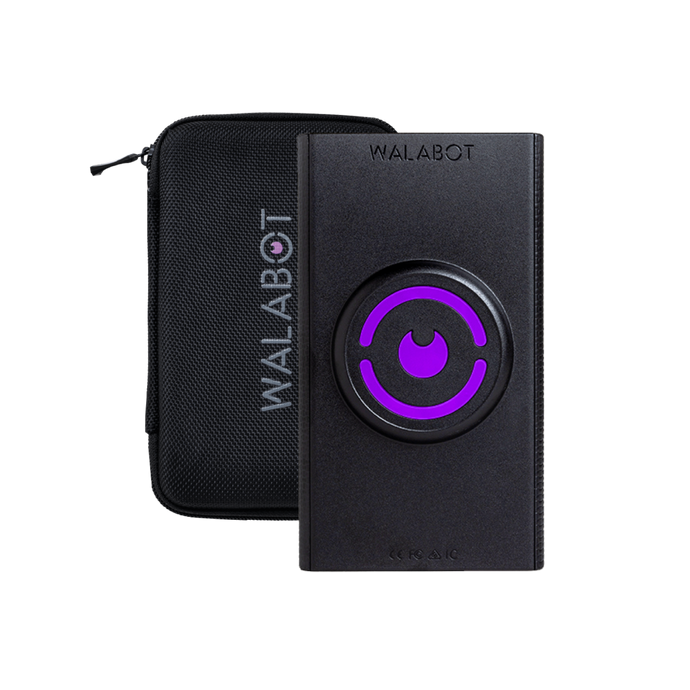
The manufacturer setup manual lists the scanner, Micro-USB and USB Type-C connection cables, wall-protective film, and a gel pad in its illustrated original DIY package instructions. The official product image also shows a case, but that artwork is not a box checklist, and the exact retail listing does not establish that a case accompanies every U.S. offer. A used unit should be checked for a compatible cable, a serviceable gel pad and film, working USB contacts, and the specific DY20BCGL02 identity.
Compared with the original DIY, Walabot says the DIY Plus adds an Expert-mode plaster workflow and built-in glide strips. Plus X is a separate model with its own image modes and exact package identity. Both are Android-only older devices, but neither model's capabilities should be folded into the black original merely because the app name is shared. The current DIY 2 and DIY 2 M are later generations with different phone connectivity and different surface/depth documentation.
Assessment
The original Walabot DIY has a meaningful documented combination—Android/OTG imaging, a center-in-screen cue, drywall and concrete use, and a four-inch general drywall stud-target reach—but it asks more of its owner than a stand-alone display finder. Phone compatibility, calibration, image interpretation, model identity and old-package condition all need attention. Consider it only as an earlier reference when the exact handset and seller contents check out; do not treat its image as a measurement, a live-wire alarm, or a safe-drilling guarantee.
Key specifications
Key details at a glance
| Maximum stated stud depth | 4 in |
|---|---|
| Depth qualification | Current Walabot support states that named targets including studs can be detected up to four inches/ten centimetres in drywall, while separate support says the app does not display object depth. An older manufacturer-authored booklet copy grouped drywall and concrete together; the current official depth page names drywall, so the matcher credits four inches only to the drywall plan and assigns no numeric range to the separate concrete plan. |
| Documented scan modes | ['Images Mode', 'Panoramic Mode', 'Expert Mode'] |
| Center and edge indication | No |
| Battery requirement | No separate battery or charging claim is made for this exact U.S. unit; the documented phone-connected USB workflow is required. |
Use the exact model’s instructions for operating limits, supplied equipment and version differences.
Sources for this review
Sources for this assessment
- Do the older Walabot DIY models work with iPhones?
- What types of objects can the Walabot DIY devices detect?
- Do I need a phone to use Walabot DIY devices?
- How can I find a stud center?
- Walabot DIY What's the Drill model-labelled setup and calibration tutorial
- Can Walabot DIY devices show the depth of an object?
- What type of walls can't the Walabot DIY devices scan?
- Official Walabot DIY historic catalog scanner image
- What can Walabot DIY devices detect?
- Can the Walabot DIY be used on lath and plaster walls?

Check this model against your wall
Use the finder to compare documented surface limits, center/edge indications and other requirements. A match is not a safety certification.