
Your needs, this model
Does it fit your priorities?
Can the Plus work on lath and plaster?
Walabot's model-specific Plus FAQ says its additional lath/plaster operation locates objects in Expert mode, and its Plus object help names studs in plaster mode. This is conditional source support, not a guarantee for every wall thickness or metallic reinforcement.
Explore this need in the finder →Does the Plus report how deep a stud is?
The manufacturer Plus FAQ says the device cannot show object depth. Retail copy repeats a general four-inch reach, but the reviewed exact maker source does not assign that figure to wood-stud depth, so this model fails a numeric stud-depth threshold.
Explore this need in the finder →What must I check before using a used Plus?
Walabot's current older-model support calls for Android 7.0+ and USB OTG; an older FAQ lists 6.0. Check the exact phone/app, both old cable types, the condition of gel pads and strips, and whether the scanner can calibrate on a new wall.
Explore this need in the finder →The Walabot DIY Plus (U.S. maker part number DY2PBCGL01) is a discontinued Android-connected wall imager with a particular documented distinction from the original DIY: the Plus adds a lath-and-plaster workflow in Expert mode. That can make this old model relevant to a narrow renovation problem, but the feature is not a blanket promise for every historic wall. This assessment is based on Walabot's model-labelled help and quick-start material plus an exact U.S. retail identity bridge. I have not used or tested the scanner.
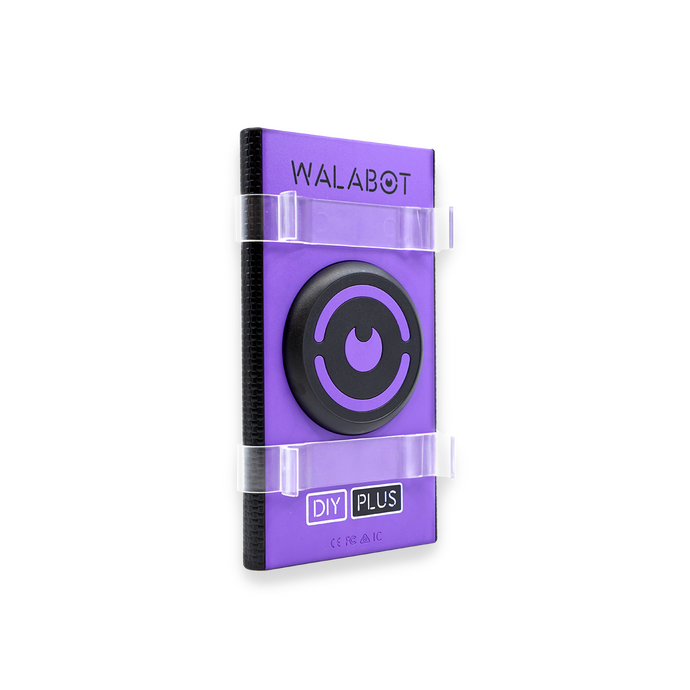
The case for Plus is its plaster mode, not a generic range claim
Walabot's DIY Plus FAQ says the Plus can locate objects in lath-and-plaster walls with its plaster function in Expert mode, and its object-support page names wooden and metal studs among the targets for drywall, lath and plaster, and concrete. The manufacturer's guide distinguishes this added workflow from the original DIY. It is the reason to investigate Plus if your wall is lath and plaster: not an inference from a similar-looking scanner or a seller's headline.
Even so, wall composition matters. Lath may be wood, metal or mixed, and later repairs can add mesh or layers that change what the scanner sees. Walabot's statement does not guarantee performance through every lath depth, reinforcement, plaster thickness or finish. The maker's general exclusions include tile, brick, stucco, vinyl, metal-backed wallboard, non-flat surfaces, chicken wire and corrugated wire. If you see a mesh or a hard facing, do not assume the Plus's plaster mode covers it. The sensible use is a candidate-location aid on a wall that fits the manufacturer's stated setup, followed by independent checks before making a hole.
Phone, calibration and handling are part of the tool
This is not a self-contained detector with a screen. The old DIY units connect by cable to an Android phone, and the app processes the signal into a visual representation. Walabot's current support page specifies Android 7.0 or later and USB On-The-Go support for the older DIY, DIY Plus and Plus X. Older material says Android 6.0, a documentation mismatch worth resolving against your exact phone and the current app before buying a used unit. The maker says normal use can be offline after the app is installed, but installation or updates require Wi-Fi.
Walabot's tutorial tells users to hold the flat side firmly against the wall while calibrating and to repeat calibration when starting another wall. A loose grip, uneven surface, depleted or damaged accessory, unsupported phone, or a wall outside the documented range can undermine the value of a scan. The Plus quick-start checklist names a gel pad, protective strips, Micro-USB and USB Type-C cables; inspect the actual listing for these parts and their condition. The quick-start material also says the sensor is USB-powered rather than battery-operated.
Read the app as an image, not a safety instrument
Images Mode provides a visual representation, while Expert Mode exposes a different view that the maker associates with its plaster workflow. The app can indicate a stud center when the stud is positioned in the middle of the display. This is a location cue, not a measurement of the stud's edges. The reviewed manufacturer sources do not document an edge indication for this model, so a shopper who requires marked left and right boundaries should choose a different verified approach.
Do not confuse the displayed image with a depth readout. Walabot's FAQ explicitly says the DIY devices cannot display object depth. A retailer's broad “four inch” statement does not become a model-specific stud-depth maximum just because it appears on a Plus listing. The available exact maker material does not establish a numeric stud-detection ceiling for this SKU, so a numeric depth requirement should not be treated as satisfied here. The manufacturer also says the Plus cannot distinguish a wire from a pipe. It is not a dedicated live-wire meter, and an absent or ambiguous image cannot prove that an area is electrically safe.
What to check on a discontinued listing
First, verify that the unit is actually DIY Plus, part number DY2PBCGL01, rather than original DIY, Plus X or DIY 2. The models look related but differ in support and documented surface operation. Second, check your phone's Android version, USB OTG function and connector; do not assume a cable shown in a stock photo is in the box. Third, ask about the scanner's ability to calibrate, the state of any gel pad and the protective strips. Finally, match your wall to the documented surface and mode before considering price or availability; old stock status changes, and a current support article is not proof of seller inventory.
Assessment
The DIY Plus is a specialized earlier option for a buyer who can verify an Android/OTG setup and has a lath-and-plaster use case that corresponds to Walabot's stated Expert-mode workflow. It is a poor fit if you need a numeric depth specification, edge marks, a live-wire meter, phone-free operation, or assurance on tile, metal mesh or unknown wall construction. The center cue can help interpret a candidate stud, but not decide where it is safe to drill. If the used package and phone compatibility cannot be confirmed, the old Plus label alone is not a reason to choose it over a current, fully supported scanner.
Key specifications
Key details at a glance
| Depth qualification | Walabot's manufacturer FAQ says DIY Plus cannot show object depth. A retailer describes a general four-inch reach, but reviewed maker material does not give an exact Plus wood-stud detection ceiling; the site's numeric stud-depth capability remains unknown rather than inherited from the original DIY or a sibling model. |
|---|---|
| Documented scan modes | ['Images Mode', 'Panoramic Mode', 'Expert Mode'] |
| Center and edge indication | No |
| Battery requirement | Manufacturer quick-start says the Plus requires no batteries and is powered through the USB connector; the compatible phone supplies the connected operating arrangement. |
Use the exact model’s instructions for operating limits, supplied equipment and version differences.
Sources for this review
Sources for this assessment
- What types of objects can the Walabot DIY Plus detect?
- Do I need a phone to use Walabot DIY devices?
- Do the older Walabot DIY models work with iPhones?
- How can I find a stud center?
- Walabot DIY What's the Drill model-labelled setup and calibration tutorial
- Can Walabot DIY devices show the depth of an object?
- What type of walls can't the Walabot DIY devices scan?
- Walabot official catalog image of DIY Plus hardware
- Can the Walabot DIY Plus be used on lath and plaster walls?

Check this model against your wall
Use the finder to compare documented surface limits, center/edge indications and other requirements. A match is not a safety certification.