
Your needs, this model
Does it fit your priorities?
Can Plus X scan lath and plaster?
Walabot's Plus X-specific support page says it can be used on both drywall and lath-and-plaster. It does not promise a reading through every thickness, metallic backing or irregular surface, so use the instructions and verify the result independently.
Explore this need in the finder →Which app views does the Plus X support?
Walabot's exact Plus X troubleshooting article names Images Mode and Expert Mode. The first supplies a maker-interpreted visual and the second shows raw radar data; neither is a live-wire safety clearance.
Explore this need in the finder →Does the Plus X meet a numeric stud-depth threshold?
The exact reviewed maker pages do not state a Plus X stud-depth maximum. A retailer's generic four-inch marketing range is not sufficient for the site's numeric stud-depth matcher, so a positive depth requirement is not satisfied.
Explore this need in the finder →The Walabot DIY Plus X (U.S. model number D2KGBC0P01) is an earlier phone-linked wall imager, not the DIY Plus under a new package name and not the later DIY 2. Walabot's old-model help lists Plus X among the discontinued, Android-only devices. Its support pages document drywall and lath-and-plaster use, Images and Expert views, firm-contact calibration, and a center cue in the model-labelled tutorial. This is a document-based fit assessment, not a hands-on review or performance test.
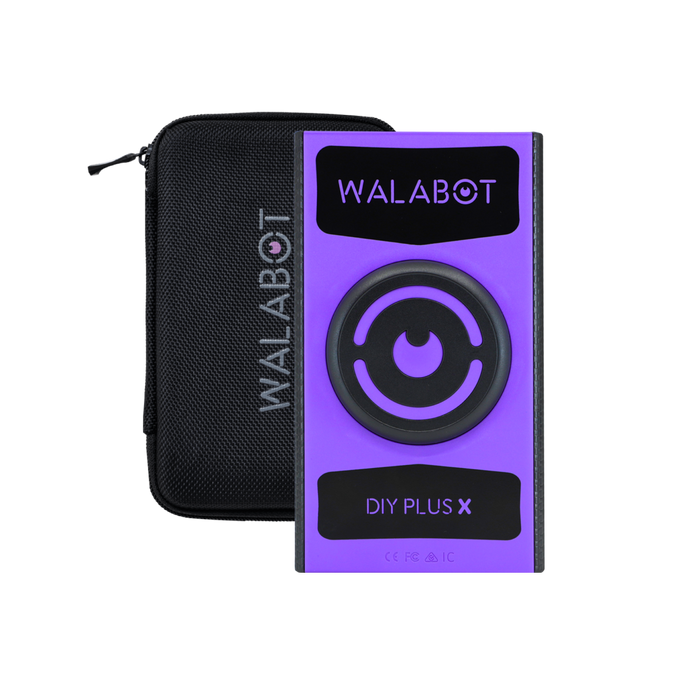
Separate Plus X support from Plus documentation
One manufacturer help page titled for Plus X has a body that identifies the DIY Plus, so it is not sound evidence on its own for the X's object list or modes. I treated that mismatch as a source conflict rather than copying its answer into this model's facts. Other Plus-X-labelled Walabot pages directly state that the X works on drywall and lath-and-plaster, and describe its Images and Expert modes. The manufacturer's “What's the Drill” tutorial has separate Plus-X setup, calibration, stud-finding and Expert-mode sections, and gives the same center-in-screen instruction for this model.
Walabot's X-specific surface answer is useful but conditional. It says both drywall and lath-and-plaster; it does not specify every lath material, plaster thickness, reinforcement or wall build-up. Do not extend that to tile, brick, stucco, vinyl, metal-backed drywall, chicken-wire mesh, corrugated wire or irregular surfaces, which the maker's general support excludes. If the wall's construction is uncertain, treat the image as exploratory and verify by a method appropriate to that assembly.
Phone compatibility and the calibration routine
Plus X uses a phone and the Walabot DIY app; it is not an independent display instrument. Current Walabot support says the older DIY, DIY Plus and Plus X need Android 7.0 or later and USB On-The-Go. An older Plus FAQ gives Android 6.0, so the sources disagree historically; the current support requirement is the safer purchase check. Ask about your exact phone model and connector rather than assuming that any Android handset will work. The manufacturer says a cellular or data connection is not required for normal use once the app is available, although Wi-Fi is needed for installation or updates.
The maker's tutorial says to place the flat side firmly against drywall, start calibration while holding it there, and repeat the process when moving to another wall. This means setup and contact pressure are not optional details. Check that the used unit can power from the phone connection, calibrate, and maintain the intended contact. The exact retailer page used to identify D2KGBC0P01 names the scanner; it does not establish that the case pictured elsewhere, cables, protective strips or gel pad are included. Confirm the actual package with the seller, and do not count an unverified accessory as part of the product's value.
What its visual cues establish—and what they do not
Walabot describes Images Mode as a graphical representation of wall objects and Expert Mode as a raw or heat-map style view. Its tutorial says a stud center indication appears when the device is positioned over the center. That supports a center-finding use case, not a documented edge-finding capability. The reviewed sources do not give Plus X a verified maximum stud depth, so a general retailer “four inch” claim is not used as a hard numeric matcher specification. A claimed object-detection reach is not necessarily a stud-specific guarantee and is not the same as measuring how far beneath the surface an object sits.
Walabot's broader DIY support also says the family cannot display an object's depth. The X's image should therefore be read as a visual clue for interpretation, not a depth gauge, wall map or proof that an intended drilling point is clear. The maker's mode documentation can show representations of studs and other objects, but it does not turn this older scanner into a dedicated live-wire meter. Never rely on a lack of wire imagery to rule out energized wiring; use utility-safe procedures and verify independently before drilling.
When the Plus X is worth investigating
The Plus X is worth a closer look only when you value the documented phone-app workflow, can confirm a compatible Android/OTG setup, and need a wall type Walabot explicitly names—especially lath and plaster. It is not a general answer to every old-wall problem, and there is no numeric stud-depth threshold here that would let it satisfy a depth-limited purchase requirement. A buyer seeking a device with a simple on-tool display, a live-wire warning meter, edge marks or a current manufacturer-supported product should compare other reviewed models instead.
Because the Plus X is discontinued, separate the identity question from the seller's stock claim. Match the exact D2KGBC0P01 model designation, verify that the offered hardware works, check app compatibility for your phone, and confirm every cable or accessory the listing says is included. Manufacturer support pages help explain the old device; they do not prove current app availability or current retail stock. Treat a secondhand or stale listing as unverified until the physical package and operating setup are clear.
Assessment
DIY Plus X is a narrowly useful historical scanner with credible maker documentation for center cues and conditional lath-and-plaster scanning. Its drawbacks are consequential: phone dependence, discontinued status, calibration on each wall, no verified numeric stud-depth ceiling, no documented edges, and no live-wire meter. For a lath-and-plaster buyer willing to verify the old phone/app and exact package, those limitations can be assessed before purchase. For a job where any one of them is essential, the Plus X should not be treated as a substitute for a purpose-built feature the sources do not document.
Key specifications
Key details at a glance
| Depth qualification | The U.S. retailer page markets a general four-inch reach, but the exact Plus X manufacturer support pages reviewed do not give a numeric stud depth and Walabot says DIY models do not show object depth. The shopper's numeric stud-depth field is therefore unknown; the retailer's general reach is not upgraded to a model-specific stud threshold. |
|---|---|
| Documented scan modes | ['Images Mode', 'Expert Mode'] |
| Center and edge indication | No |
| Battery requirement | USB-connected phone workflow; an exact Plus X internal battery/charging specification is not documented in the reviewed sources. |
Use the exact model’s instructions for operating limits, supplied equipment and version differences.
Sources for this review
Sources for this assessment
- Can the Walabot DIY Plus X be used on lath and plaster walls?
- My Walabot DIY Plus X isn't working properly - what can I do?
- Do the older Walabot DIY models work with iPhones?
- Do I need a phone to use Walabot DIY devices?
- What types of objects can the Walabot DIY Plus X detect? (title/body mismatch noted)
- Walabot DIY What's the Drill model-labelled setup and calibration tutorial
- Can Walabot DIY devices show the depth of an object?
- What type of walls can't the Walabot DIY devices scan?
- Walabot official DIY Plus X historic catalog product image

Check this model against your wall
Use the finder to compare documented surface limits, center/edge indications and other requirements. A match is not a safety certification.