
Your needs, this model
Does it fit your priorities?
Does the S300 give both center and edge cues in one pass?
Yes. The exact STHT77407 manual says one pass locates both edges and center, with a Center icon/tone and relative-position graphic. This is a different workflow from the separate METAL SCAN or AC TRACKING settings.
Explore this need in the finder →Is the 3-inch METAL SCAN figure the S300's stud depth?
No. The manual's stud table tops out at 1-1/2 inches through drywall. The separate 3-inch METAL SCAN mode searches for metal and must not be counted as a stud-finding range.
Explore this need in the finder →Can the S300 combine its center-and-edge scan with AC TRACKING?
The manual describes center/edge finding in STUD mode and identifies AC TRACKING separately. The finder keeps these as distinct operating plans rather than assuming both signals are available at once; either way, an AC alert is not safe-to-drill confirmation.
Explore this need in the finder →Research note: This assessment is based on the exact STANLEY Stud Sensor 300 / S300 instructions for model STHT77407, revision A dated August 2008. It is a document-based review, not a hands-on test; no measured performance, ownership, current retail offer, stock or price is claimed. The saved current U.S. STANLEY Measuring & Marking page did not contain the exact S300/STHT77407 string. The model is therefore treated as an earlier reference, not as a claim that a used or remaining-stock unit cannot exist.
One-pass center and edge indications in STUD mode
The S300's exact manual describes the unit's STUD setting as locating both stud edges and the center in one pass. An LCD relative-position graphic and Center icon/tone communicate the center, while the top channel can be used to mark the result. That is a meaningful distinction from the S100 and S150 manuals reviewed alongside it: those two models signal edges and have the user estimate center from marks approached from opposite directions. Do not assume this S300 workflow applies to every Stanley sensor with a similar case.
The manufacturer states up to 1-1/2 inches (38 mm) for wood or metal studs through drywall. The manual cautions that thickness, density and moisture affect performance, so the figure is a maximum, not a guaranteed detection depth. A 0.7-, 1.0- or 1.5-inch preference is within the published ceiling; 1.6 inches is not. The arithmetic does not say that a particular wall or framing member will be found at that depth. The manual also specifies a separate METAL SCAN mode up to 3 inches. That longer number describes metal-target scanning, not stud detection; counting it as a stud range would conflate two different functions.
Use the correct mode for the question
The front controls identify STUD, METAL SCAN and AC TRACKING as separate functions. The center-and-edge instructions belong to STUD mode. METAL SCAN addresses metal targets and has its own range; AC TRACKING is the wire-warning function. For compatibility matching, these are not one combined scan plan. A request for a stud center and a live-wire detector at the same time should not be treated as proven by simply combining features that the manual assigns to distinct modes.
For stud finding, place the tool flat on a suitable wall area and wait for calibration before moving. Keep the button pressed and slide slowly in a straight line, following the relative-position screen and center indication. The manual explains how to mark center or edges through the top channel. A second pass or another direction can help assess consistency, but neither a beep nor an icon identifies every hidden service or confirms that a cavity is clear.
Surfaces and limits
The instructions describe use on gypsum drywall and list carpet, foil-faced surfaces, ceramic tile, cement or concrete, and metal/plaster walls as unsuitable. They limit the device to interior surfaces. The evidence does not support lath-and-plaster, tile, exterior cladding or metal-mesh stud-finding plans. A center display and a higher maximum do not override those material restrictions. If the finish is unfamiliar, check the wall construction before relying on an electronic sensor.
The S300 requires one 9V battery, not included. Calibration should be done at an appropriate point away from a stud or metal and not on a wet or freshly painted surface, following the manual. The instructions also caution that broad or doubled framing and unusual spacing can affect interpretation. Treat the output as a locating aid and confirm the pattern rather than drilling from a single signal.
AC TRACKING: helpful warning, not proof of safety
In AC TRACKING mode, the manual describes detection of live 120V AC wiring up to 2 inches (50 mm) through drywall, with an AC icon, red warning light and sound. It warns that shielded conductors, metal conduit or casing, metallized walls, and thick or dense construction may prevent a detection. The up-to-2-inch value applies to the wire warning, not to the stud mode. A no-alert result is not proof that a location is safe to drill. De-energize and independently verify utilities before penetration; consult a qualified professional when the path is uncertain.
Similarly, do not interpret the separate METAL SCAN as a way to certify the absence of pipes, conduit or other hazards. Its stated metal range and its target are different from the stud-finding plan, and it is not a substitute for a safe-work procedure.
Identification and comparison
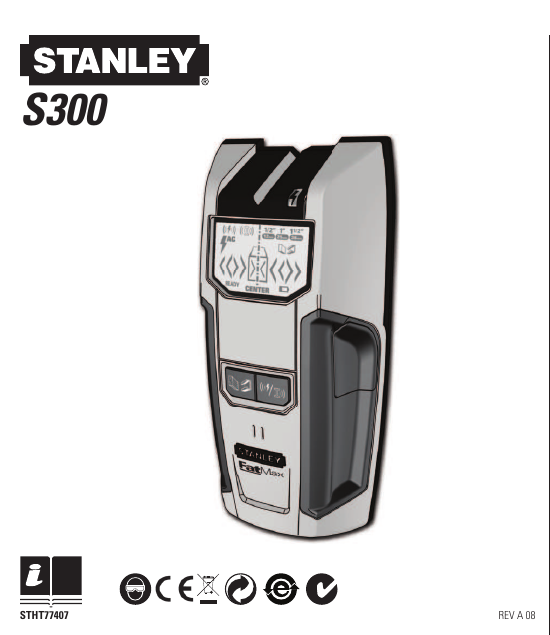
The image shown with this assessment is the S300 illustration extracted from page one of the exact STHT77407 instructions. It is a manual illustration, not a photograph of a retail item or evidence of tested performance. The exact model code is useful when comparing listings because the S100, S150, S200 and later STANLEY instruments have different documented indications and operating arrangements. A listing that only says “Stanley stud sensor” does not resolve which manual or modes apply.
The S300 is a documented earlier option for someone who values direct center and edge indications through dry interior drywall, plus distinct metal-target and AC-tracking modes, and who is prepared to switch modes intentionally. Compared with the S100/S150, its center cue is the notable workflow difference; compared with the S200, the STHT77407 manual explicitly calls out both edges and center, as well as distinct AC TRACKING and METAL SCAN. Its drawbacks include the 9V battery, calibration, older-model status, explicit surface exclusions, and the need not to confuse separate mode limits. There is no evidence here of today's retail availability, package, warranty, or condition of any individual unit.
Sources: STANLEY S300 / STHT77407 instructions, Rev A 08; STANLEY current U.S. Measuring & Marking Tools page (checked 2026-11-02; exact S300/STHT77407 strings were absent from the saved page snapshot).
Key specifications
Key details at a glance
| Maximum stated stud depth | 1.5 in |
|---|---|
| Depth qualification | The STHT77407 table states up to 1-1/2 inches (38 mm) through drywall for wood or metal studs. The separate 3-inch METAL SCAN value is not a stud-finding depth. Surface thickness, density and moisture affect sensing depth. |
| Documented scan modes | ['STUD center-and-edge scan', 'METAL SCAN', 'AC TRACKING'] |
| Center and edge indication | Yes |
| Live-wire meter | Yes |
| Battery requirement | One 9V battery, not included |
Use the exact model’s instructions for operating limits, supplied equipment and version differences.
Sources for this review
Sources for this assessment
Check this model against your wall
Use the finder to compare documented surface limits, center/edge indications and other requirements. A match is not a safety certification.