
Your needs, this model
Does it fit your priorities?
Is a one-pass center indication on interior drywall useful, without requiring a dedicated edge cue?
The S200 manual describes a relative-position display and a CENTER icon with an audible tone on a one-pass scan. It does not establish a separate edge mode, so this fit does not satisfy a requirement for edges or both edge and center cues.
Explore this need in the finder →Would the stated 3/4-inch stud limit and live-AC warning meet a 0.7-inch comparison threshold?
The manual's 0.75-inch maximum clears 0.7 inches but falls short of 0.8 inches. The separate 2-inch AC warning is not proof of a safe drill location.
Explore this need in the finder →Should the S200 be considered for tile or lath-and-plaster walls?
No match is warranted: the manual excludes ceramic tile and metal/plaster walls and supports only the listed common interior scan materials. Do not extend the drywall claim to exterior, mesh or lath-and-plaster surfaces.
Explore this need in the finder →Research note: This assessment is based on STANLEY’s model-specific instructions for the Stud Sensor 200, model STHT77406, revision A dated 2012. It is not a hands-on test, and no measured performance, ownership or current retail availability is claimed. The manufacturer’s current U.S. product pages reviewed for this edition do not show this exact model, so treat it as an earlier-model reference and verify the exact code and instructions before considering a used or remaining-stock unit.
What the S200 is designed to report
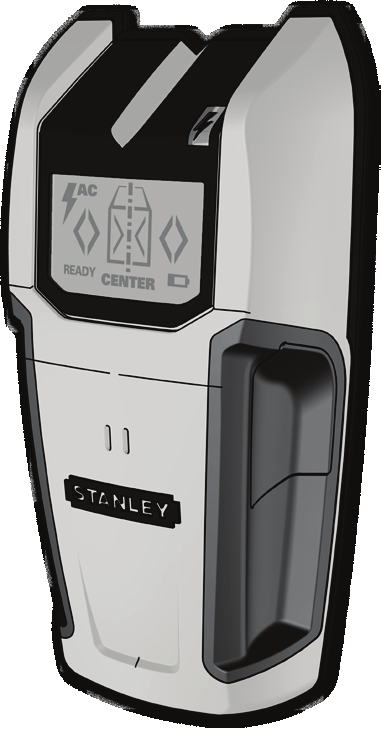
The S200 is an electronic finder with an LCD rather than a passive magnet. Its instructions describe a one-pass search that shows the stud’s relative position and then gives a center indication with a tone. A mark channel is built into the housing. The manual also says to use the handle and keep the other hand away while scanning, so the reference drawing is useful for identifying the shape but not a substitute for the operating directions.
This is best understood as a center-oriented result, not a broad multi-sensor map. The guide mentions marking centers and edges, but its procedure and display description center on the center icon; it does not spell out a separate edge mode or an edge-specific depth. I therefore would not select the S200 for a task that requires verified edge indications, or both edges and center, unless you find a matching manual for the exact unit that confirms those outputs. A center mark can help plan a bracket, but it does not reveal every stud boundary or establish what lies behind a wall.
Depth and surface limits matter more than the headline
STANLEY’s stated wood-or-metal stud limit is up to 3/4 inch (19 mm) through drywall. This is a manufacturer maximum, not a promise that the tool will detect a stud at that depth on every wall. The same instructions caution that thickness, density and moisture change the sensing result. For a minimum-depth preference of 0.7 inches, the stated ceiling reaches the threshold; at 0.8 inches, it falls short. Do not add a generic “deep scan” claim: the reviewed S200 instructions give this single stud-depth figure.
The material list is also specific. The manual covers common materials such as gypsum drywall, plywood sheathing, hardwood floors, linoleum over wood and wallpaper. It warns that carpet, foil-faced surfaces, ceramic tile, cement or concrete, and metal/plaster walls are not scannable. It describes interior use only. That makes the S200 a poor match for a tiled bath, a metal-mesh wall, exterior cladding, or lath and plaster. A successful reading on one finish should not be generalized to a different wall assembly.
Calibration and scanning routine
The S200 uses one 9V battery, which the manual says is not included. Start with the face flat against a suitable part of the wall and hold the activation control until the ready signal appears. Do not move it while it calibrates; the instructions warn against calibrating directly over a stud, metal, or a damp or freshly painted area. Then keep the control pressed and move slowly in a straight path. When the display reports the center, use the top mark channel to record it. A rough or sprayed ceiling needs a cardboard spacer, calibrated together with the tool, according to the manual.
Those directions are not a shortcut around checking the construction. Double studs and solid headers can appear as one wide target, and the manual cautions that an object with unusual spacing or width may not be a stud. Scan from more than one direction and look for a consistent pattern; do not drill solely because one indicator sounded.
The AC warning is not a safety clearance
The S200 has a separate live-AC warning, specified for 120V wiring up to 2 inches (50 mm) through drywall. The instructions describe a red light, an AC icon and a tone near a live wire. They also warn that shielded wiring, metal conduit or casing, metallized walls and thick or dense surfaces may defeat detection. Static charge can broaden the apparent warning area. The manual tells the user to switch off AC power when working near wiring and to use caution around pipes and other hidden services. A quiet display is not proof that a wall is safe to penetrate.
Who should consider this earlier reference
The S200 is a possible fit for someone comparing an older electronic center finder for ordinary interior drywall who is comfortable with a 9V battery, a 3/4-inch stated stud limit and careful calibration. Its useful distinction is the direct center cue alongside a separately documented live-wire alert. It is not the right choice when the job depends on a deeper stated stud limit, an explicit edge-only mode, tile or plaster capability, or a safety guarantee. If you compare it with an edge-sensing model, compare the actual mode and material instructions—not just the sensor name or an undated listing. The exact manual and model code matter more than a generic product-family description.
Sources: STANLEY Stud Sensor 200 instructions, model STHT77406, Rev A 06/12; STANLEY current U.S. Measuring & Marking Tools page checked 2026-11-02 (the captured page did not contain the exact S200 code).
Key specifications
Key details at a glance
| Maximum stated stud depth | 0.75 in |
|---|---|
| Depth qualification | STANLEY states wood or metal stud detection up to 3/4 in (19 mm) through drywall. The manual says surface thickness, density and moisture affect depth; this is a stated maximum, not a guaranteed reading. |
| Documented scan modes | ['One-pass stud-center finding', 'Live 120V AC wire warning'] |
| Live-wire meter | Yes |
| Built-in bubble level | No |
| Battery requirement | One 9V battery, not included |
| Built-in ruler | No |
Use the exact model’s instructions for operating limits, supplied equipment and version differences.
Sources for this review
Sources for this assessment
Check this model against your wall
Use the finder to compare documented surface limits, center/edge indications and other requirements. A match is not a safety certification.