
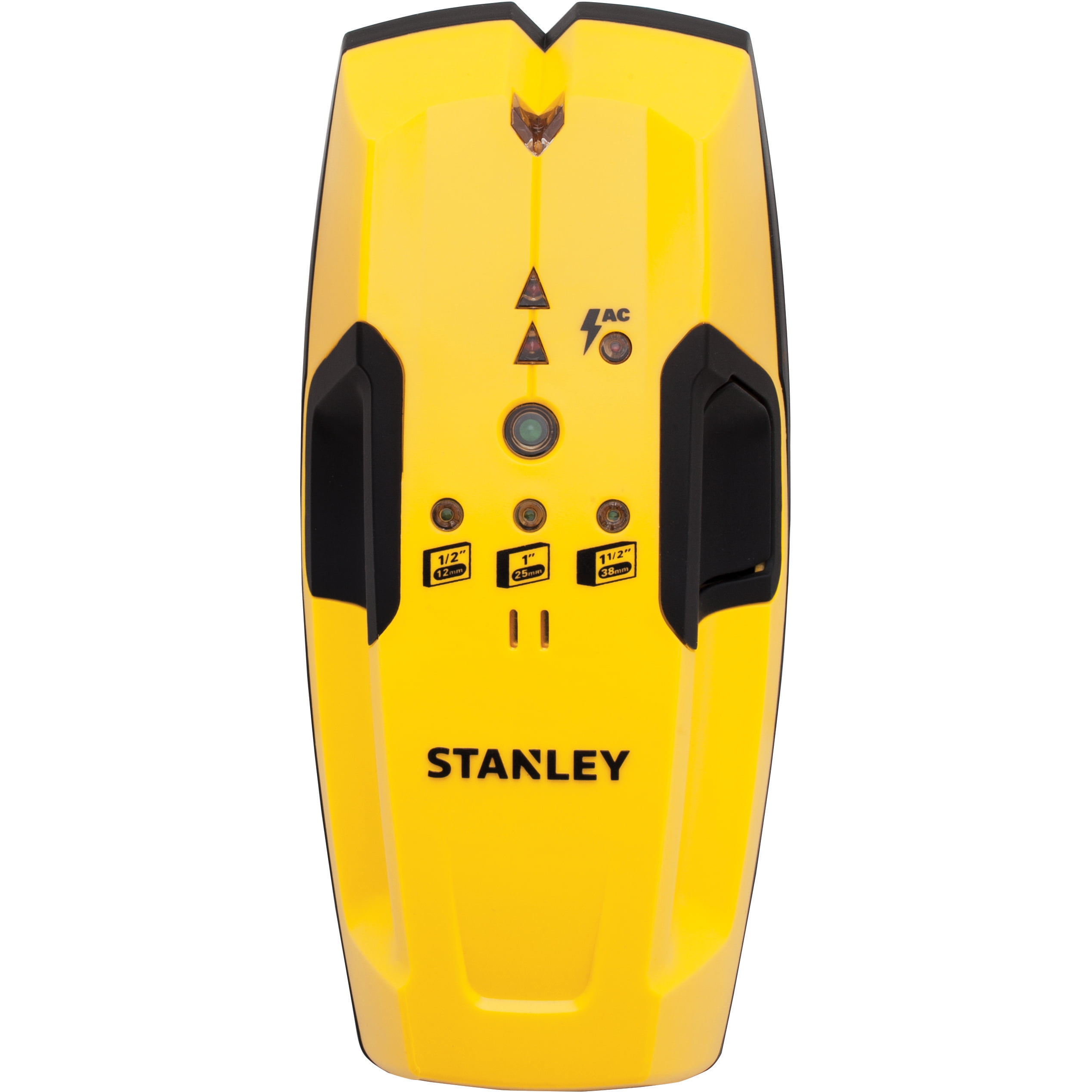
Your needs, this model
Does it fit your priorities?
Does the S150 display the center directly?
No direct center readout is described. The manual signals edges and tells the user to repeat the scan from the opposite side; the midpoint of the two pencil marks is the center estimate.
Explore this need in the finder →What is different about the S150's depth selection?
The S150 manual shows 1/2-, 1- and 1-1/2-inch read-depth settings. Choose the setting for the surface being scanned; the highest setting is a stated comparison ceiling, not a wall-specific promise.
Explore this need in the finder →Should I rely on the S150's AC warning before drilling?
No. The manual describes a live-AC proximity light and tone up to 2 inches through drywall, but lists shielded/conduit wiring and several dense or metalized walls as misses. Turn off power and use separate verification.
Explore this need in the finder →Research note: This is an evidence-led assessment of the STANLEY Stud Sensor 150, model S150 / STHT77404, identified on the exact manufacturer manual cover as revision A dated June 2012. The official PDF was opened in STANLEY's document reader and inspected; a local retrieval of the same attachment returned an empty HTTP 404 and is preserved as a failed retrieval, not treated as source content. No product photo was available for this exact model in the reviewed material, so no substitute image is presented. This is not a hands-on review, and no measured performance, current offer, retail package or stock is claimed.
Three depth settings, but still an edge workflow
The S150's important distinction from the neighboring S100 is its selected-depth stud scan. The exact manual lists 1/2-, 1- and 1-1/2-inch settings and states a maximum wood-or-metal stud depth of 1-1/2 inches (38 mm) through drywall. It displays red LEDs and sounds a tone at an edge. The documented workflow approaches the stud from opposing directions and uses the midpoint of two marks to estimate the center. The manual does not describe a dedicated LCD center readout; buyers should not confuse an edge signal with direct center-and-edge reporting.
A larger stated ceiling and selectable settings can be useful comparison points for a wall with a known layer thickness, but neither is a guarantee. The manual says thickness, density and moisture affect detection. At a 0.7-inch minimum-depth preference, the 1-1/2-inch model maximum exceeds the threshold; it also exceeds thresholds through 1.5 inches. At 1.6 inches, it does not meet the comparison. These are arithmetic comparisons against a published ceiling, not predictions of a successful scan. Select the setting appropriate to the wall layer described by the manual rather than assuming the highest setting is always better.
Keep to the documented surface envelope
The S150 instructions describe use through gypsum drywall and list the stud depth through that surface. They also exclude carpet, foil-faced materials, ceramic tile, cement or concrete, and metal/plaster walls. The evidence does not establish lath-and-plaster, tile, metal mesh, or exterior capability. A 1-1/2-inch setting does not broaden this list. If a wall finish or substrate is not one of the supported conditions, the extra depth setting is not evidence of compatibility.
The manual's routine begins with a flat placement away from a stud, metal, wet surface or fresh paint. Hold the button still until the calibration indicator goes out; then continue holding it while scanning slowly and straight. Mark an edge, reverse direction to locate the other edge, and estimate the center between marks. Recheck a result at another point or height if the wall layout suggests an inconsistent target. These are instructions for using the signal, not a promise that every cavity, doubled stud or irregular framing member will read as expected.
Wire detection is a limited warning
The manual describes a separate red LED and tone near live 120V AC wiring, up to 2 inches (50 mm) through drywall. It specifically warns that shielding, metal conduit or casings, metallized walls, and thick or dense construction may hide wiring. The number is not a safety clearance, and a missing warning does not mean it is safe to drill. De-energize and verify independently before penetrating a wall, especially near outlets, switches, plumbing or known utility routes.
The documented function is a live-AC proximity warning within this edge-finder procedure; the manual does not identify an independent AC-only tracking procedure. It is safest to compare the S150 as a stud sensor with a limited AC alert, not as a dedicated wire tracer or a device that can certify a safe area.
Battery, image and lifecycle checks
The instructions call for one 9V battery, not included. The manual illustration needed to verify the exact S150's body was not available through the locally retrievable source, so the article deliberately includes no image rather than substituting an S100, S200 or S300. If you are assessing an older candidate, match the STHT77404 code and S150 wording to its own instructions. The 2012 manual and absence of the exact code from the saved STANLEY current U.S. Measuring & Marking page support classifying it as an earlier reference; they do not establish present availability or the package contents of a particular listing.
Who should compare the S150
This model belongs in a comparison for dry interior drywall when edge indications are acceptable, a selectable depth range is useful, and the buyer is comfortable calculating center from two marks. It is distinct from the S100's single stated 3/4-inch ceiling and from the S300's directly documented one-pass center-and-edge output. The trade-offs are an older manual-based configuration, extra setup around depth selection, a 9V battery, explicit surface exclusions, and an AC alert that cannot establish safety. Do not pay a premium based only on the 1-1/2-inch figure or an attractive listing photo; verify the exact code, matching instructions, condition, battery arrangement and any seller's return terms.
Sources: STANLEY S150 / STHT77404 instructions, Rev A 06/12 (official document-reader copy inspected; local attachment retrieval returned 404); STANLEY current U.S. Measuring & Marking Tools page (checked 2026-11-02; exact S150/STHT77404 strings were absent from the saved page snapshot).
Key specifications
Key details at a glance
| Maximum stated stud depth | 1.5 in |
|---|---|
| Depth qualification | The S150 manual lists wood or metal stud detection up to 1-1/2 inches (38 mm) through drywall. The selected 1/2-, 1- or 1-1/2-inch read-depth mode should be chosen to suit surface thickness; material thickness, density and moisture affect sensing depth. |
| Documented scan modes | ['Stud-edge scan: 1/2-inch, 1-inch or 1-1/2-inch selected depth', 'Live 120V AC proximity warning'] |
| Center and edge indication | No |
| Live-wire meter | Yes |
| Battery requirement | One 9V battery, not included |
Use the exact model’s instructions for operating limits, supplied equipment and version differences.
Sources for this review
Sources for this assessment
Check this model against your wall
Use the finder to compare documented surface limits, center/edge indications and other requirements. A match is not a safety certification.