
Your needs, this model
Does it fit your priorities?
Is a selectable depth useful when the intended wall is ordinary interior drywall?
The 77-115 manual offers wood/metal edge-scan settings at 1/2, 1 and 1-1/2 inches. At each setting, mark the two edges from opposite directions to estimate the center; no single-pass center cue is documented.
Explore this need in the finder →Does the deepest setting cover a 1.5-inch comparison threshold?
The maker states up to 1-1/2 inches for the highest mode, but labels it a maximum affected by wall thickness, density and moisture. It clears a 1.5-inch screen only as a comparison figure, not as a guaranteed reading.
Explore this need in the finder →What if the wall is lath-and-plaster or the job calls for wire warning?
The manual conditionally permits ordinary lath-and-plaster, but not unusually thick plaster or metal mesh. It does not document a live-wire meter, so the 77-115 cannot satisfy that extra warning requirement; its support document also excludes tile, concrete, carpet and foil-faced material.
Explore this need in the finder →Research note: This assessment follows STANLEY’s model-specific IntelliSensor Plus manual for 77-115 and the exact diagram printed in that manual. It is not a hands-on test, and I make no claim of ownership, measured performance, present stock or package contents. A broad U.S. Measuring & Marking category snapshot checked for this edition does not show the exact code; that page is not a dedicated finder inventory, so the listing here is an earlier-model reference, not proof that retailers have no remaining stock.
A depth selector, not a center-map display
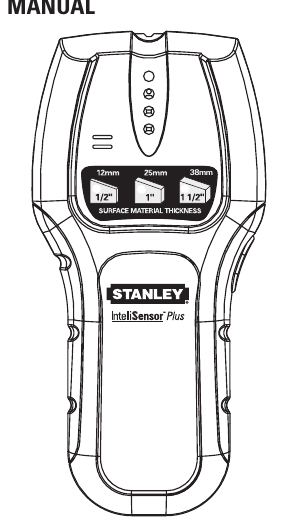
The 77-115 is the most configurable of this group of older IntelliSensor manuals. Its instructions describe separate settings for 1/2-, 1- and 1-1/2-inch surface thickness, selected with the side control. The maker describes the sensor as finding wood and metal studs and providing LED and audio signals when an edge is detected. The highest setting is a stated maximum, not a guarantee that a stud behind every 1-1/2-inch assembly will be found.
Do not read the three settings as a wider electronic picture of the stud. The manual’s operating routine marks an edge from each direction; the center is estimated from those two marks. It does not document a dedicated one-pass center cue or a full-width sensor array. That distinction matters when a bracket needs a center point: you must complete both passes rather than treating the first lit indicator as the stud center. The page-one drawing also shows the three thickness selections, which makes the chosen depth visible, but the screen is not a wall-material classifier.
Choose the setting to match the surface
STANLEY tells the user to choose a depth mode based on the thickness of the material being scanned. The manual covers common interior materials such as gypsum drywall, plywood sheathing, hardwood floors, linoleum over wood and wallpaper; it also warns that surface thickness, density and moisture affect the result. Its list of materials that the scanner cannot handle includes carpeting, foil-faced surfaces, ceramic tile, cement or concrete, and metal-and-plaster walls. Those exclusions are more useful for a real decision than simply repeating “multi-depth.”
The separate plaster-and-lath note is conditional: ordinary lath and plaster may work unless it is exceptionally thick or contains metal mesh. That is not a general approval for every older wall. A plaster wall with unknown backing should be treated as an uncertain surface, and the mode setting cannot compensate for metal mesh or a surface thicker than the unit’s stated range. For rough ceilings, the instructions suggest a cardboard spacer and say to calibrate with that spacer in place; it changes the scanned stack, so do not treat a ceiling reading as interchangeable with a bare drywall scan.
Calibration and marking are part of the result
The manual calls for a 9-volt battery and says it is not included. Set the tool flat against the wall, select the appropriate depth mode, and hold the control without sliding while the audible calibration cue is running. STANLEY warns not to calibrate directly over a stud, dense material such as metal, or a wet or freshly painted area. It also says not to move before the green and depth indicators show calibration is complete. Continue holding the control during the slow straight scan; the sensor shuts off when the button is released.
When the edge signal appears, mark that location and approach from the opposite direction to record the other edge. The midpoint is a working estimate, not an independent measurement of framing position. The manual notes that doubled studs and headers can produce a wide response. If a pattern is unexpected, repeat from another direction and compare with likely framing locations instead of assuming that one signal identifies a stud.
What it does not tell you
No live-wire meter or AC-tracking function is described in the 77-115 instructions. The user still has to account for wiring and pipes near the surface, and the sensor does not identify every density change as a particular hidden object. A quiet scan is not evidence that a drilling path is clear. Turn off power before working near wiring and use an independent verification method when the consequence of a miss matters.
Who might compare this earlier model
The practical case for the 77-115 is a dry interior scanning task where choosing among three depth settings and marking both edges is useful. The 1-1/2-inch mode reaches the same stated maximum as the older FatMax 400, but the two manuals describe different outputs: the 77-115 is edge-oriented, whereas the 400 describes center and edges in one pass and adds a limited live-wire alert. The simpler 77-100, 77-110 and Stud Sensor 75 manuals give shallower 3/4-inch ceilings. Those differences are more important than the IntelliSensor name.
Before considering a used or remaining-stock unit, confirm that its label reads 77-115, check that the side depth control and battery compartment match the manual illustration, and inspect the body and contacts. The manual’s maximum is not a promise for an unknown finish, and the maker’s exact current retail package was not verified. If your task requires an explicit center cue, tile capability or a live-wire warning, the evidence reviewed here does not establish those features for this model.
Sources: STANLEY IntelliSensor Plus 77-115 instructions; STANLEY U.S. Measuring & Marking category (checked 2026-11-02; broad category snapshot only, not a complete stud-finder inventory).
Key specifications
Key details at a glance
| Maximum stated stud depth | 1.5 in |
|---|---|
| Depth qualification | The highest mode is only a stated 1.5-inch maximum; an edge must be marked from both directions to estimate center. No live-AC warning is documented. The manual excludes several common finishes and requires careful calibration. |
| Documented scan modes | ['Wood/metal stud-edge finding at 1/2 in, 1 in or 1-1/2 in selected depth'] |
| Center and edge indication | No |
| Battery requirement | One 9V battery; the manual says it is not included |
Use the exact model’s instructions for operating limits, supplied equipment and version differences.
Sources for this review
Sources for this assessment
Check this model against your wall
Use the finder to compare documented surface limits, center/edge indications and other requirements. A match is not a safety certification.