
Your needs, this model
Does it fit your priorities?
Can the ESF5002 give me both a whole-width pattern and a center cue on drywall?
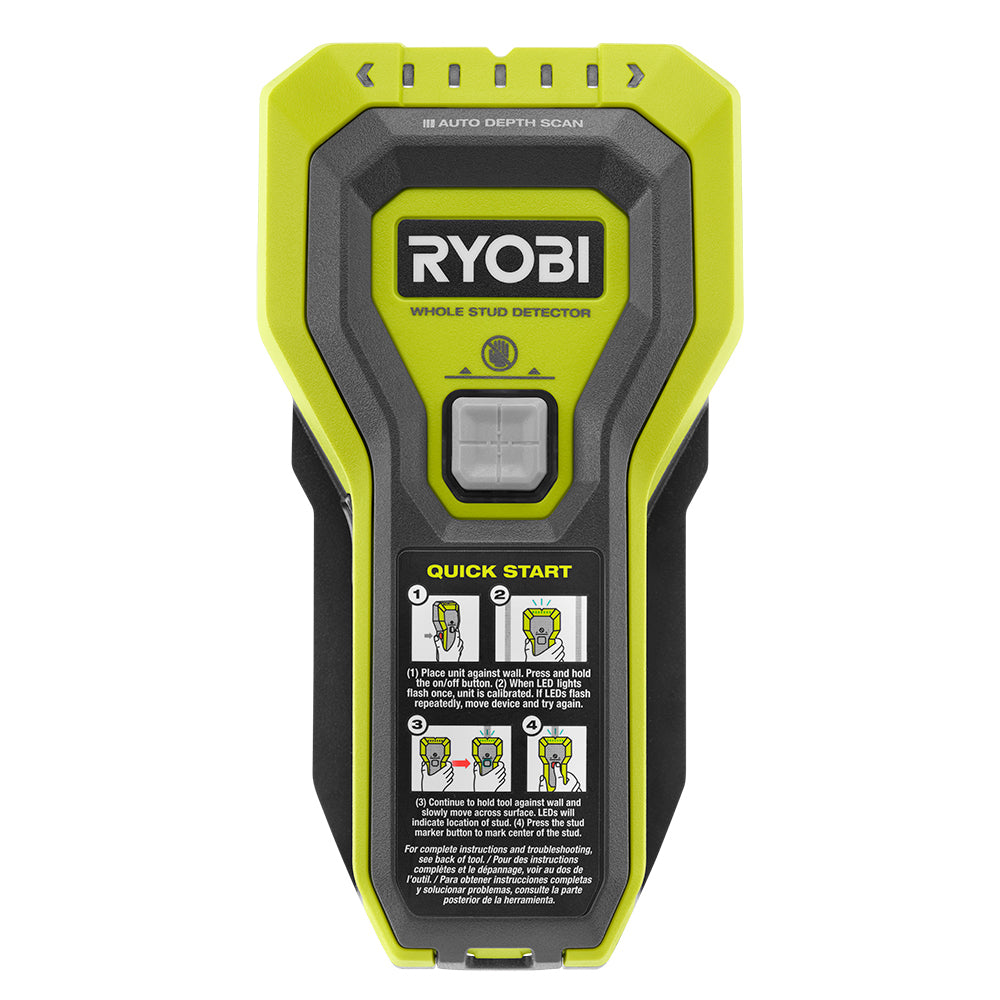
RYOBI says multiple LEDs indicate the full stud width, and the exact-model manual says the full set of lights around the marker illuminates at center. That supports a whole-width pattern plus an on-center marker on suitable drywall; it does not identify every hidden object or guarantee the result.
Explore this need in the finder →Does the ESF5002 have a documented 1.5-inch scanning limit?
The exact RYOBI product description states Auto Depth Scan for wall thickness up to 1-1/2 inches for identifying wood and metal studs. Use that as a maker-stated comparison ceiling only; the manual's separate 1.5-inch typical stud width is not the same measure.
Explore this need in the finder →Should I rely on this detector for a separate live-wire warning?
No separate live-wire meter or AC-warning mode is documented for ESF5002 in the reviewed exact product page and operator manual. If a documented added warning cue is essential, choose a model whose exact instructions explicitly list one; no warning feature proves a wall is safe to penetrate.
Explore this need in the finder →The RYOBI ESF5002 Whole Stud Detector is a focused choice for someone scanning ordinary drywall who would rather see a broad response across a stud than interpret one edge light. Its graduated LEDs are described as showing the stud’s full width, and the center marker provides a second, different kind of cue. That combination is the model’s strongest documented distinction. It is not a general-purpose wall scanner, and the reviewed sources do not document a separate live-wire meter.
What the lights and marker actually tell you
RYOBI describes the ESF5002 as detecting wood and metal and says the multiple LEDs indicate the full width of the stud. The exact-model operator manual adds useful detail: the display spans the width of a typical 2-by-4 stud, and at the center all LEDs—including those around the center marker—illuminate. The user can then press that marker to leave a small dimple. This is more informative than a single point cue, but the LEDs still report a signal pattern; they do not identify every object behind the wall or guarantee that a perceived boundary is framing. The manufacturer does not describe a selectable wood-versus-metal mode or an LCD that labels the target. That makes the ESF5002 a reasonable match if you value both a visible full-width pattern and an on-center marker. It can help you compare the apparent left and right sides before marking the center, but it is not an edge-only tool with separate edge tones. The manual notes that pressing the marker can shift the LED display slightly; it calls this normal. Keep the display and your mark as separate cues rather than treating the small dimple as proof of a stud's exact geometry.Depth, surfaces, and what is not established
RYOBI’s product description says its Auto Depth Scan technology determines wall thickness up to 1½ inches for identifying wood and metal studs. That is the source for the numeric comparison in this assessment. The manual separately describes a typical stud as 1½ inches wide; that figure is a framing-member width, not an additional detection-depth specification. The reviewed sources do not give separate maximum depths for wood and metal or explain how the top-line wall-thickness limit changes with each finish. Treat the claim as an upper comparison limit, not a promise that the device will find a stud through every wall at that thickness. The manual’s operating instructions are oriented to drywall. It warns that metallic-foil or metallic-fiber wallpaper and plaster containing metal mesh can make readings unreliable; it also says variable lath-and-plaster densities can produce inaccurate readings. No reviewed exact-model source establishes tile, exterior, or broad metal-mesh compatibility, so this assessment does not extend the drywall claim to those surfaces. When the wall construction is unfamiliar, use the finder only as one part of a cautious verification process.A setup routine that follows the manual
Two AAA batteries are listed in the package, and the manual says two are preinstalled behind a red pull tab. Before scanning, remove the tab, grip the lower part of the detector, and keep fingers away from its shaded sensing area. Place the tool flat against an open patch of drywall away from a suspected stud, then press and hold the on/off button while it calibrates. The manual says the LEDs sequence and flash when calibration finishes; if the low-battery warning appears, replace the cells. Avoid touching the drywall with your free hand during a scan, because the manual warns that this can affect readings. Keep the button held and move the device slowly in a straight horizontal line while maintaining wall contact. As the signal builds, the graduated lights fill across the apparent stud width; the full set of lights around the center marker indicates the center cue. Pause before pressing the marker. If contact is lost, the manual says the unit can flash an error and should be turned on and recalibrated before continuing. It also shuts off automatically after three minutes, so long scans may require restarting. These instructions make calibration and consistent contact part of the task, not optional refinements.When another type of finder is the better fit
If a separate live-wire warning is essential, the ESF5002 should not be selected on the assumption that its stud LEDs also detect wiring: the reviewed product page and exact-model manual do not document a live-wire meter or AC warning mode. Choose an exact model whose manufacturer explicitly documents such a cue, and remember that even a warning feature cannot certify a wall as safe. Turn off relevant circuits before penetrating a surface and use appropriate utility-location procedures. Likewise, choose a different tool if the job depends on a documented lath-and-plaster, tile, exterior, or deep material-specific plan. The ESF5002’s full-width presentation may be easier to interpret than a single edge light for some drywall tasks, but no independent test or hands-on trial was conducted for this assessment. The stated 1½-inch wall thickness is not a field result.Check the exact model and package
The RYOBI U.S. Stud Finder collection showed one current listing for the ESF5002, while a page-two probe returned no products. Its exact product page identifies model ESF5002 and lists the detector, two AAA batteries, and an operator manual. Verify that the offer is for this exact standalone detector rather than a package that happens to include a RYOBI finder with a separate laser or another tool. The manual’s model number, the 1½-inch wall-thickness wording, and the included-cell count are practical checks before purchase. Warranty, current retail availability, and any later package changes should be confirmed from the seller or manufacturer; this source-based review makes no price, stock, ownership, or test claim.Key specifications
Key details at a glance
| Maximum stated stud depth | 1.5 in |
|---|---|
| Depth qualification | RYOBI's exact product description says Auto Depth Scan determines wall thickness up to 1-1/2 inches to identify wood and metal studs. The exact-model manual's 1.5-inch figure is a typical stud width, not a detection depth. No material-specific wood/metal depth split is given; the product-page maximum is a comparison ceiling, not a guaranteed reading. |
| Documented scan modes | ['Whole-width stud detection'] |
| Center and edge indication | Yes |
| Battery requirement | Two AAA alkaline cells; the manual says two are preinstalled, and the product page lists two AAA batteries in the package. |
Use the exact model’s instructions for operating limits, supplied equipment and version differences.
Sources for this review
Sources for this assessment

Check this model against your wall
Use the finder to compare documented surface limits, center/edge indications and other requirements. A match is not a safety certification.