
Your needs, this model
Does it fit your priorities?
What does the X2100's green center light add when marking a drywall stud?
Franklin's X2100 page says the middle LED turns green to indicate the stud center, while the shared manual says the display follows both center and edges. That can make a detected pattern easier to mark, but it does not prove the pattern is a stud; compare a second scan and account for pipes, wires and surface irregularities.
Explore this need in the finder →Does the X2100's 1.7-inch claim make it dependable on every plaster wall?
No. Franklin says the X2100 can see through most lath-and-plaster walls within its stated reach, but varying thickness and construction can exceed that depth, and metal mesh may stop detection. Treat plaster as conditional and verify the actual wall rather than relying on the maximum figure.
Explore this need in the finder →Can the X2100 live-wire meter certify a safe drill point?
No. The manual says the meter is optimized for live wires on or near studs, may not detect every wire or hidden object, and becomes more responsive over repeated slow passes. It is only an extra warning cue. Turn off electrical power, gas and water before penetrating a wall.
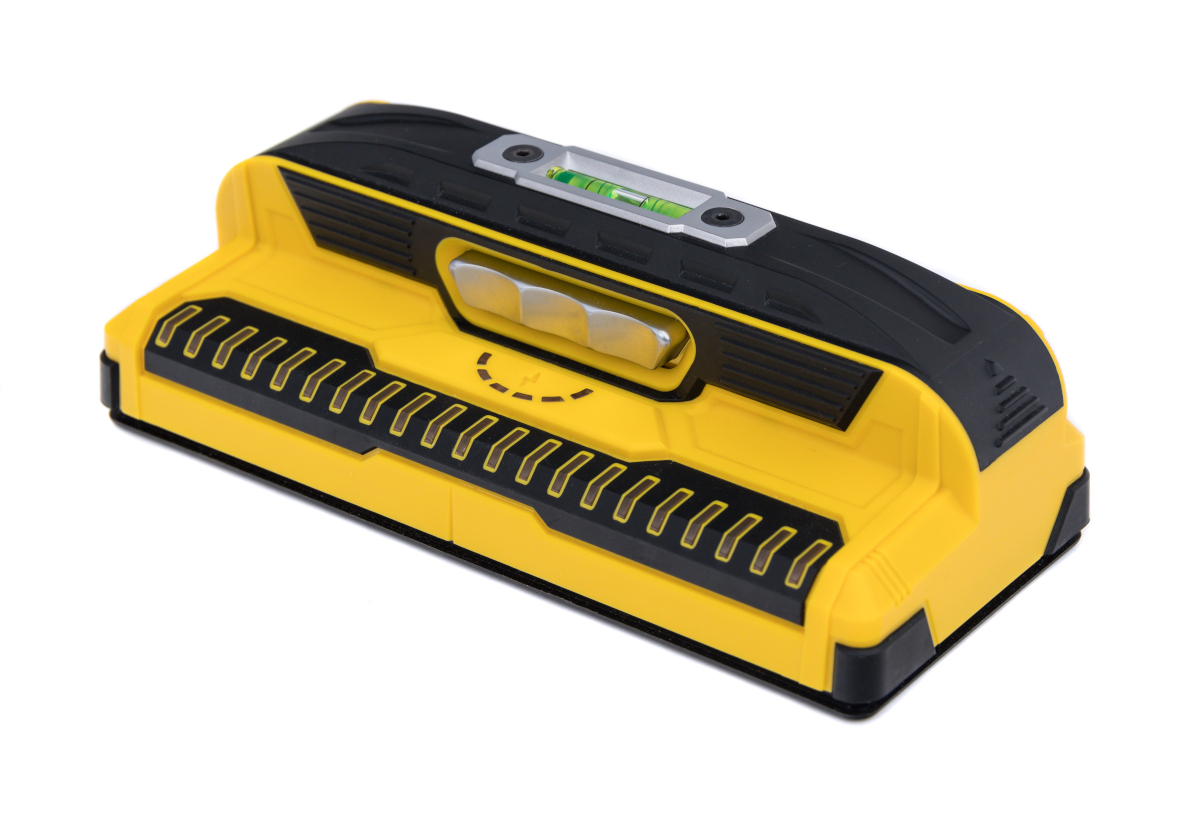
Explore this need in the finder →This is a source-based assessment of Franklin Sensors’ ProSensor X2100, not a hands-on test. Its official U.S. page lists 13 sensors, 21 LEDs, a stated 1.7-inch maximum stud depth, a bubble level, a live-wire meter and a pencil caddy. The page’s clearest model-specific signal detail is that the middle LED turns green at the stud center. That is a useful marking cue, but it is not evidence that the tool identifies hidden materials or works to its maximum depth on every wall.
Where the X2100 sits in the lineup
The X2100 is a dedicated electronic stud finder built around a wide indicator array. Franklin’s X2100 and M210 pages describe a closely related feature set: each lists 13 sensors, 21 LEDs, a 1.7-inch detection-depth claim, a live-wire meter, bubble level and pencil caddy. The X2100 page states specifically that its middle LED turns green to indicate the stud center; the M210 page uses the more general phrase “in certain models.” That difference makes the X2100’s center cue easier to confirm from its own product page. It does not establish a more capable sensor, greater reach or a better real-world result than the M210.
The shared X2100/M210 instructions explain that the LEDs can track both stud edges and center. Treat the light pattern as a density map rather than a material label: it may respond to a stud, but can also react to pipes, wires, thick paint, surface texture or other irregularities. The green center indicator is therefore a way to mark the center of a detected pattern, not a certificate that the pattern is a wood stud.
Operating routine and what the display means
The instructions call for two AA batteries and a continuously held on button while scanning. They say the tool can begin scanning immediately after power-up, with no calibration required. Keep fingers on the handle and away from the sensing edges. Move across the wall to find a response, then continue holding the button and scan up and down across the same area. The manufacturer says a stud response should remain more constant while irregularities may appear sporadically. This repeat pass is more useful than treating the first illuminated LED as a final answer.
The wide 21-light display may help a user see the boundaries of a broad response rather than infer them from a single point. The official X2100 page and the shared manual support center-and-edge indications, while the manual also notes that no hidden object type is identified. Marking both sides and comparing the apparent center can support a layout decision, but the sensing pattern cannot tell whether a signal belongs to framing, plumbing, wiring or an unusual wall layer.
Surface limits matter more than the headline depth
Franklin states a maximum stud-finding depth of 1.7 inches. The manual says the X2100 can see through most lath-and-plaster walls within that reach, but immediately qualifies the claim: irregular plaster thickness or construction variation beyond the depth can defeat detection, and metal-mesh reinforcement may prevent it. The same instructions do not guarantee detection through tile, flooring, roofing or exterior materials. They also advise a clean, dry surface; damp paint or wallpaper, metallic wallpaper and foil-backed insulation can disrupt electronic readings.
For ordinary dry interior drywall, the manufacturer’s described workflow and feature set make the X2100 a plausible option for a person who values a broad visual pattern and an explicit center cue. For older plaster, treat it as a conditional aid, not a promise. If the wall is tiled, exterior, wet, unusually layered or reinforced with mesh, the X2100’s maximum-depth figure does not bridge that gap. When a placement matters structurally, verify the framing by an independent method appropriate to the wall.
Live-wire warning is not a safety clearance
The live-wire meter operates while the button is held. The manual describes a sequence of yellow indicators that strengthens near some live electrical wires and recommends slow passes in both directions over the same area. Franklin says the meter is optimized for wires on or near studs; it may not find every live wire or hidden object. A quiet meter is not proof that a drilling point is clear. The instructions explicitly say to turn off electrical power, gas and water before penetrating a wall. Use the X2100 only as a supplementary warning cue, never as the safety decision.
Package checks and bottom line
The exact product page identifies the X2100 model, but the material reviewed here does not establish whether a seller’s package includes two AA batteries, a protective case or other extras. The manual establishes the battery requirement, not package contents. Check the exact model name and supplied items before purchase; Franklin lists the compatible case separately, so do not assume a case is included. The product page also does not give a body weight or dimensions, so neither should be inferred from the photo.
The X2100 makes the most sense when the buyer wants a wide LED indication, center-and-edge guidance, no calibration startup and an added live-wire cue for a dry interior-wall project. Its green center indicator is its clearest documented point of distinction from the M210 page, while many core specifications and limitations are shared. Neither the added color nor a 1.7-inch maximum removes the need to confirm the reading, account for wall construction and shut off utilities before making a penetration.
Key specifications
Key details at a glance
| Sensing points | 13 |
|---|---|
| Indicator lights | 21 |
| Maximum stated stud depth | 1.7 in |
| Center and edge indication | Yes |
| Live-wire meter | Yes |
| Built-in bubble level | Yes |
| Battery requirement | 2 AA |
Use the exact model’s instructions for operating limits, supplied equipment and version differences.
Sources for this review
Sources for this assessment
Check this model against your wall
Use the finder to compare documented surface limits, center/edge indications and other requirements. A match is not a safety certification.