
Your needs, this model
Does it fit your priorities?
Does the ProSensor T13 show stud edges as well as the center?
Yes. The current shared T13-family instructions say the LEDs track stud center and edges simultaneously. The official T13 page lists 13 LEDs, but the current manual says only certain models turn the center LED green and does not name T13 as one of them. Treat the center/edge pattern as a density indication, not object identification.
Explore this need in the finder →Can I rely on the T13's 1.7-inch figure for every lath-and-plaster wall?
No. The current manual names up to 1.7 inches for the T13 and says that can cover most lath-and-plaster walls, but uneven thickness and construction variation can make locating studs difficult. Metal-mesh reinforcement may prevent detection. Use a second verification method when the wall is uncertain or the attachment has serious consequences.
Explore this need in the finder →Can a center-and-edge light pattern tell me that the hidden object is a stud?
No. The shared instructions describe simultaneous center-and-edge indications, but the manual says the tool detects density changes rather than identifying object type. Pipes, wires, metal or a surface irregularity can also produce a signal, and an object can be missed. Use the repeated-scan method only to compare a pattern, not as proof of identity or safety.
Explore this need in the finder →Is a T13 reading a live-wire warning or proof that a point is safe to drill?
The reviewed T13 product page and current manual do not document a dedicated live-wire meter, so this assessment does not match the model to a required live-wire-meter choice. That source gap is not proof that no hardware exists in every package, and a stud-finder reading cannot make a wall safe. Follow utility shutoff and independent safety checks before penetrating a surface.
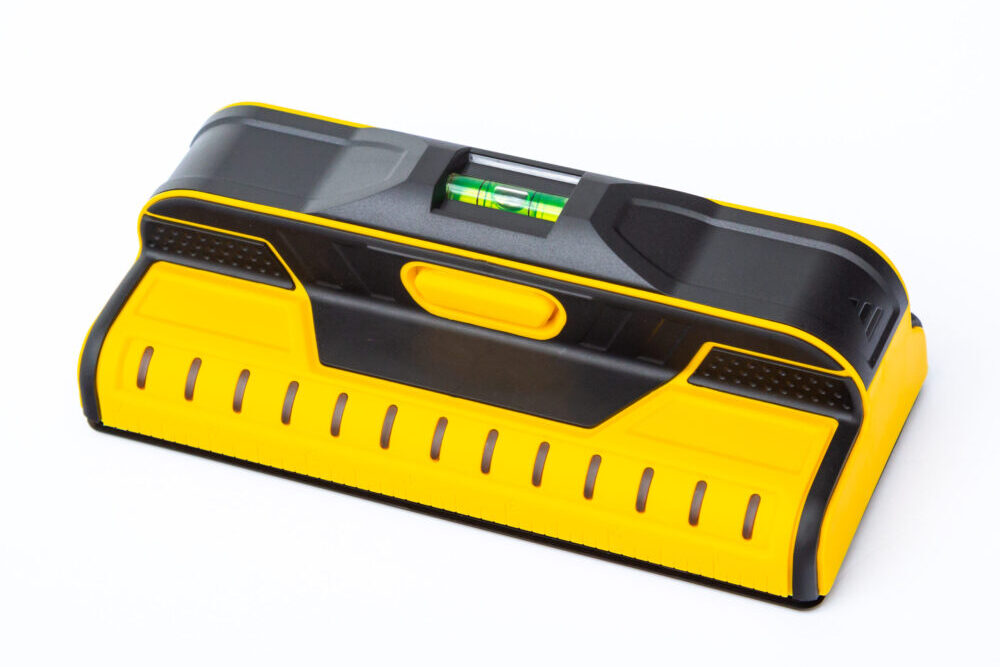
Explore this need in the finder →The Franklin Sensors ProSensor T13 is a straightforward electronic stud finder whose official model page lists 13 sensing points, 13 LEDs, a built-in bubble level, a ruler and a maximum detection depth of 1.7 inches. Its main distinction from the better-equipped Franklin models in this library is not a proven accuracy advantage or disadvantage: it has a 13-light display, while the M210 and X2100 list 21 LEDs and live-wire meters. This is a desk assessment, not a hands-on test; depth, wall use and retail package were not independently checked.
A smaller display, with center-and-edge indications
The T13 is built around 13 sensors and a set of 13 LEDs. The current family instructions include T13 and say the lights follow a stud's center and edges at the same time. It provides a pattern to compare, not identification of wood, proof of a stud or assurance that every object will register. Franklin warns that the detector responds to changes in density and may light for pipes, wires, metal or an irregular surface. It can also miss material behind the wall.
One confusing detail deserves restraint: the T13 page includes Franklin's general wording that the middle LED turns green on “certain models.” The current shared manual likewise qualifies the green light but does not say which models have it. Neither source identifies T13 as one of those versions. I would not buy the T13 expecting a green center indicator unless the exact unit and instructions you are offered establish it. Its center-and-edge display is documented; its center-light color is not.
Depth is a comparison limit, not a promise
Franklin lists the T13's maximum detection depth as 1.7 inches. The current instructions give that same reach for T13 in their lath-and-plaster discussion, saying the unit may work through most such walls while warning that uneven plaster thickness and construction differences can exceed the limit. Metal-mesh reinforcement may prevent detection. These qualifications matter more than the headline number if you have older plaster, several wall layers, foil-backed insulation or a surface whose build-up is unknown.
The manual also says the T13 works by sensing density changes and does not recommend the ProSensor for tile, flooring, roofing or exterior materials because of their variable density. Foil-backed insulation can create inconsistent results, and metallic wallpaper may block signals. Use a suitable tool for those surfaces instead of treating a maximum depth as broad material compatibility. There is no T13-specific multi-mode procedure in the reviewed model page or current instructions; don't transfer the MAX's separate Mode 1 and Mode 2 claims to this model.
A simple scan routine still takes care
Franklin's instructions call for two AA batteries and advise using 1.5-volt alkaline cells without mixing old and new batteries or different types. Battery inclusion in a seller's package is not established. Keep the detector clean and dry, allow it to adjust after a large temperature change, and hold it by the handle with your fingers away from the sensing area. Press and hold the on button, place the tool firmly on the surface and begin scanning; no calibration or tuning is required. The button may be pressed before or after the T13 touches the wall, and sliding is not necessary.
When an indication appears, repeat the scan rather than marking from a single pass. The instructions suggest scanning vertically to compare a persistent signal with a sporadic response from an irregularity. Start away from doors and windows, then check those areas deliberately; headers and grouped framing can produce a different pattern. The T13's built-in bubble level and ruler can help with layout, but they do not verify the framing or make a mounting position structurally suitable.
Where it sits beside other Franklin models
Choose by the documented task, not by sensor counts alone. The M210 and X2100 pages list 13 sensors, 21 LEDs and a live-wire meter; X2100 specifically describes a green center cue. The T13 page lists 13 LEDs and does not document a live-wire meter. A visitor who requires a documented live-wire meter should not be matched to the T13 on the evidence reviewed here. Conversely, a larger LED count is not itself proof of a more dependable real-wall result.
The ProSensor MAX is a distinct option with 35 LEDs and two documented modes for different wall layers; its manual also separates a 2.5-inch general maximum from a lower wood-stud figure. That option is for its named deeper mode. The T13 remains a plausible choice for a dry interior scan when its center-and-edge pattern, level and ruler matter more than a documented live-wire meter or deeper-mode claim.
Who should pause before choosing it
Look elsewhere if you need the manufacturer to document a live-wire meter, if the wall is tiled or exterior, if you expect a guaranteed result through thick or reinforced plaster, or if you need the finder to distinguish a stud from a pipe or wire. The T13 manual cautions that objects may go undetected and that the finder alone should not be the only source used to locate something behind a wall. Before drilling, nailing or otherwise penetrating the surface, follow the manual's instruction to shut off gas, water and electric power and use other information to assess what is concealed.
Before ordering, confirm the offer is the ProSensor T13 rather than a neighboring T11, 710, 710+ or X1100 family model. The official directory lists a compatible case separately; the reviewed sources do not establish that a case or two AA batteries are included with every retail listing. Check the exact manual, seller description and return terms. If your wall is unfamiliar or the attachment has high consequences, treat a stud-finder response as one clue and arrange independent verification.
Key specifications
Key details at a glance
| Sensing points | 13 |
|---|---|
| Indicator lights | 13 |
| Maximum stated stud depth | 1.7 in |
| Depth qualification | Manufacturer-stated 1.7-inch maximum; the shared current manual names the same limit for T13 on most lath-and-plaster walls but does not guarantee every wall. |
| Center and edge indication | Yes |
| Built-in bubble level | Yes |
| Battery requirement | 2 AA; use 1.5-volt alkaline batteries and do not mix old/new or battery types |
| Built-in ruler | Yes |
Use the exact model’s instructions for operating limits, supplied equipment and version differences.
Sources for this review
Sources for this assessment
- ProSensor T13 — official model page
- Franklin Sensors ProSensor T11/T13/M132/710/710+/X1100 Operating/Safety Instructions (11/25)
- Franklin Sensors U.S. product directory
- Franklin Sensors instructions and quick-start index
- ProSensor M210 — official comparison model page
- ProSensor X2100 — official comparison model page
- ProSensor MAX — official comparison model page
Check this model against your wall
Use the finder to compare documented surface limits, center/edge indications and other requirements. A match is not a safety certification.